In the rapidly evolving realm of computer technology, seamless system start-up is crucial for maintaining operational efficiency and minimizing downtime. This study introduces an expert system develoed to diagnose and resolve computer system startup problems effectively. Using a combination of artificial intelligence (AI) techniques and a detailed knowledge base, the system aims to replicate human expert decision-making in troubleshooting. Initial testing involved a dataset of 96 cases, with the system achieving an accuracy and precision of 92.71%, and a recall of 93.68%. Subsequent refinement of the system was evaluated on an expanded dataset of 246 cases, resulting in improved metrics: an accuracy of 98.78%, precision of 99.17%, and a perfect recall of 100%.
## I. INTRODUCTION
Smooth computer system start-up and operation is critical for individuals, groups, and businesses in the quickly evolving field of computer technology. The hardware, firmware, and software that make up modern computer systems are all interconnected. It may be challenging to identify the precise cause of a booting-up failure due to the complex relationships between these components. A booting-up failure is said to occurs when an electronic device, such as a computer, is unable to correctly launch its operating system, rendering it unusable [1]. The initiation phase of a computer system is crucial, and any glitches or failures during startup can lead to significant disruptions, downtime, and potential data loss.
Startup problems are irregularity, fault, or obstacle that prevent a computer system from a completed start-up. These problems can range from software conflicts to hardware failures. Certain startup issues could be intermittent, happening only sometimes or only in particular circumstances. It can take a while to locate the root of these sporadic problems and may require sophisticated diagnostic equipment. Due to a number of circumstances, diagnosing a startup problem might be difficult. Errors related to booting up can have a substantial effect on the availability of the system, and prompt diagnosis of these errors is necessary. Finding the issue quickly is essential to reducing downtime. Since the booting phase forms the basis of the entire computing experience, any interruptions during this phase may have a domino impact on user productivity, system functionality, and other unfavorable outcomes, including
1. Downtime Cost: Extended periods of start-up failure lead to downtime, during which productivity comes to a halt. This downtime directly translates into financial losses, especially for businesses that rely heavily on continuous computer system operations
2. Data loss or Corruption: Startup failures can sometimes lead to data corruption or loss. The financial repercussions of data loss involve the costs associated with data recovery efforts, which may include hiring external experts or using specialized tools
3. Lost of Revenue: For businesses, especially those involved in e-commerce or reliant on online platforms, startup failures can result in a loss of revenue. Transactions, sales, and customer interactions may be adversely impacted
4. Customer trust and Reputation Damage: The fallout from startup failures can lead to reputational damage, impacting customer trust. Rebuilding trust may involve financial investments in marketing, public relations, and customer outreach effort
5. Diminish Productivity: It contribute to reduced employee productivity during startup failures as the computer system in question cannot be put to any productive use during this period by its users.
Resolving problems that impede computer systems' startup processes as soon as possible is crucial to the seamless operation of computer systems. Startup problems arise from a multitude of sources, including hardware failures, incompatible drivers, operating system errors, and software conflicts [2]. Diagnosing startup problems poses several challenges, including the need to discern between hardware and software issues, address evolving technologies, and accommodate the diverse configurations of modern computer systems. The dynamic and evolving nature of computer systems requires an adaptive and intelligent approach to effectively diagnose and resolve startup problems.
Given the diverse and complex nature of computer system issues, a systematic and comprehensive diagnostic approach is essential. This approach should thoroughly consider the intricate interplay between hardware and software components, ensuring that the diagnosis captures all potential fault lines and interactions that could lead to system failures. Among the plethora of challenges plaguing computer systems, startup problems are particularly vexing due to their capacity to precipitate significant operational disruptions, engender data loss, and inflict financial damage on organizations and individuals alike [3]. The motivation behind developing an expert system for the diagnosis of computer system startup problems is anchored in the quest to surmount these challenges, leveraging the prowess of artificial intelligence (AI) and expert systems to usher in a new epoch of efficient, automated diagnostics.
Drawing upon the foundational work of Richard S. Segall, this study aims to transcend traditional methodologies in computer system troubleshooting, migrating domain-specific expertise into a contemporary, web-based diagnostic platform. Leveraging the seminal principles elucidated by Segall, the proposed system endeavors to implement a structured, user-centric methodology tailored for the expeditious resolution of computer startup anomalies. The objective of this research is the conception and development of an advanced, accessible web-based expert system, meticulously designed to diagnose and remediate computer startup issues through the integration of a comprehensive knowledge base and sophisticated logic processing capabilities. The impetus for this research is predicated on the critical importance of the initial booting sequence in computing environments, wherein interruptions or malfunctions can precipitate extensive operational disruptions and data integrity concerns. Consequently, the envisioned expert system seeks to identify and rectify startup problems with unprecedented accuracy and also to enhance the user experience.
## II. LITERATURE AND RELATED STUDY REVIEW
Startup issues can significantly impact productivity, data integrity, and user satisfaction. The integration of expert systems in the diagnosis of such problems offers a streamlined approach to troubleshooting. Diagnosing these issues involves a step-by-step process to identify and address the underlying issues preventing a computer or device from starting up successfully. Finding and fixing the underlying problems that are stopping a computer or other device from starting up properly is the first step in diagnosing booting failure. The process of finding and fixing problems in a computer or information technology system is methodical in traditional system diagnosis. An area of artificial intelligence (AI) solutions known as expert systems makes use of knowledge, reasoning, and problem-solving techniques to provide intelligent advice and solutions. The primary aim of an expert system is to replicate the knowledge of a human expert and enable its utilization for problem-solving and decision-making in certain fields. In order to duplicate the decision-making capabilities of a human expert in the field of computer troubleshooting [4].
Expert system is a specialized tool designed to navigate and resolve the complexities that may hinder the smooth commencement of computer operations [5]. It offers a reliable and efficient tool for users, system administrators, and IT professionals. Through the integration of artificial intelligence, knowledge representation, and continuous learning, the expert system aspires to minimise disruptions, optimise troubleshooting processes, and empower users to unlock the full potential of their computer systems.
Expert systems have emerged as valuable tools for diagnosing and resolving these issues efficiently. Several studies and developments in this field have advanced our understanding of expert systems for diagnosing computer system startup problems. Expert systems' fundamental components were developed in the field of artificial intelligence. The methods of reasoning and the means of conveying domain knowledge are what give rise to the knowledge of domain specialists. Additionally, they are an essential component of artificial intelligence since they manage behaviours that other processes find challenging to control [6].
The impact of computer systems start-up problems can be significant, affecting both individuals and organizations. Understanding and mitigating these impacts are crucial for ensuring the stability, efficiency, and resilience of computer systems. Addressing start-up problems promptly and proactively can help organizations and individuals avoid the negative consequences associated with these issues. [7]
The study by Retno et al. [8] described the development of an expert system using case-based reasoning (CBR) to assist computer technicians in diagnosing hardware issues efficiently. This system aims to address the time-consuming nature of diagnosing computer problems and delays in providing solutions. By inputting symptoms, users and technicians can access tailored solutions quickly, saving time and enhancing service quality. The system's design is based on expertise concepts and CBR methodology, matching new cases with stored instances for accurate diagnoses. Implementation and testing phases reveal user-friendly interfaces, highlighting the system's potential as a valuable tool for technicians and users.
Future research should focus on updating the knowledge base regularly and enhancing functionalities for broader community benefits.
The Expert PC Troubleshooter, proposed by [9], is a web-based expert system designed to diagnose and troubleshoot PC hardware problems efficiently. It consists of six modules: a user interface, a knowledge base, an inference engine, a fuzzy-logic module, an intelligent agent, and an expert interface. The system guides users through a diagnostic process, matches symptoms with troubleshooting rules, and uses logical reasoning and fuzzy logic to derive solutions. It features an autonomous intelligent agent for self-learning and aims to automate fault diagnosis to reduce the workload on technicians. Future work includes improving system performance and scalability. In business contexts, the Expert PC Troubleshooter is positioned to meet industrial needs, reduce costs, and automate problem-solving processes in large organizations.
The primary objective of developing an expert system for startup problem diagnosis is to harness the power of artificial intelligence and expert knowledge to streamline the troubleshooting process, that can swiftly identify, categories, and providing accurate solutions for a wide array of startup problems [10]. The efficient diagnosis and resolution of startup problems are essential to;
1. Minimise computer system downtime
2. Enhance user experience and satisfaction
3. Ensure the reliability and functionality of computer systems in various domains.
4. Maintaining the credibility of computer systems
This study was inspired by the work of Buchana's et [11], particularly in the book "Expert systems: A perspective from computer science" (2018). This research highlighted the importance of capturing and leveraging domain expertise. It focused on the contemporary application of expert systems in diagnosing computer system startup problems. It aims to streamline the troubleshooting process, empower users, and provide reliable and efficient solutions to a wide range of computer-related problems [11]. The expert system's development seeks to make computer troubleshooting accessible, user-friendly, and effective, ultimately minimizing disruptions and maximizing the potential of computer devices. The primary objective of this study is to develop a web-based expert system for diagnosing computer startup problems.
## III. METHOD AND METHODOLOGY
This section outlines the systematic approach used in the development and implementation of the web-based expert system for computer startup troubleshooting. This architecture of the proposed expert system, depicted in Figure 1 is especially designed to address the challenges involved in diagnosing computer startup issues following a systematic and user-centric approach, ensuring the system is intuitive and effective. It is built on the concepts of rule-based expert systems. The system's web-based implementation ensures wide accessibility and encourages significant interaction among users.
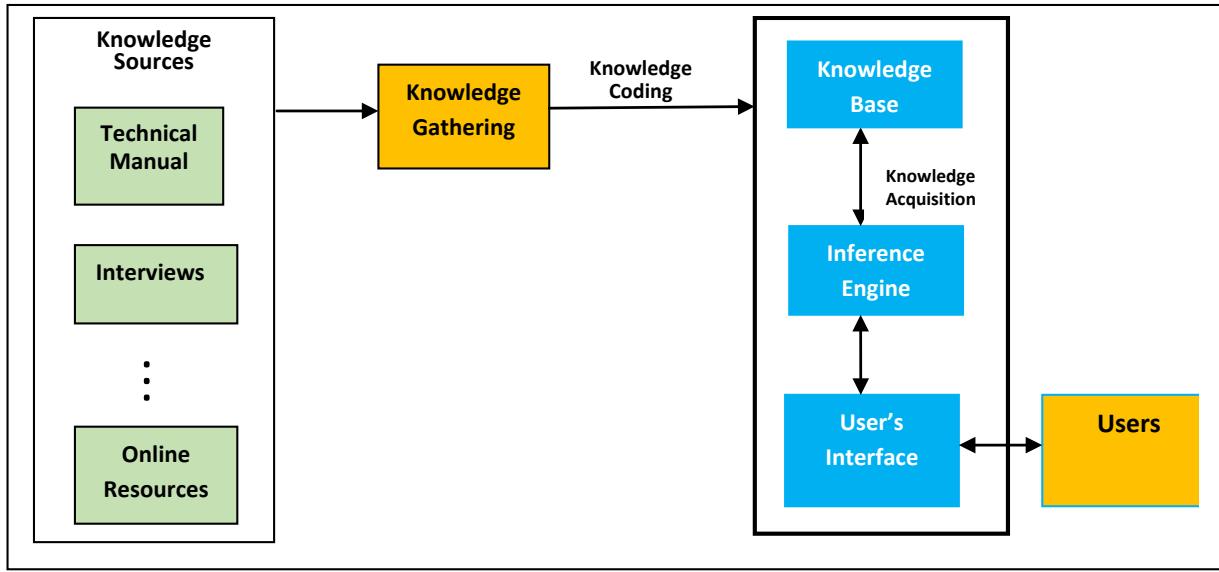 Figure 1: Architecture of the Booting Problems diagnosis
### a) Expert System
Figure 1 depicts the intricate interconnections and flow of data among various components of an expert system designed to enhance decision-making and intelligent behavior. The system consists of knowledge/data gathering, knowledge coding/ representation, knowledge base, inference engine, and a user interface, each playing a critical role in the operation.
1. Knowledge/Data Gathering: The knowledge/data gathering phase for developing an expert system in computer repairs encompasses several key steps. Initially, relevant information essential for problem-solving within the domain of computer repairs was identified. Subsequently, data collection was conducted through a combination of methods, including personal interviews with experts and web scraping from technical manuals and online resources. We developed a series of questionnaires designed to reveal typical strategies. Interviewees were asked to think aloud as they answered the questions. The answers given were then stored as step-by-step sequences of rules. During the interview, investigators also tried to classify the rules according to different types of knowledge. This was to help determine if knowledge types could be used to identify areas where the expert was weak or where the knowledge elicitation method was inadequate.
Very often a replay protocol was taken which involved playing back the sequences of rules and asking the expert to explain it or correct any mistakes. This led to interesting results because very often, some experts do not do rigorous checking when problem-solving and may miss an error in the solution. The next stage of data collection was retrospective. Diagnostic experts were taken to an expert system development environment to watch a simulation of how it was believed they went about solving problems. They were given opportunities to stop the simulation at any time in order to amend anything they saw and then explain what they would have done instead. This allow effective gathering of detailed knowledge, the insights gleaned from expert interviews and the systematic extraction of data from various sources serve as the basis for constructing a decision tree. This decision tree, formulated based on multiple expert responses, aids in diagnosing specific computer problems by posing yes or no questions and facilitating conclusive diagnoses. A screen shoot of some of the gathered knowledge is depicted in figure 2 and Table 1.
- Rule H1: IF the computer shows no signs of power (no lights, no fan noise) THEN instruct the user to check power cables, power supply unit, and electrical outlet
- Rule H2: IF the computer powers on but there are no display and beep codes are heard THEN consult beep code guide to diagnose hardware issues such as RAM, motherboard, or graphics card failures
- Rule H3: IF the computer starts but the BIOS does not detect the hard drive THEN advise checking the data and power connections of the hard drive and confirming BIOS settings
- Rule H4: IF the computer shows a CPU overheat warning at boot THEN recommend checking the CPU fan and heatsink, and if necessary, applying new thermal paste
- Rule H5: IF the graphics card initialization fails (power is on but no video output) THEN suggest resetting the graphics card and checking for any damage or necessary driver updates
- Rule S1: IF the system repeatedly enters a boot loop THEN prompt to boot in safe mode and use system restore to revert recent changes
- Rule S2: IF error messages related to the bootloader are displayed THEN provide steps to use recovery media to repair or reinstall the bootloader
- Rule S3: IF the system displays 'Operating system not found' THEN verify the boot sequence in BIOS and ensure the correct drive is prioritized
- Rule S4: IF a Blue Screen of Death (BSOD) appears during boot THEN record the error code and guide through targeted troubleshooting steps based on that code
- Rule S5: IF Windows attempts automatic repair without success THEN guide through accessing advanced options to perform manual repairs or reinstall Windows
- Rule A1: IF system boots into safe mode automatically without user input THEN instruct to check system configuration files for errors or malicious changes
- Rule A2: IF the system shows errors about missing system files during boot THEN suggest running commands
Figure 2: Some summarized form of the knowledge gathered from knowledge sources
2. Knowledge Coding/Representation: The acquired knowledge is organized and encoded into a JSON format to facilitate efficient retrieval and reasoning by the inference engine. This step ensures that the information is stored in a structured manner that enables effective processing. Sample knowledge coding is depicted in Figure 3.
JSON format is commonly used for structuring data because it is easy for both humans and machines to read and write. Each piece of information is represented by a key-value pair, separated by a colon (:), and different pairs are separated by commas. Additionally, objects are enclosed within curly braces {}.
and arrays are enclosed within square brackets [] if multiple items need to be represented.
1. Knowledge Base: The knowledge base stores all the coded information, facts, rules, and data necessary for the system's decision-making process. It serves as a repository of domain-specific knowledge that the inference engine can access during the reasoning process.
2. Rule base Inference Engine: The inference engine processes user input, applies logical rules or algorithms, and derives conclusions based on the system's current state and the knowledge stored in the knowledge base. It utilizes reasoning
capabilities to generate actionable responses and decisions, utilizing tools like Exsys Corvid shell and CLIPs for predefined inference mechanisms and rule-based reasoning, respectively.
3. User Interface: The user interface serves as the primary interaction point for users, allowing them to input queries, commands, or requests. Implemented using HTML, CSS, and JavaScript, the user interface facilitates user-friendly interactions with the system, initiating its operational cycle.
input queries, commands, or requests. Implemented using HTML, CSS, and JavaScript, the user interface facilitates user-friendly interactions with the system, initiating its operational cycle.
Table 1: Sample extracted knowledge in If-Then Rule format
<table><tr><td>If (Condition)</td><td>Then (Action)</td><td>Symptom</td></tr><tr><td>The computer does not power on</td><td>Check if the power cable is plugged in and the power supply switch is turned on</td><td>Computer does not power on</td></tr><tr><td>There is a single beep but no display</td><td>Check the monitor connection or replace the monitor</td><td>Beep during startup</td></tr><tr><td>Repetitive short beeps are heard</td><td>Check for RAM issues; ensure RAM is seated properly or replace faulty RAM</td><td>Repetitive short beeps</td></tr><tr><td>"Boot Device Not Found" appears</td><td>Check the BIOS/UEFI settings to ensure the boot order is correct and the primary storage device is detected</td><td>Error message displayed</td></tr><tr><td>The computer starts but the operating system does not load</td><td>Boot into safe mode and perform system repair or restore from the last known good configuration</td><td>Operating system fails to load</td></tr><tr><td>A BSOD error occurs</td><td>Note the error code and consult the database for specific troubleshooting steps</td><td>Blue Screen of Death (BSOD)</td></tr><tr><td>The system shuts down soon after starting</td><td>Check for excessive dust in fans and heat sinks; ensure adequate cooling and ventilation</td><td>Unexpected shutdown</td></tr><tr><td>Startup issues occur with external devices connected</td><td>Disconnect all non-essential peripherals to determine if the issue is related to external hardware</td><td>External device issues</td></tr><tr><td>Problems start after a BIOS update</td><td>Rollback the BIOS update or reset BIOS settings to default</td><td>BIOS update issues</td></tr><tr><td>Startup issues after new software installations</td><td>Uninstall recent software additions or restore the system to a previous state</td><td>New software issues</td></tr><tr><td>Startup repair tools report corrupted system files</td><td>Run system file checker tools (e.g., 'sfc /scannow') to repair system files</td><td>System file corruption</td></tr><tr><td>Multiple restarts occur without a full boot</td><td>Check for overheating or hardware failure issues; inspect CPU and GPU temperatures</td><td>Continuous restart cycle</td></tr><tr><td>System hangs at BIOS screen</td><td>Reset the BIOS settings to default; check for firmware updates</td><td>BIOS hang-up</td></tr><tr><td>Error message about disk error appears</td><td>Run disk diagnostics; check for disk health using tools like CHKDSK</td><td>Disk read error</td></tr><tr><td>Frequent system freezes during startup</td><td>Check for insufficient RAM or failing hard drive</td><td>System instability</td></tr><tr><td>Operating system loads but with significant delay</td><td>Check for too many startup programs; optimize OS settings</td><td>Slow operating system load</td></tr><tr><td>No signal to monitor despite system running</td><td>Verify GPU installation and driver updates; check video cable connections</td><td>No display signal</td></tr><tr><td>Startup beeps but no POST screen</td><td>Check for motherboard issues; ensure all components are seated properly</td><td>POST failure</td></tr><tr><td>Error message indicating missing system files</td><td>Perform system restore or reinstall critical system files</td><td>Missing system files</td></tr><tr><td>System repeatedly enters repair mode</td><td>Perform a comprehensive OS repair installation or restore from backup</td><td>Automatic repair loop</td></tr><tr><td>Power light is on, but fans are not running</td><td>Inspect power supply unit and motherboard for faults; check fan connectors</td><td>Inactive cooling fans</td></tr><tr><td>Keyboard not detected on startup</td><td>Ensure keyboard is properly connected; check USB or PS/2 ports for damage</td><td>Keyboard detection error</td></tr><tr><td>Changes in BIOS settings do not save</td><td>Replace CMOS battery; check for BIOS update to ensure settings are retained</td><td>BIOS settings reset</td></tr><tr><td>Random shutdowns occur shortly after booting</td><td>Check PSU for adequate power supply or signs of failure; test with a different PSU if possible</td><td>Power supply issues</td></tr><tr><td>System boots into safe mode automatically</td><td>Check system configuration and correct settings forcing safe mode boot</td><td>Safe mode auto-start</td></tr><tr><td>Loud noises from case during operation</td><td>Inspect for obstructed or failing fans; check hard drive for mechanical issues</td><td>Mechanical noise on startup</td></tr></table>
Overall, this expert system exemplifies a closed loop of interaction and information exchange, where new knowledge is continually acquired, coded, and integrated into the knowledge base, enhancing the system's overall intelligence and decision-making capabilities in the domain of computer repairs. The use of tools like Drools Workbench, and CLIPs (C Language Integrated Production System) ensures the system remains robust and capable of adapting to new information and challenges effectively.
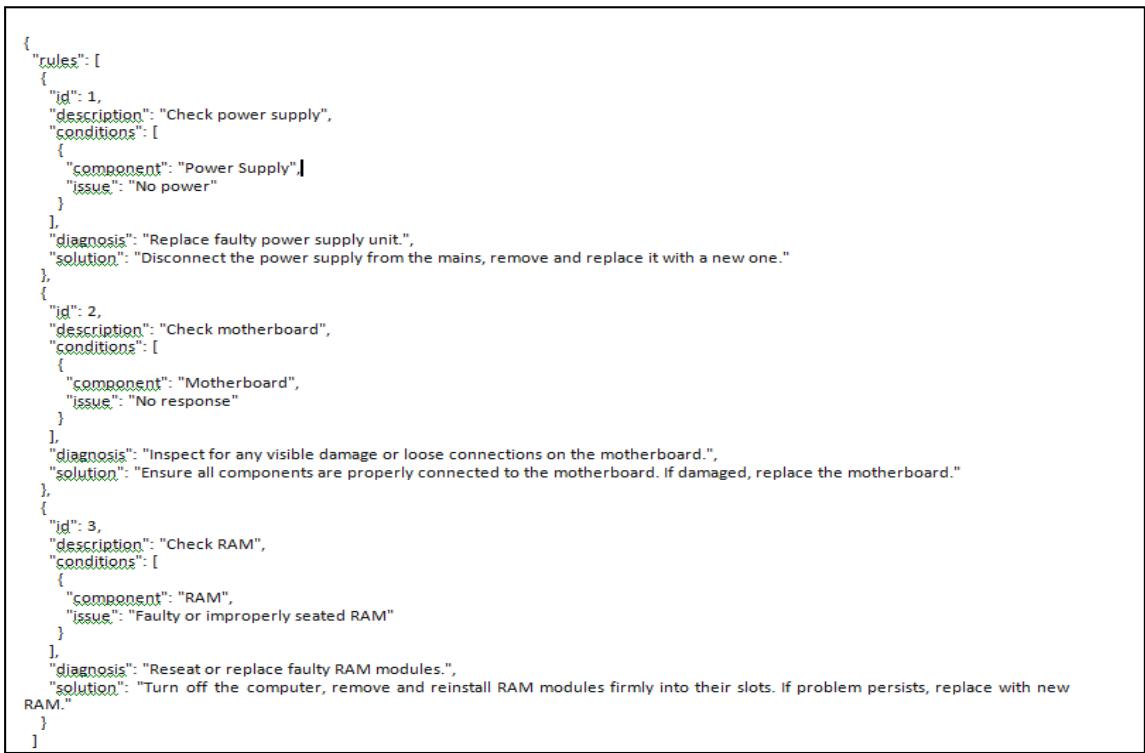 Figure 3: Sample Knowledge representation in JSON format
## IV. IMPLEMENTATION
The implementation of the expert system is achieved using CLIPS in conjunction with a MySQL database. The rule-base is realized as a relational database, making use of the MySQL database technology. CLIPS supports modularity, integration with other systems, and offers a development environment with debugging and testing capabilities. Highly extensible, it allows customization and extension of its functionality. The implementation snippet is depicted in figure 4, and the rule base in MySQL database is depicted in figure 5.
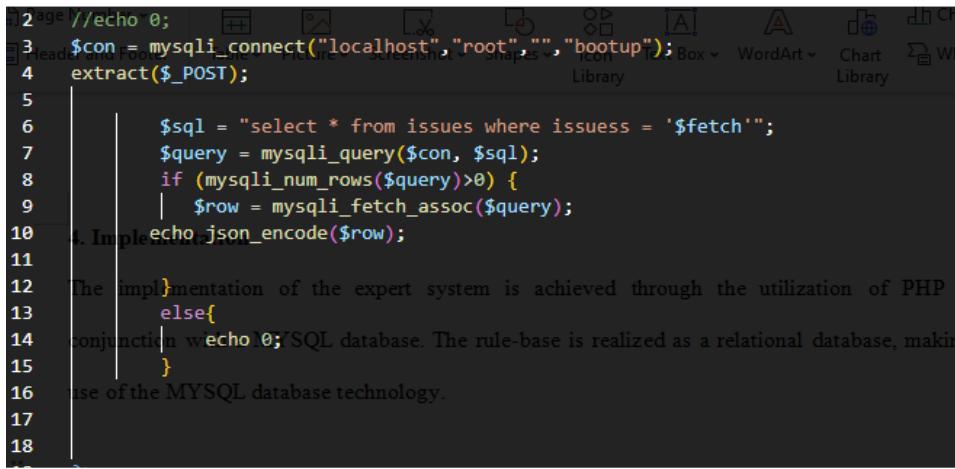
Figure 4: Source-Code Snippet
<table><tr><td colspan="9">+ Options</td></tr><tr><td>id</td><td>fid</td><td>type</td><td>trueid</td><td>falseid</td><td>content</td><td>refimage</td><td>nextflow</td><td>dates</td></tr><tr><td>1</td><td>de54fs</td><td>question</td><td>de54fs-2</td><td>de54fs-8</td><td>Does Computer Turn ON</td><td>none</td><td>0</td><td>2023-09-23 18:23:36</td></tr><tr><td>2</td><td>de54fs</td><td>question</td><td>de54fs-4</td><td>de54fs-3</td><td>Anything on screen</td><td>none</td><td>0</td><td>2023-09-23 18:23:40</td></tr><tr><td>3</td><td>de54fs</td><td>refer</td><td>00</td><td>00</td><td>Check Video/Graphic Card Issue</td><td>none</td><td>2</td><td>2023-09-26 05:12:43</td></tr><tr><td>4</td><td>de54fs</td><td>question</td><td>de54fs-5</td><td>de54fs-9</td><td>Computer boots every time?</td><td>none</td><td>0</td><td>2023-09-23 18:26:53</td></tr><tr><td>5</td><td>de54fs</td><td>question</td><td>de54fs-6</td><td>de54fs-13</td><td>is there any error code?</td><td>none</td><td>0</td><td>2023-09-26 05:12:43</td></tr><tr><td>6</td><td>de54fs</td><td>question</td><td>de54fs-7</td><td>de54fs-13</td><td>is the back ground of the code blue?</td><td>none</td><td>0</td><td>2023-09-26 05:12:43</td></tr><tr><td>7</td><td>de54fs</td><td>solution</td><td>00</td><td>00</td><td>check BSOD issues on the issues tab for proper gui...</td><td>none</td><td>0</td><td>2023-09-26 05:12:43</td></tr><tr><td>8</td><td>de54fs</td><td>question</td><td>de54fs-16</td><td>de54fs-11</td><td>Power switch working?</td><td>none</td><td>0</td><td>2023-09-23 18:26:53</td></tr><tr><td>9</td><td>de54fs</td><td>question</td><td>de54fs-13</td><td>de54fs-12</td><td>Does computer beep?</td><td>none</td><td>0</td><td>2023-09-23 18:26:53</td></tr><tr><td>10</td><td>de54fs</td><td>solution</td><td>00</td><td>00</td><td>Power supply unstable replace Power supply</td><td>none</td><td>0</td><td>2023-09-23 18:30:43</td></tr><tr><td>11</td><td>de54fs</td><td>solution</td><td>00</td><td>00</td><td>Replace switch</td><td>none</td><td>0</td><td>2023-09-23 18:30:43</td></tr><tr><td>12</td><td>de54fs</td><td>question</td><td>de54fs-14</td><td>de54fs-15</td><td>New Part added?</td><td>none</td><td>0</td><td>2023-09-23 18:30:44</td></tr><tr><td>13</td><td>de54fs</td><td>refer</td><td>00</td><td>00</td><td>Check Beep code Issue/Ram issues</td><td>none</td><td>3</td><td>2023-09-26 05:12:18</td></tr><tr><td>14</td><td>de54fs</td><td>solution</td><td>00</td><td>00</td><td>Remove and retry if it works, then Power supply so...</td><td>none</td><td>0</td><td>2023-09-23 18:34:08</td></tr><tr><td>15</td><td>de54fs</td><td>question</td><td>de54fs-17</td><td>de54fs-18</td><td>Do you hear Hard Drive spin up?</td><td>none</td><td>0</td><td>2023-09-23 18:34:08</td></tr><tr><td>16</td><td>de54fs</td><td>question</td><td>de54fs-24</td><td>de54fs-19</td><td>Power source connections to the computer properly?</td><td>none</td><td>0</td><td>2023-09-23 18:51:13</td></tr><tr><td>17</td><td>de54fs</td><td>question</td><td>de54fs-22</td><td>de54fs-26</td><td>PC can boot from CD or Floppy?</td><td>none</td><td>0</td><td>2023-09-23 18:52:14</td></tr><tr><td>18</td><td>de54fs</td><td>question</td><td>de54fs-23</td><td>de54fs-20</td><td>Try another Power IDE cable and slot. Does it Work...</td><td>none</td><td>0</td><td>2023-09-23 18:52:23</td></tr><tr><td>19</td><td>de54fs</td><td>question</td><td>de54fs-21</td><td>de54fs-13</td><td>Test Power cable/source. is it damaged?</td><td>none</td><td>0</td><td>2023-09-23 18:52:27</td></tr><tr><td>20</td><td>de54fs</td><td>question</td><td>de54fs-21</td><td>de54fs-25</td><td>Does the drive work in another PC?</td><td>none</td><td>0</td><td>2023-09-23 18:52:35</td></tr><tr><td>21</td><td>de54fs</td><td>solution</td><td>00</td><td>00</td><td>Replace Power cable/source</td><td>none</td><td>0</td><td>2023-09-23 18:46:08</td></tr><tr><td>22</td><td>de54fs</td><td>refer</td><td>00</td><td>00</td><td>Check Hard Disk Drive Issue</td><td>none</td><td>4</td><td>2023-09-26 05:11:59</td></tr></table>
Figure 5: Rule Base in MySQL Database
### a) Evaluation Metrics
The performance of the expert system is measure using the following performances metrics;
1. Expert Judgement: the expert system's response in solving the problem is compared to the response made by the domain expert. If the two responses are different, then it is important to know whether the expert or the expert system is wrong. If it is the expert system that is wrong, then it may be caused by an error in knowledge representation. If the domain expert's behavior is what causes the difference in the response, it is better to change the knowledge base according to the expert's behavior because the expert system is designed to simulate correct behavior of an expert.
2. Accuracy: Determines the percentage of total decisions that were correct, comparing the expert
system's responses with the consensus answers from human experts.
3. Precision: Measures the ratio of correct positive observations to the total predicted positives. High precision relates directly to a low false positive rate, indicating that the system accurately identifies true instances of a condition or situation.
4. Recall (Sensitivity): Assesses the ability of the system to identify all relevant instances within a dataset. High recall indicates that the system covers the majority of relevant outcomes, minimizing false negatives.
### b) Result
A dataset containing ninety six (96) start-up problems/challenges were simulated for the two experts and our expert system to diagnose. The result of the diagnoses is presented in table 2 and table 3.
Table 2: Agreement Analysis
<table><tr><td>Description</td><td>Number of Cases</td></tr><tr><td>Total Cases Evaluated</td><td>96</td></tr><tr><td>Cases where Expert System and Both Experts Agreed</td><td>89</td></tr><tr><td>Cases where Both Experts Agreed</td><td>95</td></tr><tr><td>Cases where Expert System Agreed with Expert 1</td><td>93</td></tr><tr><td>Cases where Expert System Agreed with Expert 2</td><td>92</td></tr></table>
Table 3: Evaluation Metrics
<table><tr><td>Metric</td><td>Result (%)</td></tr><tr><td>Accuracy</td><td>92.71%</td></tr><tr><td>Precision</td><td>92.71%</td></tr><tr><td>Recall</td><td>93.68%</td></tr><tr><td>Error rate</td><td>7.23%</td></tr></table>
### c) Discussion
The comprehensive analysis integrates the expert system's agreement with human experts and its evaluation metrics to provide a detailed insight into its performance. The accuracy (92.71%) reflects the proportion of total cases where the expert system's judgments were correct. Precision (92.71%) shows the system's ability to correctly predict agreements, and
Recall (93.68%) evaluates how well the expert system captured all possible agreements among the two experts. The near-unanimous agreement among human experts underscores the clarity of the cases and the expert system's strong alignment with expert judgments. The slight variations in agreement with each expert suggest minor differences in interpretation or the system's alignment with one expert over another. An error rate of $7.29\%$ indicates that the system made incorrect decisions in about 7 out of 96 cases. This metric is crucial for identifying opportunities for improvement, highlighting the instances where the
The system's decision-making does not align with the expert consensus. Overall, the expert system demonstrates high reliability, closely aligning with human expert judgments. The slight variations in agreement with each expert suggest minor differences in interpretation or the system's alignment with one expert over another. An error rate of 7.29% indicates that the system made incorrect decisions in about 7 out of 96 cases. This metric is crucial for identifying opportunities for improvement, highlighting the instances where the system's decision-making deviates from expert consensus.
A further refinement was carried out to improve consistency or reduce biases of the expert system. The refined expert system was evaluated on additional one hundred and fifty (150) new cases of computer system start-up problems appended to the initial 96 cases, amounting to two hundred and four six (246) new dataset. The evaluation of the new dataset is presented in table 4 and the improved evaluation metric in table 5.
Table 4: Result of the Refined Expert system on the updated dataset
<table><tr><td></td><td>Expert 1</td><td>Expert 2</td><td>Expert System</td></tr><tr><td>Agreement with Expert 1</td><td>242</td><td>244</td><td>243</td></tr><tr><td>Agreement with Expert 2</td><td>244</td><td>246</td><td>244</td></tr><tr><td>Total Agreement</td><td>246</td><td>246</td><td>242</td></tr></table>
Table 5: Improved Evaluation of the Refined Expert system on the updated dataset
<table><tr><td>Metric</td><td>Calculation</td><td>Value</td></tr><tr><td>Overall Accuracy</td><td>(Total agreements/Total cases) * 100</td><td>98.78%</td></tr><tr><td>Precision</td><td>(Total agreements with both experts/Total agreements by the expert system) * 100</td><td>99.17%</td></tr><tr><td>Recall</td><td>(Total agreements with both experts/Total agreements by both experts) * 100</td><td>100%</td></tr><tr><td>Error Rate</td><td>100 - Overall Accuracy</td><td>1.22%</td></tr></table>
The expert system evaluated shows outstanding performance in diagnosing cases, with high accuracy (98.37%), excellent precision (98.78% for Expert A and 99.17% for Expert B), and robust recall rates (98.78% for Expert A and 99.17% for Expert B). The system's low error rate of 1.22% further attests to its reliability and efficiency. The expert system has shown marked improvements from its initial to its refined evaluation, as detailed in the analyses of Tables 2 and 4. Specifically, accuracy increased from 92.71% to 98.37%, precision improved for both experts (from 96.88% to 98.78% for Expert 1, and from 95.83% to 99.17% for Expert 2), and recall also saw similar improvements. The error rate decreased significantly from 7.29% to 1.22%. These enhancements indicate that the expert system has become more reliable and effective, likely due to refined algorithms and improved learning models, making it a robust tool for supporting high-stakes decision-making processes.
## V. CONCLUSION AND FUTURE WORK
The development and implementation of the expert system for diagnosing computer system start-up problems have significantly enhanced the troubleshooting process. This system leverages advanced artificial intelligence techniques to efficiently diagnose and resolve start-up issues, minimizing downtime and improving user satisfaction. The integration of a comprehensive knowledge base and sophisticated logic processing capabilities ensures that the system can address a wide array of problems with high accuracy, precision, and recall.
The system's ability to closely align with expert judgments and effectively replicate human expert decision-making is a testament to its robustness and reliability. While the current system demonstrates substantial capabilities, continuous improvements are essential to keep pace with evolving technology landscapes. Future work should focus on:
1. Expanding the Knowledge Base: Regular updates to the system's knowledge base to include new technologies, software updates, and hardware configurations will enhance its applicability and accuracy.
2. Integrating Machine Learning: Applying machine learning algorithms could enable the system to learn from new diagnostic scenarios and improve its problem-solving strategies over time.
3. Enhancing User Interface: Further development of the user interface to ensure it is more intuitive and accessible, potentially incorporating voice commands or natural language processing for a more interactive experience.
### a) Acknowledgment
We gratefully acknowledge the support and finance provided by the Tertiary Education Trust Fund (TETFund), whose sponsorship was instrumental in the research and development of this expert system. The contributions of TETFund have not only facilitated this research but also underscore the importance of leveraging technology to enhance educational resources and operational efficiencies in academic settings. This support has been crucial in achieving the project goals, and we are thankful for the opportunity to advance the state of technological solutions in computer system diagnostics.
Generating HTML Viewer...
References
11 Cites in Article
A Dahouk,S Abu-Naser (2018). A Proposed Knowledge Based System for Desktop PC Troubleshooting 2.
D Retno,R Eva,R Sri (2019). Design of Expert System for Diagnosis Damage Computer Hardware.
El Kahlout,& Faten,Abu-Naser,S Samy (2023). Developing an Expert System to Computer Troubleshooting.
B Ahmed (2020). An Expert System for Engine Excavator Troubleshooting.
Peter Jackson (1998). Introduction to Expert Systems.
S Sahin,M Tolun,R Hassanpour (2012). Hybrid expert systems: A survey of current approaches and applications.
W Ahmed (2018). KBS for Desktop PC Troubleshooting.
D Retno,R Eva,R Sri (2019). Design of Expert System for Diagnosis Damage Computer Hardware.
B Youssef (2012). Expert PC Trouble-shooter with Fuzzy-Logic and Self-Learning.
E Faten,S Sammy (2023). Developing an Expert System to Computer Troubleshooting.
Bruce Buchanan,Randall Davis,Reid Smith,Edward Feigenbaum (2018). Expert Systems: A Perspective from Computer Science.
No ethics committee approval was required for this article type.
Data Availability
Not applicable for this article.
How to Cite This Article
Olayemi Olasehinde. 2026. \u201cDevelopment of Expert System for the Diagnosis of Computer System Startup Problems.\u201d. Global Journal of Computer Science and Technology - D: Neural & AI GJCST-D Volume 24 (GJCST Volume 24 Issue D1).
Explore published articles in an immersive Augmented Reality environment. Our platform converts research papers into interactive 3D books, allowing readers to view and interact with content using AR and VR compatible devices.
Your published article is automatically converted into a realistic 3D book. Flip through pages and read research papers in a more engaging and interactive format.
Our website is actively being updated, and changes may occur frequently. Please clear your browser cache if needed. For feedback or error reporting, please email [email protected]
Thank you for connecting with us. We will respond to you shortly.