In almost every way, web development has been getting better and better over the last ten years. During this time, a number of frameworks and libraries came out, which made it much easier and faster to make a web app. Over the last decade, the LAMP stack (Linux, Apache, MySQL, and PHP) and Java-based applications have dominated web development. It was challenging for a single developer to construct a web application by using these stacks because of how complex they were. As the field of web development matured, MERN-an acronym for “MongoDB,” “Express,” “React,” and “Node JS”-emerged as the dominant stack in 2023. Due to the relative simplicity of the technologies comprising this stack, a single developer may effectively handle both the front-end and back-end of the application. MongoDB, which is a no-SQL database; Express, which is a framework of Node JS used in back-end development; React, which is a JavaScript library used in front-end development; and NodeJS, which is an environment for JavaScript; these are the components that make up the MERN stack.
## I. INTRODUCTION
In 1989, while working as a fellow at Europe's CERN Laboratory, Tim Berners-Lee proposed a computer platform that would make it easier for scientists working in different regions of the world to work together. For this reason, in 1990, the Hypertext Markup Language (HTML) was developed. The primary building block that was used to construct the World Wide Web and is still in use today is the Standard Generalized Markup Language (SGML) served as the primary inspiration for the development of HyperText Markup Language (HTML). Programmers were provided with the tools necessary to design web page layouts that could be viewed and interacted with wherever on the web thanks to the norm. [1] In today's globally linked digital environment, organizations need tools that allow for global growth. An
organization would be severely lacking without a web application. There are several benefits to having a robust online presence, including increasing exposure to your brand and facilitating online sales. Now that firms are establishing themselves online, a web application is essential for reaching international audiences. Despite the rise of mobile apps, a well-built online application is still vital to meeting modern business requirements. Websites are now thought of as cross-platform apps because their style and content can be changed. Programmers were able to create and share information more easily and share information with businesses when they made Web applications. [2]
This thesis has two sections. The first section is more theoretical, and it explains the rationale behind each of the technologies utilized to create this website. The thesis's second section delves into the nuts and bolts of putting the e-commerce web app into action.
This thesis focuses on the development of a Multi-vendor E-commerce web app for reselling secondhand laptop computers. This app has three user types: admin, seller, and buyer (by default). Where sellers may list their old laptops for sale and buyers can book them first. Stripe payment handles payment integration. According to their roles, various types of users will see a unique set of dashboard options. The website's database houses all of its data, which is then processed by the server and shown by the app.
## II. INTRODUCTION TO MERN STACK
The MERN Stack is a set of robust and reliable technologies that may be used to build scalable master web applications, complete with server, front-end, and database components. Building full-stack computer applications can be done much more quickly and easily with the help of JavaScript. The MERN Stack is an open-source technology that provides a user-friendly, comprehensive JavaScript framework for building dynamic, dynamically responsive applications and webpages.
The 3-tier Architecture system at MERN is mostly made up of three layers:
- As a front-end tier, the Web
- The server is in the middle.
- The database is the backend.
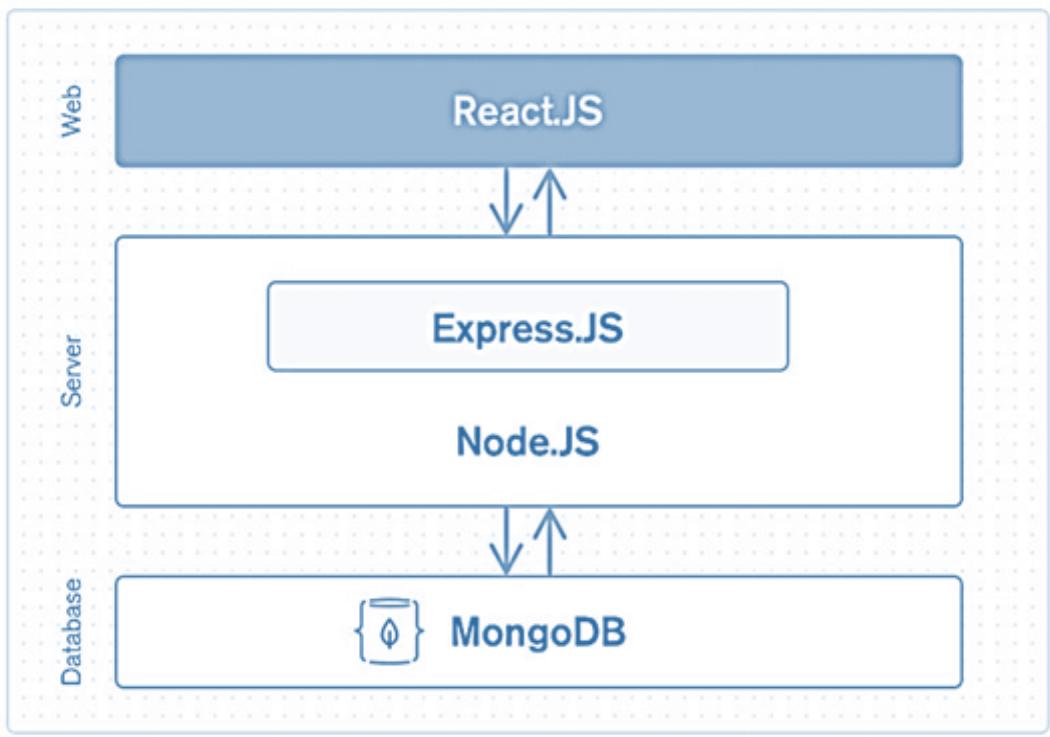 Figure 1: MERN Architecture
- Front-End Tier- The MERN stack's front end is almost entirely built on top of React.js. It is a well-liked front-end JavaScript library that is freely available to the public. It is well-known for its ability to produce interactive client-side applications. With React, you can build sophisticated user interfaces out of simpler building blocks. It also links those intricate user interfaces to the server-side information stored there. Both mobile apps (using React Native) and online apps (using React) can be built with React. React facilitates and supports code reuse, which has several advantages and saves a lot of work. It allows users to build complex web applications that dynamically update their website's content without requiring a page refresh.
- Server or Middle Tier - It's the next layer down from the top and is managed mostly by Express.js and Node.js, both of which are part of the MERN stack. Because Express.js maintained the Server-side framework within the Node.js server, both parts manage it simultaneously. One of the most popular JavaScript frameworks for backend development is called Express.js. It makes it considerably simpler and easier for programmers to launch powerful APIs (Application Programming Interface) and web servers. In addition to this, it enhances the capabilities of the HTTP (HyperText Transfer Protocol) objects that are available in Node.js. On the other hand, Node.js is a vital component in its own right and is an essential component overall.
Outside of a web browser, you may execute JavaScript by using this server environment, which is available for free and uses open source. Because it is constructed on a foundation of JavaScript, Node.js is a potent tool that can be used for fast constructing online services and mobile applications.
- Database as Back-End Tier - A database's major job is to store information relevant to your application, such as content, statistics, information, user profiles, comments, and so on; this important component of the MERN Stack was developed by MongoDB. The primary function of its data storage is security. It keeps meticulous records, which it returns to the user at their request. The database serves as its primary storage medium. To ensure that users can always access their data in the event of a system failure, it creates a copy of their data in many locations. This suggests that the relational table model is not at the foundation of MongoDB. On the other hand, it offers a novel approach to information storage and retrieval. As the most widely used open-source document-oriented database, MongoDB is a type of database known as a NoSQL (NoSQL or Non-Structured Query Language). NoSQL often refers to a non-relational database that stores data without a predefined structure or standard relational tables. MongoDB is a document-oriented document store, as opposed to a relational database's rows and columns. [3]
### Why choose MERN stack
- Open-source technology- Because it is an open-source code that is being built upon by technology specialists throughout the world, MERN is favored by startups. The MERN stack is an open-source framework for developing high-performance websites and online applications. Because there is no vendor lock-in with open-source software, there will be no additional hurdles to go through if you ever decide to make a switch or upgrade.
- You can find free samples online- You may save a ton of time by using one of the many free templates you can get online. Customizing a theme would have taken three times longer than downloading one. If you have any problems along the process, professionals will be there to support you. There are online forums for many platforms where you may ask questions and obtain comments on your code from other developers who are also using that platform. Having knowledgeable guides to lead the way makes learning a breeze.
- Easy to use- With such thorough documentation, implementing the underlying technology is a breeze. Its accessibility and ease of use make it a great option for those just starting out in the field of web development. It might be difficult for developers to select which of the numerous accessible tools is worth their time. Because there are fewer pieces to these instruments to learn and master, they are
more straightforward to pick up and utilize. A MERN stack project is a great place to start if you're new to web programming since it provides a solid foundation in the fundamentals without overwhelming you with advanced concepts straight away. [4]
### a) Node.js
Simply referred to as "Node," the JavaScript runtime environment is compatible with multiple operating systems. Programmers don't have to go through the trouble of learning two new languages because JavaScript can be applicable to both client and server-side application development. This is because Node is so widely utilized for server-side development. Despite its many misnomers, Node is only a JavaScript runtime and not a programming language or framework for creating applications.
The V8 JavaScript engine is included in Node, the same engine that is utilized by Google Chrome and other web browsers. It is a cross-platform application that can operate on macOS, Linux, Windows, and other operating systems because it is developed in C++. JavaScript code is interpreted and carried out by the engine. It is possible for it to function outside of the context of a browser by having it embedded in a C++ application or by having it built as a stand-alone program. The V8 engine conducts a just-in-time (JIT) compilation of JavaScript, which speeds up execution.
{"code_caption":[],"code_content":[{"type":"text","content":"1 // index.js\n2\n3 const http = require('http');\n4\n5 const hostname = '127.0.0.1';\n6 const port = 3000;\n7\n8 const server = http.createServer((req, res) => {\n9 res.statusCode = 200;\n10 res.setHeader('Content-Type', 'text/plain');\n11 res.end('Hello, programmer!\");\n12});\n13\n14 server.listen.port, hostname, () => {\n15 console.log('Server running at http://${hostname}:${port}/');\n16}); "}],"code_language":"javascript"}
Figure 2: Here is a Sample of a Node.js-Compatible JavaScript File
The Figure 2. shows how to write a simple JavaScript file (index.js) for the Node system. The HTTP (Hypertext Transfer Protocol) package for Node.js is loaded at the beginning of the script. The module has many classes and methods for putting together an HTTP server.
After installing Node JS in your device, you can run the program by the command "node index.js". The JavaScript code tells Node to do two very simple things:
- When a browser on the local machine connects to http://localhost:3000, it will show a message. The message says, "Hello, programmer!"
- When the command is run, send a message to the console. The message says, "Server running at http://127.0.0.1:3000/."
#### How does Node.js works
A Node program is run by a single process. In contrast to the majority of server-side programs, Node.js does not initiate a new thread for each request. So, a Node server can handle thousands of connections at the same time without having to deal with problems caused by threads running at the same time or the extra work that multithreading brings. Node.js is driven by events and runs in the background. The usual approach of receive, process, send, wait, and receive is not used when writing code for the Node environment. Instead, Node uses an event loop to handle requests as they come in and stack up in the event queue. Small requests are handled one after the other without waiting for answers.
This is a change from the most common models, which run bigger, more complicated operations and handle multiple threads at the same time, with each thread waiting for the right answer before going on.
Ryan Dahl, who made Node.js, says that it has a big edge over these other models. Node doesn't stop I/O (input/output) processes like older methods do. This is due in large part to the fact that Node methods don't directly do I/O, which helps get rid of the chance of stopping. Blocking only happens when synchronous methods are used in the normal Node library, but this is more of an exception than the rule. This makes Node a good choice for real-time apps with a lot of work going on at the same time.
Node is thought to be easy to learn, just like JavaScript. It is used by a lot of people and has a big, busy group of users who support it. Node is also asynchronous, event-driven, and doesn't block, which means it can handle the kind of real-time concurrency that is widespread in many web apps and online services today. Node works well for real-time apps like chats, live services, Internet of Things (IoT) services, and single-page apps. [5]
## i. Node.js Server Architecture
Rather than waiting for one operation to finish before starting another, Node.js allows applications to continue working despite input/output delays. The technique is known as asynchronous I/O.
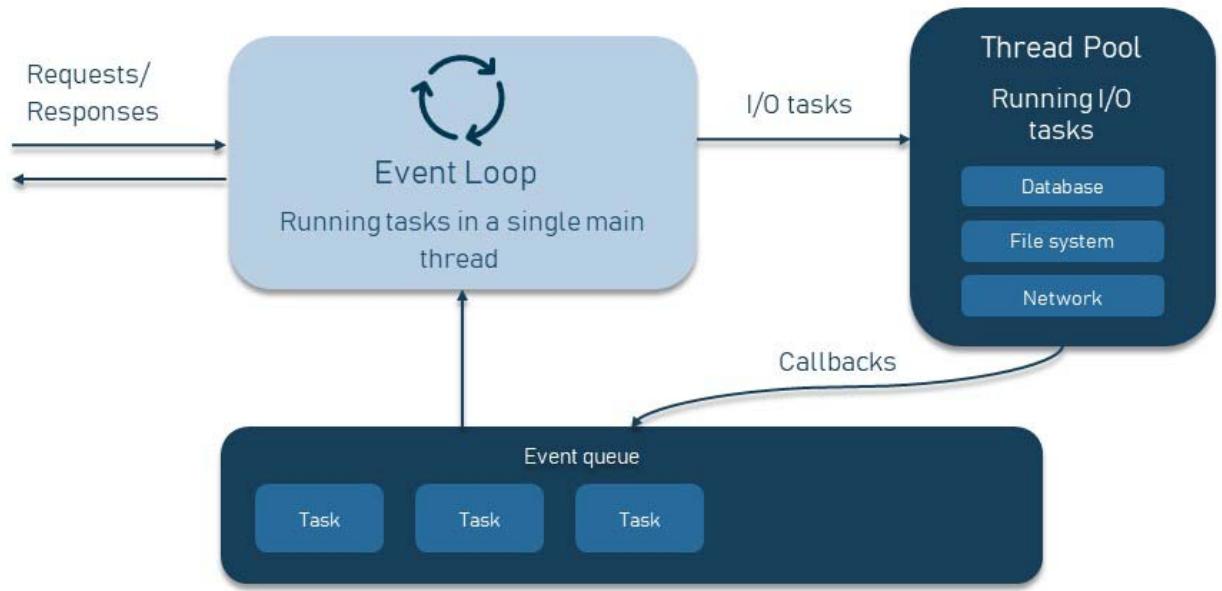
NODE.JSSERVERARCHITECTURE Figure 3: The Inner Workings of Node.js
Non-blocking, I/O and request processing that doesn't wait - Imagine that a function needs to get data from the network, handle it, and then return the result. In the world of synchronous operations, this means that the program would have to wait until the function gets data and does its work, which would block other activities.
Callback and promises- Callbacks are functions that are called when I/O operations have finished. They can be added to the event queue and served in the main thread once it's clear. Callbacks can be nested in other callbacks, which makes code more complicated and can lead to "callback hell," which we'll talk about below.
Event Loop- pulls in fresh callbacks and checks the event queue for pending requests after previous tasks have completed. The cycle starts over again after that. [6]
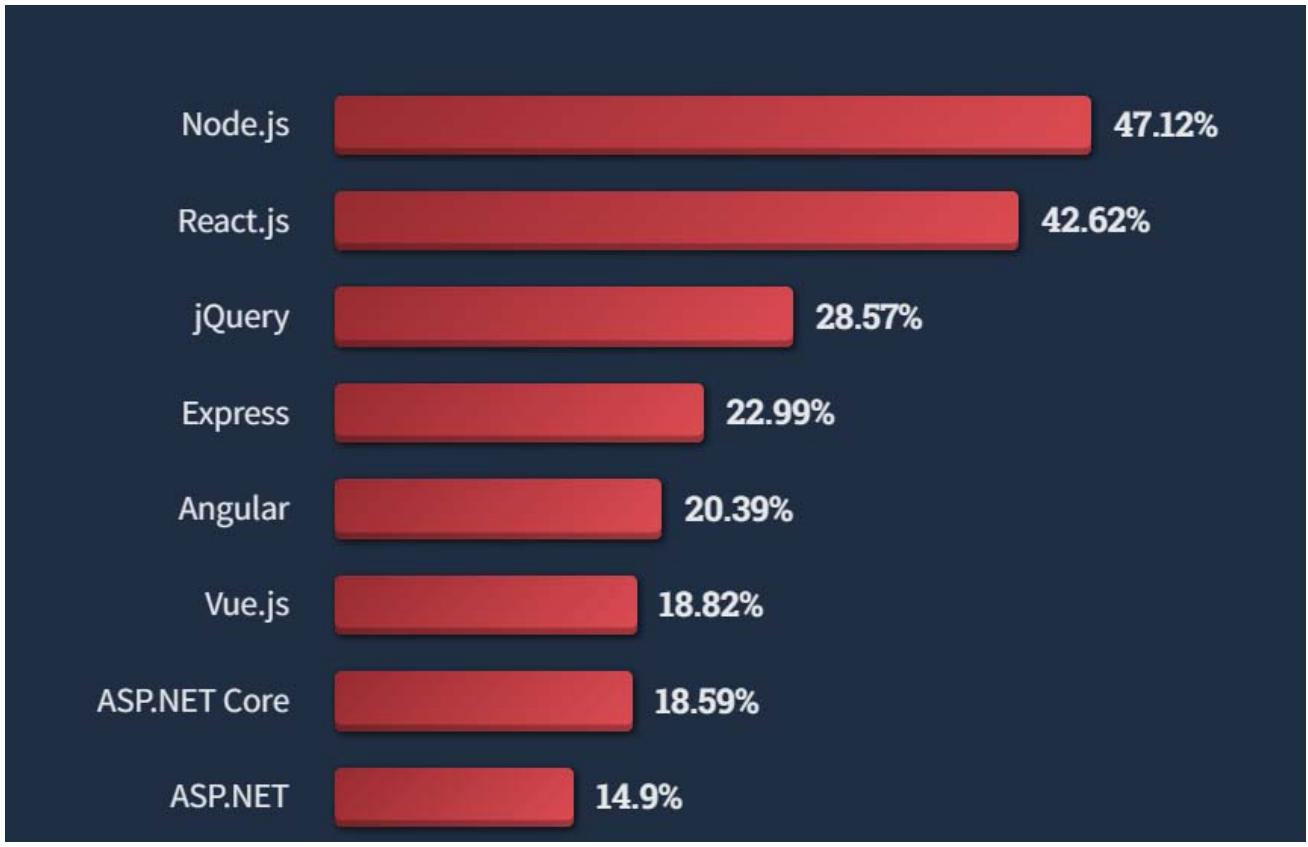 Figure 4: Stack Overflow Survey [7]
## ii. Node Modules
Node.js modules are functionally independent chunks of code that communicate with third-party programs. Any number of files or folders can make up a module. Modules are used a lot by programmers because they can be reused and because they can break up a complicated piece of code into doable chunks. The http module is one of the most often used core components since it can be used to build an HTTP client. [8]
## iii. Node Package Manager (NPM)
Node Package Manager is what "npm" refers to. It's a repository and reference guide for applications written in JavaScript. To facilitate package installation and dependency management, npm also provides command-line utilities. Over 11 million developers rely on npm since it is free and easy to use. One may even call it significant. They are free and widely used because of their open-source nature. Over a million packages may be found on npm. [9]
There are two ways that NPM may carry out the operation: globally and locally. When NPM is run in global mode, it affects all Node.js apps on the computer, whereas when NPM is run in local mode, it only impacts the application in that directory. The node Modules subdirectory contains all the NPM-installed modules. Express.js will be installed in the root folder of your project by the command npm install express. The ExpressJS folder will be created within the node Modules folder where the installation will take place. The bundle is included in the package.json file in the property dependencies. We can use a package by using require function along with module name
$ npm install <module name>
const express $=$ require('express') [10] In a JavaScript/Node project, the package manager (here, npm) generates a package.json file that serves as the project's root directory. A package.json file may be created with the help of the npm init command. After that, you'll be prompted to provide some metadata about your project, such as:
- Name - project name
- Version - latest major release.1.0.0, 1.2.3, etc.) minor.patch format
- Description - project description
- License - the terms of the license that governs your project, so others may understand how they might make use of it.
Sometime if we need to update a package, we can do it by giving the command "npm update <package name>". Following command will update the package to latest version available. [9]
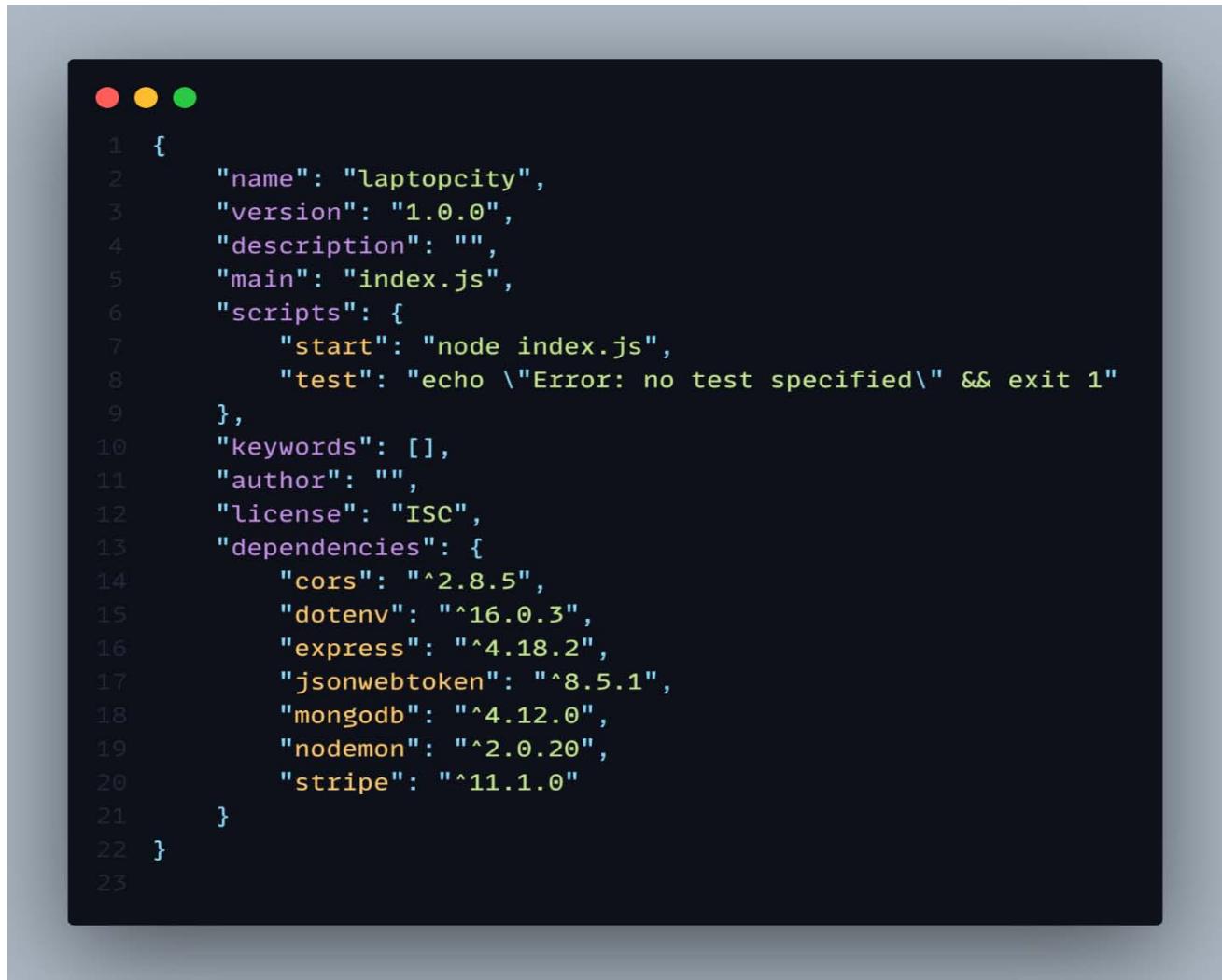 Figure 5: PackageJson File of Laptop City (Multi-Vendor E-Commerce Web App)
Figure 5 shows all the packages use in this e-commerce project under dependencies property such as cons, dotenv, stripe etc.
### b) Express.js
The most widely used web framework for Node.js is called Express.js. People have called it the de facto standard server platform for Node.js because it is used to make web apps and APIs.
Building a Node.js application's backend from start can be hard and take a long time. Writing the business logic for an application is what really matters, but developers waste time on mundane tasks like setting up ports and route handlers. When creating online applications, developers can save time with tools like Express.js.
## i. Handling Requests
Web applications have traditionally relied on a web server to passively await HTTP requests from clients. In response to an HTTP request, the server will pass control to the route handler it determines is most appropriate. Creating a route handler from scratch in Node is often not the easiest thing to do. Express, fortunately, has features that allow you to define which function is invoked in response to a certain combination of HTTP verb (GET, POST, PUT, etc.) and URL pattern (Route).
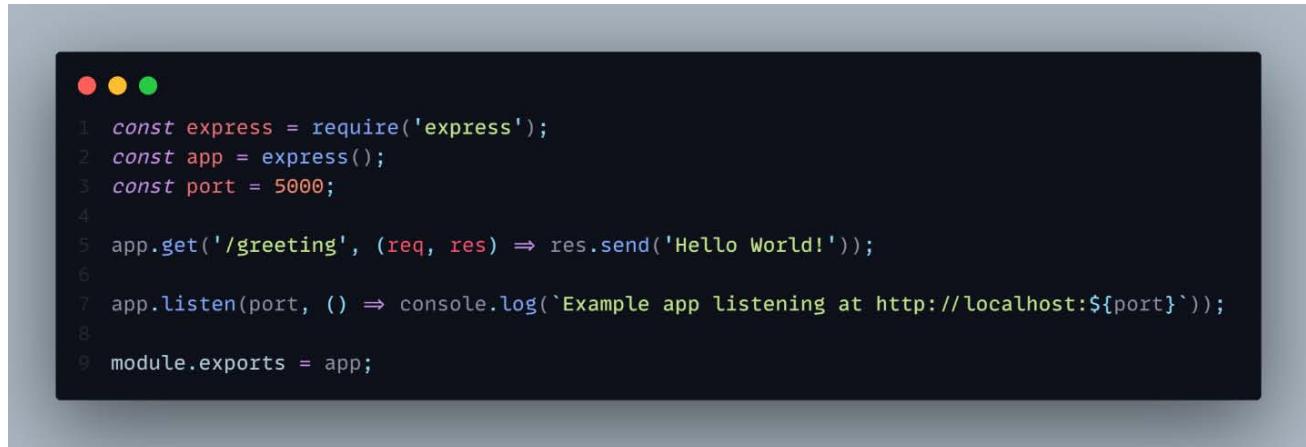 Figure 6: An Express Server Demonstrating Routing in Express
The following figure is a code snippet example of an Express route. Express is a web application framework, and this line of code declares that all GET requests to the /greeting route will be processed by a function that returns "Hello World!" to the client.
## ii.Middleware
Express is an opinion-free system, which means that it doesn't tell writers how to organize their code. Instead, it lets them do it however they want. One place where this lack of a point of view is clear is in the use of software. Middleware lets tasks be done on requests and replies as they move through the routes. Express apps use it a lot. Middleware can be used at both the application level and the route level, and it can also be linked to other pieces of middleware. You can add almost any suitable software to the request handling chain, and you can do it almost any way you want.
Express provides us with several built-in middleware such as express.static, express. json etc.
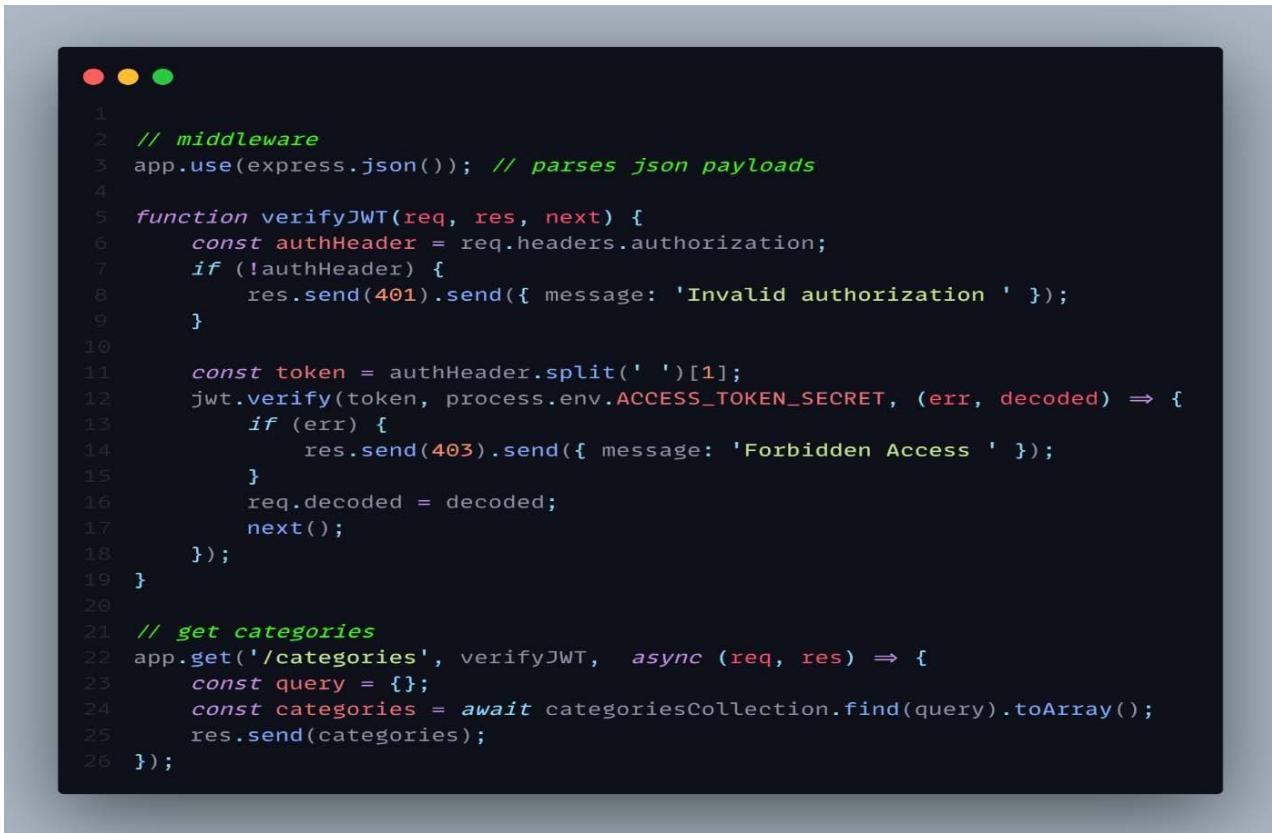 Figure 7: Express app Demonstrating Middle Functions
Typically, an Express route will include middleware and a route handler function. The example that follows demonstrates an Express router that applies middleware to every HTTP GET request sent to the /categories route. To determine if a user has a valid JWT before allowing access to the /categories route, a middleware function called verifyJWT is utilized in this case. The verifyJWT middleware will run when a user navigates to the /categories URL, and then the user will be given access to the API data if the user has valid JWT. [11]
### c) MongoDB
MongoDB's document-oriented NoSQL design makes it well-suited for storing massive datasets. MongoDB stores information not on tables but in collections and documents. Documents, which are comprised of key-value pairs, are the primary unit of data storage that may be utilized while working with MongoDB. Collections are like the tables in a relational database since they hold collections of documents and activities. The database known as MongoDB first appeared somewhere in the middle of the 2000s.
## i. MongoDB Features
- Each database has its own collections, and those collections have their own documents. The number of fields in each document may vary. Each file may have a unique size and include varying amounts of information.
- Developers will find the document structure more familiar since it mirrors the way they build classes and objects in their preferred programming languages. In contrast to tables, developers typically claim that their classes have a hierarchical structure based on key-value pairs.
- In MongoDB, a predefined schema is not required for the rows (or documents). The fields may be made dynamically instead.
- The data format of MongoDB makes it easy to store arrays and represent complex structures like hierarchies.
- Environments built on top of MongoDB scale quite well. Clusters have been defined by businesses all over the globe; some of them use 100 or more nodes and store millions of records in their databases.
## ii. Key components of MongoDB Architecture
- _id- This field is required for all documents in MongoDB. The _id column in a MongoDB document stores a unique identification. The _id field is the primary key in the document's database. If the _id column is not supplied while creating a new document in MongoDB, the database will construct one automatically. Each document in the collection will be given a random number between 1 and 24 by MongoDB.
- Collection - A group of MongoDB records is called a collection. When working with RDMSs like Oracle or Microsoft SQL Server, a collection may be thought of as a table. A set is contained entirely inside one database.
- Database - Like a table container in a relational database management system, this one store collections. Separate directories and files are created on the file system for each database. There may be more than one database on a MongoDB server.
- Document - In MongoDB, a "document" refers to an individual record in a collection. In turn, the document will be made up of labels for fields and their associated data.
- JSON - JavaScript Object Notation describes this format. This format is designed to make it easy for humans to read and understand structured data. Many languages now have built-in support for JSON. [12]
## iii. MongoDB Data Modelling
A fully functional database system cannot be created without first creating a data model. Data models are mostly used to provide visual information about the potential link between two or more data elements. Petabyte-scale data repositories, which contain data from across corporate divisions and teams (including sales, marketing, and beyond), will rely heavily on the layout/design.
Adding new data models or restating the definitions of existing ones is a continual and dynamic process that necessitates many feedback loops and direct interaction with the stakeholders.
Skillful data modelling requires the use of formalized schemas and procedures to guarantee a consistent, repeatable, and reliable method of managing an organization's business operations and its data resources.
When experts in the data industry begin the process of constructing data models in MongoDB, they are faced with the decision of whether or not to embed the information or to keep it distinct in a collection of documents. As a result, there are two different ideas involved in effective MongoDB data modelling:
1. The Embedded Data Model - Data modelling in MongoDB that's built right in When there is a connection between two data sets, data modelling is used, specifically a denormalized data model. As a result, documents may maintain a unified structure thanks to the embedded data model's established links between data pieces.
2. The normalized Data Model - Relationships between data components or documents are modelled with the use of object references in a normalized data model. Because of the efficiency gains from using this approach, many-to-many connections may be recorded with little repetition of information. [13]
## iv. MongoDB Atlas
MongoDB Atlas is a novel, multi-cloud database solution that has been crafted by the proficient developers of the company. With Atlas, you can build scalable, high-performance, global apps on any cloud platform with no effort because to its simplified database deployment and management. [14]
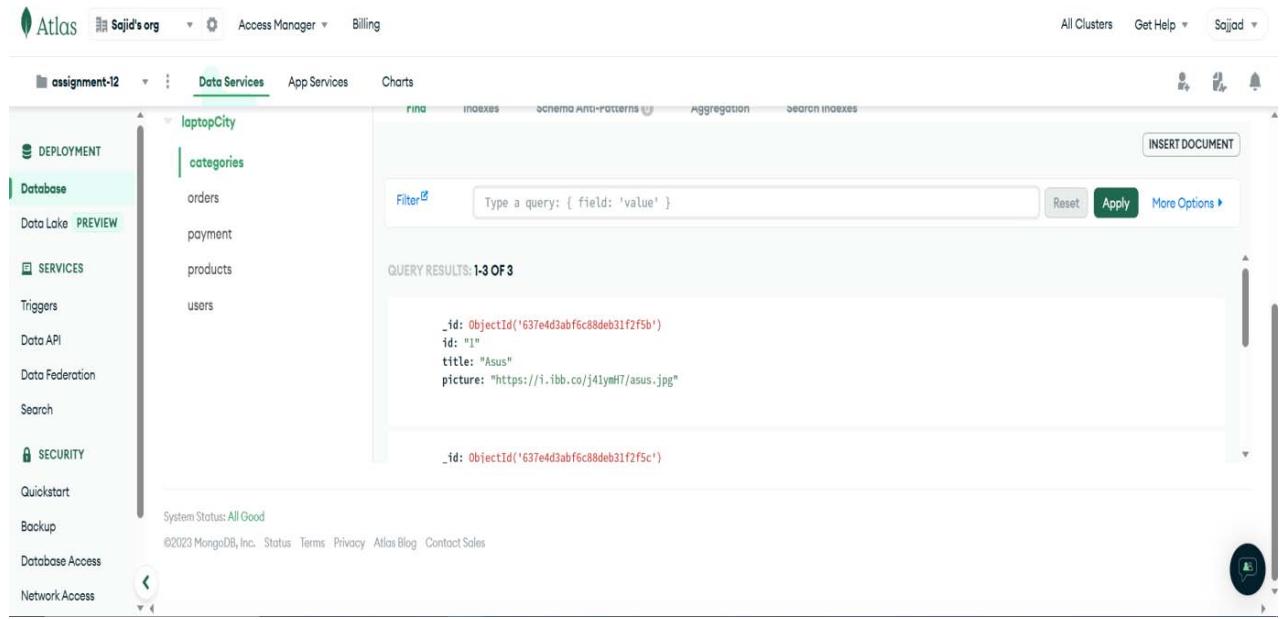 Figure 8: Screenshot of the MongoDB Atlas
## v. Advantages and disadvantages of MongoDB
The reasons MongoDB is favoured by majority of developers are:
- Developer UX- MongoDB was designed to provide programmers a pleasant experience while making applications. They like that this database works with several languages, including Ruby on Rails, Python, PHP, Swift, Scala, Rust, and JavaScript. MongoDB also provides its users with top-notch technical assistance. With the cloud-hosted version of MongoDB, Atlas, the database's use has become even more intuitive.
- Scalability and Transnationality- Scalability is one of the best things about MongoDB. Thanks to its scale-out architecture, you can create apps that remain stable despite sudden increases in user volume. As a result, the workload is dispersed across a large fleet of less powerful but cheaper computers. Because MongoDB has come up with so many new ideas, it can handle a huge number of read and write tasks. Sharding in MongoDB makes it possible to store information groups in one place even though the information itself is saved on many computer clusters. This is very different from the relational database design, which is limited because it grows to make computers faster and more powerful as it grows.
Nothing is perfect, with many advantages as mentioned above, MongoDB have some limitations
- Joins not Supported - MongoDB is not like a linear database in that it doesn't allow joins. Still, you can use the joins method by adding it to your code by hand. But it could slow down the process and hurt efficiency.
- High Memory Usage - Each value-key pair in MongoDB is given a name. There is also data redundancy since joins are not functional. This causes memory to be used more than it needs to be. [15]
### d) React.js
Facebook developed the React.js framework, which is a JavaScript framework and tool It is free for anyone to use. It's used to create real-time user interfaces and online applications with a fraction of the code required by standard JavaScript.
Using react, we partition the user interface of the application by developing a number of reusable components. Each component is a stand-alone portion of the user interface; nevertheless, the combination of numerous components results in the whole user interface.
In an application, the primary duty of the react component is to manage the view layer, similar to the role of the V in the model-view-controller (MVC) paradigm. It does this by offering the best and most efficient way to display. React.js recommends that developers divide up complex user interfaces into smaller, more manageable pieces that can be reused independently. By doing so, the ReactJS framework improves upon the DOM manipulation capabilities of JavaScript while maintaining their speed and efficiency. This makes it possible to load web pages faster and make web applications that are very active and flexible. [16]
#### React.js History
In 2011, Facebook had a lot of users and had to do something hard. It wanted to give people a better experience by making an interface that was livelier and more sensitive, as well as fast and high-performing.
One of Facebook's software workers, Jordan Walke, made React so that it could do just that. React made the development process easier by giving developers a more organized way to make dynamic, interactive user experiences with reusable parts. [16]
Why use React.js
- Dynamic applications can be created easily- When compared to JavaScript, where coding can rapidly become difficult, react simplifies the creation of dynamic web apps by requiring less code and offering greater functionality.
- Improved Performance- The creation of web applications is sped significantly thanks to React's utilization of Virtual DOM. Virtual DOM compares the current states of the components to their earlier states and changes only the parts of the Real DOM that have changed. So, this increases the page speed and performance as with every change the page doesn't rerender This is different from how most web applications work, which update all of the components again.
- Reusable Components- Every React project is made up of components, and most applications have many. These components come with their very own set of controls and logic, and they may be used in a variety of places across the application. Because of this, the amount of time needed to create the application is drastically reduced, and the quality of the code produced is much improved. [17]
## i. Virtual-DOM
The genuine Document Object Model (DOM) is replicated in its entirety as the virtual DOM. When the state of a application changes, the real Document Object Model (DOM) does not change. Instead, the virtual DOM is changed in its place.
When new UI elements are added, a fake DOM that looks like a tree is made. Each part of this tree is a branch. A new virtual DOM tree is created whenever the state of one of these parts shifts. Next, the newly constructed tree is "diffed" against the existing virtual DOM tree.
Once this is complete, the virtual DOM will determine the most efficient means by which to implement these modifications in the real DOM. This ensures that as little of the original DOM as feasible is used. This means that making changes to the actual DOM will be easier and quicker.
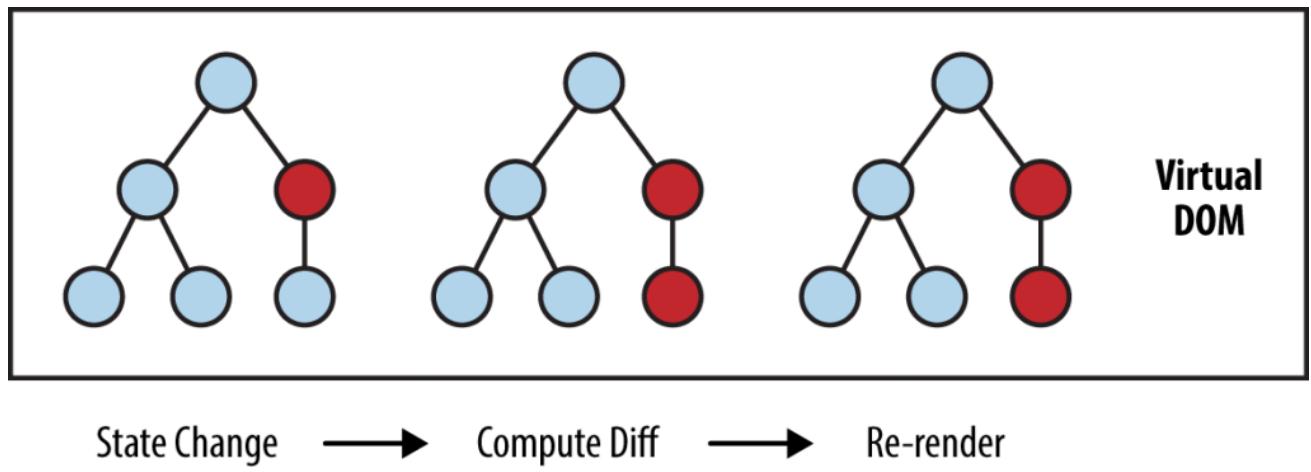
Figure 4. shows Professional Developers and students of computer programming utilize the web technologies Node.js and React.js most frequently.
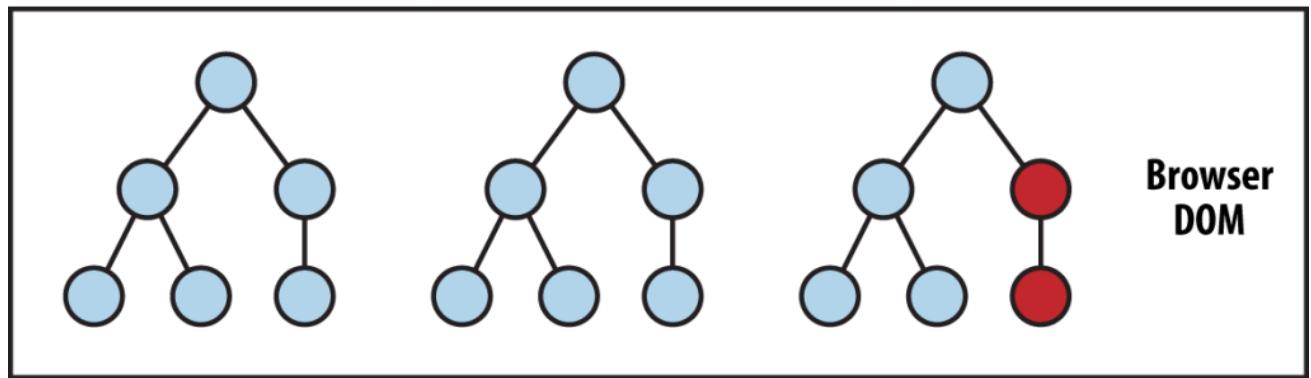 Figure 9: Virtual Dom and Diffing Process
In figure 9 Nodes that have changed is denoted in red circles. These nodes represent the changed UI components. [18]
## ii. JSX (JavaScript XML)
An add-on for React known as JSX, which stands for "JavaScript XML," enables users to write JavaScript code in a format that is visually similar to HTML. To put it another way, JSX is a syntax that is utilized by React and is comparable to HTML. It is an extension of ECMAScript that enables HTML-like grammar to coexist alongside code written in both JavaScript and React. The syntax is used by preprocessors, sometimes known as transpilers, such as babel, to convert code that is similar to HTML into normal JavaScript objects that a JavaScript engine can read.
Like regular HTML, JSX uses properties with HTML elements. The way properties are named in JSX is different from how they are named in HTML. For example, a class in HTML becomes className in JSX because class is a protected term in JavaScript. [19]

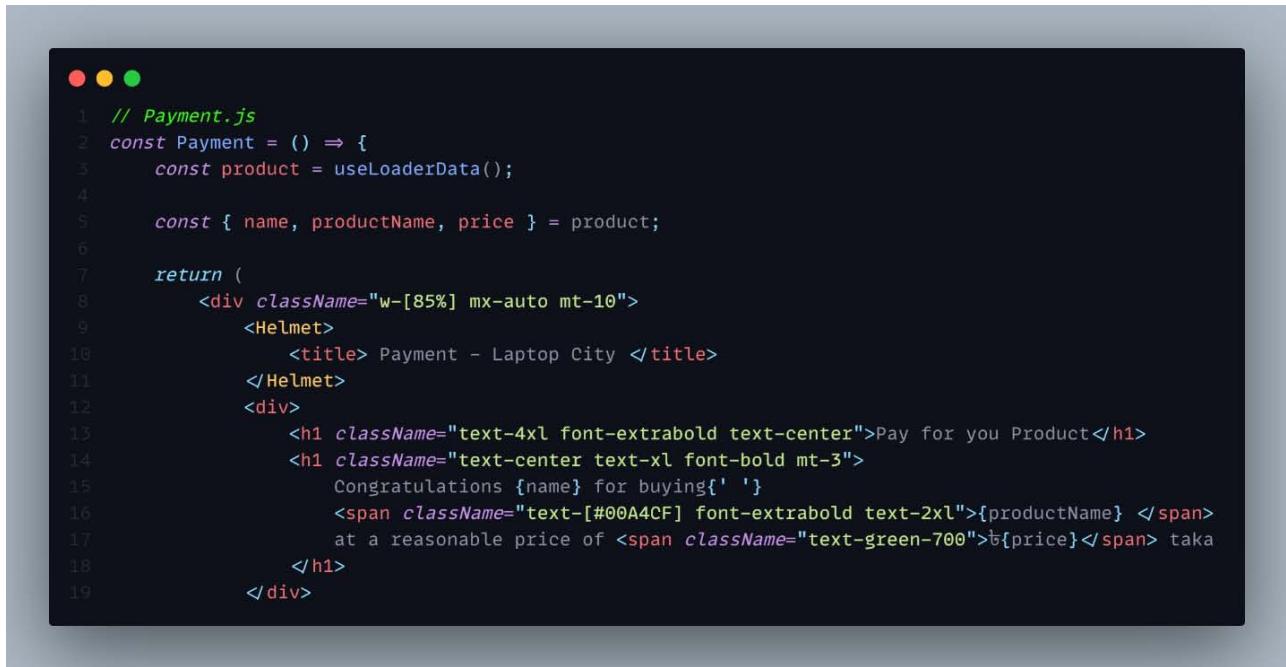 Figure 10: A JSX File in React Application
## iii. Components
Previously for a single page application developer had had to write thousands of line of code. Those applications followed traditional DOM structure which made debugging code a complex process. For a single error, developer had had to check each line of code and make the necessary changes. So that component-based approach was made to overcome this problem. By component approach it means breaking down the whole application into small components.
Components are the most important parts of a React program. It makes it much easier to build user interfaces. Each component is in the same place, but it works separately from the others. They all come together in a parent component, which is the final UI of your app. [20]
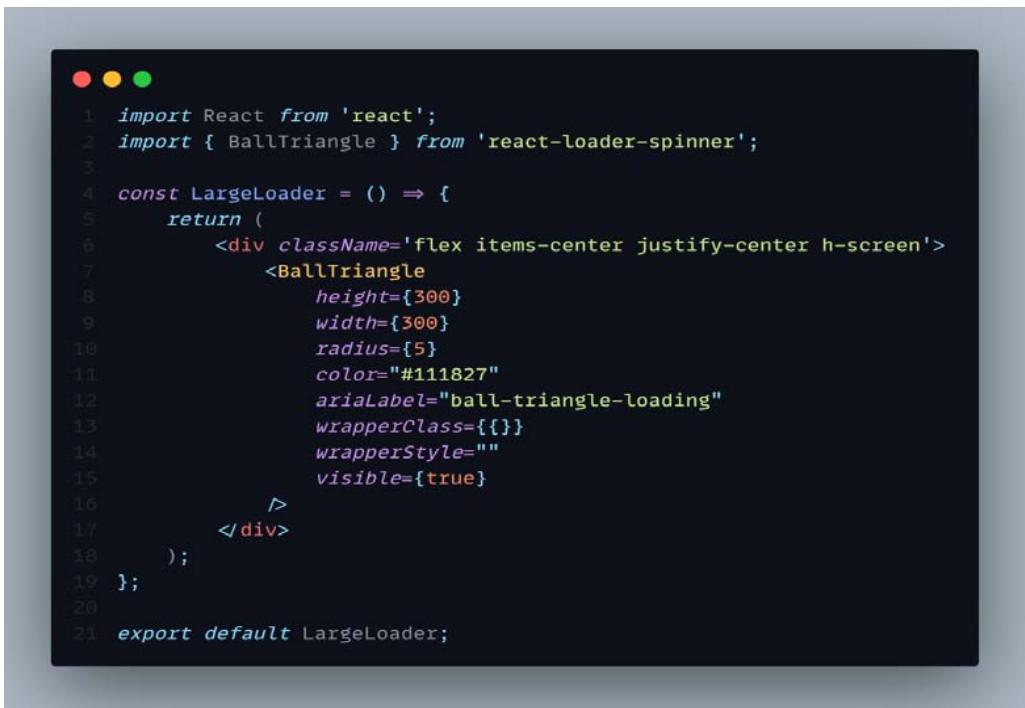 Figure 11: A Loader Component
## iv. Pros and Cons of the React
### React.js Advantages
- Component based architecture- React components are a highly sophisticated portion of a web page that can be independently produced, maintained, and even reused. They were made possible by the introduction of these components. Your web page can be broken up into several different components, each of which is capable of functioning on its own. Any one of them can be updated independently of the others. This allows for a great deal of modularity and flexibility in the way that it may be used with other parts of the web application to enhance its functionality.
- Hight Performance- The ability to dynamically load information in response to user input without reloading the entire page is made possible by React's component-based architecture, making it ideal for building scalable Single Page Applications. However, this might not be ideal. Imagine being required to update DOM after every change that was brought about by the user's interaction on the web page. If your webpage is complicated and have multiple UI elements, it might result in a significant speed decrease.
- To get around this problem, React uses a concept called Virtual DOM, which is essentially a replica of your actual Document Object Model. All the changes brought on by user interaction or other events are now handled by the virtual DOM before the real DOM is updated (if the intelligence of React deems it necessary, of course).
React.js Disadvantages
- High Pace of Development- This is probably the most talked about reason not to use React. React is not only a tool that is growing quickly, but it is also changing quickly, which means that its developers have to change the way they write code. Customers in many fast-evolving sectors are eager to adopt more dependable technology and solutions. Again, this relies on the team's level of expertise and their ability to win clients over to the idea of using React.
- Not a full-featured framework- Developers don't enjoy what they may have in a fully equipped framework like Angular, despite the fact that React is a powerful JavaScript library with a set of interactive and helpful capabilities necessary to create large-scale apps. If you look at the MVC (Model View Controller) architecture, react only manages the view part. You will need more packages and tools to work with Controller and Model. The resulting code could not be well-structured or follow any particular
patterns. While more organized and manageable solutions may be found in frameworks like Angular, which offer the full set of MVC features. [21]
## III. IMPLEMENTATION OF LAPTOP CITY - A MULTI-VENDOR E-COMMERCE WEB APPLICATION
### a) Project Overview
Laptop City is a C2C (Consumer-to-Consumer) online retailer. E-commerce that is of the consumer-to-consumer (C2C) variety refers to any electronic transactions of products or services that are carried out between individual customers. In most cases, these dealings are executed by utilizing the services of a third party, which is responsible for providing the digital marketplace in which the deals are executed. Multiple merchants can list and sell their used Laptops on the Laptop city platform. [22]
Laptop City is an online marketplace for the purchasing and selling of reconditioned laptops. This website caters to one of three distinct categories of users. There is a choice for the user role throughout the registration process. If a user wishes to sell things on this Laptop City platform, they can opt to take on the "Seller" position instead of the "Buyer" role, which is the default setting.
Laptops can be booked and purchased by users having the buyer role. Stripe has been incorporated into the payment system. Users that have the seller role have the ability to add products, delete products that they have uploaded, and advertise their own products. If a product is being advertised, it will be displayed on the advertise section in home page; however, if there aren't any product for advertisement, the advertisement section won't be visible. The Product will be automatically removed from the application once the product is sold out. Admin are a special category of user. The administrator can see who has the Buyer and Seller roles and can remove them from the database if necessary. The admin can delete an item that a Buyer has reported.
### b) Home Page
LAPTOP city
 Panel label: Blogs Login.


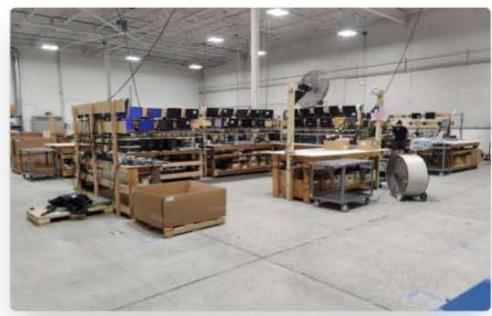
Laptop City processes 1,000s of laptops per month. We are proud of our emphasis on high quality, tested and working products. Our business thrives on the basis of these principles of integrity, as we want our customers to be pleased with our products. We understand that our success depends on your repeat business.
#### Refurbished LAPTOPS collection

 Figure 12: Landing Page of Laptop-City
The app's landing screen is depicted in Figure 12. There are four distinct parts to the homepage, one of which is an advertisement portion that appears only when relevant products are being promoted. Information regarding Laptop City can be found in the first two sections. And finally, the categories part of the reconditioned laptops can be found in the third area. There are just three laptop varieties that can be used with this platform right now. There's Lenovo, Apple, and Asus. The moon icon can be found in the upper righthand corner of the navigation bar, allowing the user to choose between a dark mood and a light mood. In the event that the website is already set to a dark mood, a sun icon will be displayed; clicking on it will allow you to go back to the light mood. If the user is already logged in, the login button is replaced by a dashboard and a logout option.
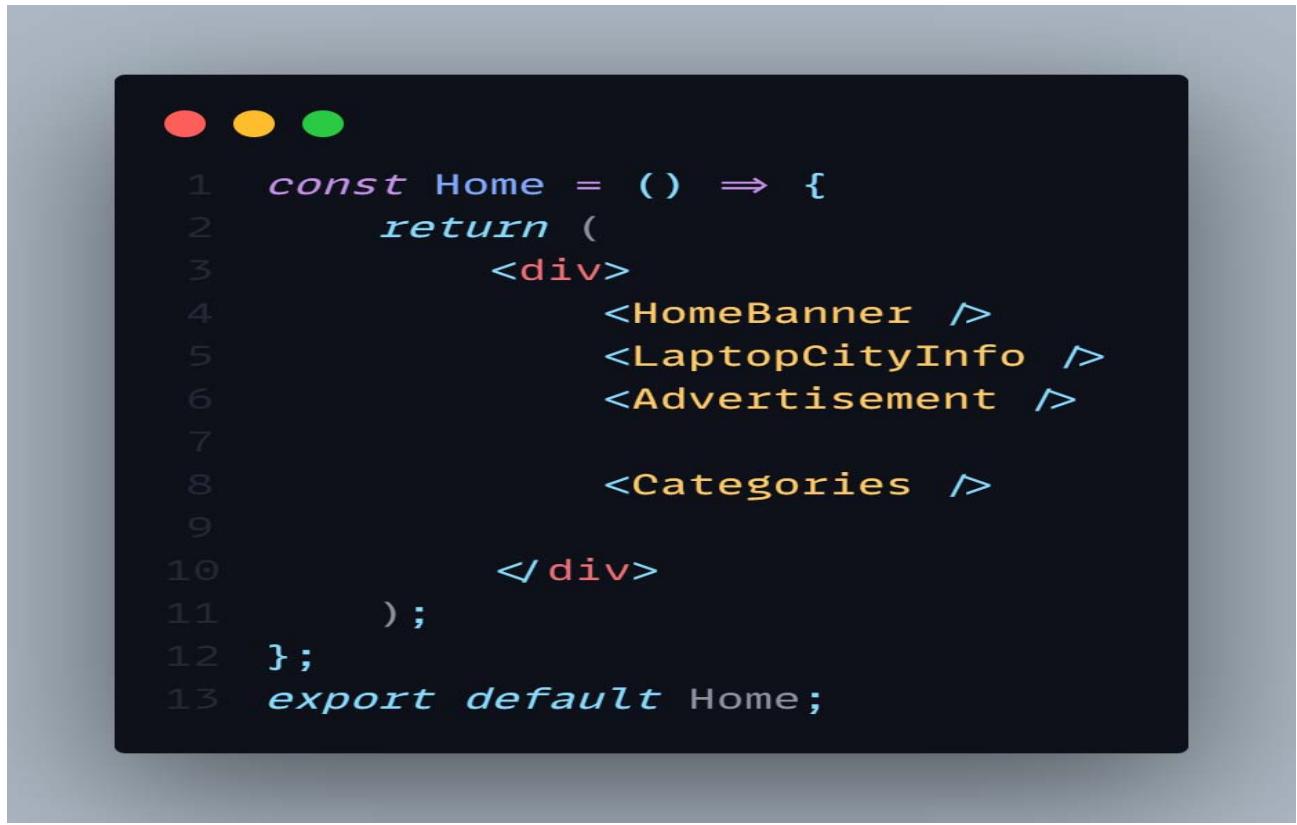 Fig 13: Home Component
Figure 13 illustrates the primary home page component, which consists of the Banner, Info, Advertisement, and Categories components respectively. Because the Home page is made up of reusable components, the complexity of the code will be minimized, and it will be much simpler to debug. And each of these smaller components might be utilized wherever we see fit on our own accord.
### c) Authentication System
A user's credentials are required for login or registration. Firefox is in charge of all authentication in Laptop City.
Most apps require users to be able to verify their identity. When an app has a user's credentials, it may save their information securely in the cloud and provide them with a consistent, personalized experience across all of their devices. You can ensure that your app's users are who they say they are with the help of Firebase Authentication, a suite of back-end services, developer-friendly SDKs, and pre-built UI components. A wide range of alternative techniques, such as passwords, phone numbers, and huge federated identity providers like Google, Facebook, and Twitter, may all be utilized to successfully complete the authentication process. Firebase Authentication is easy to connect with a custom backend because it uses common protocols like OAuth 2.0 and OpenID Connect and communicates directly with other Firebase services. [23]
## i. Sign Up
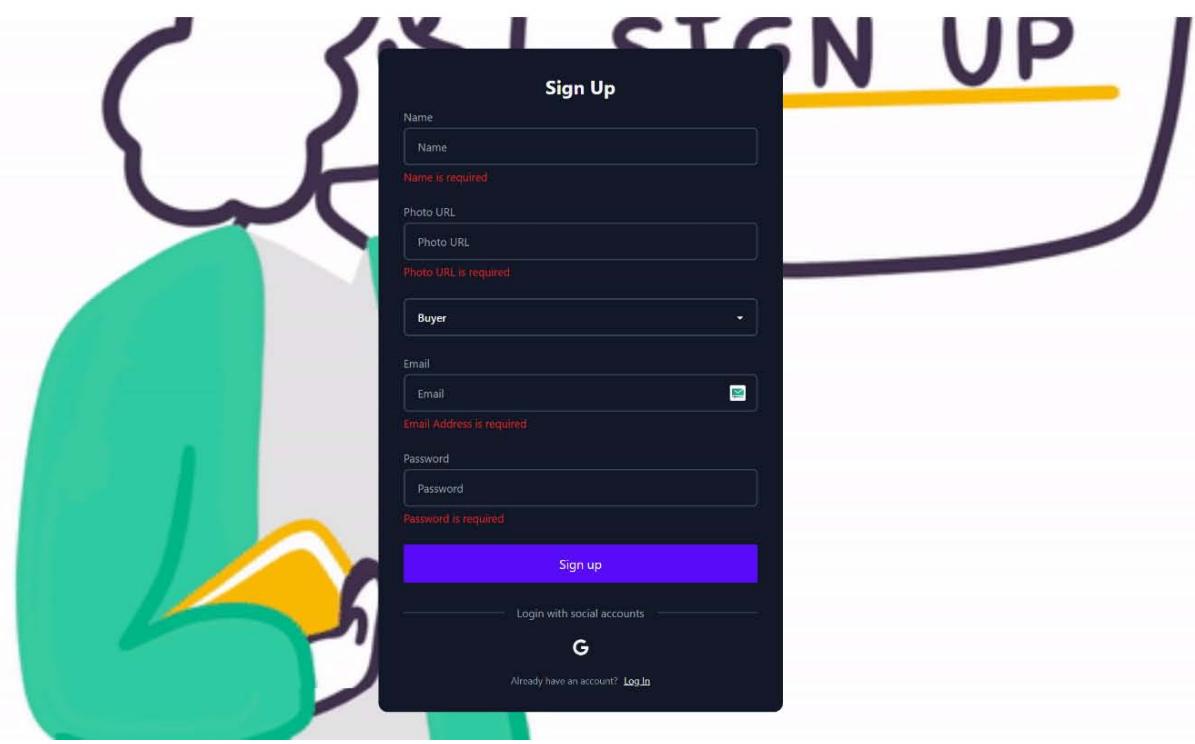
Figure 14: Signup form Screen
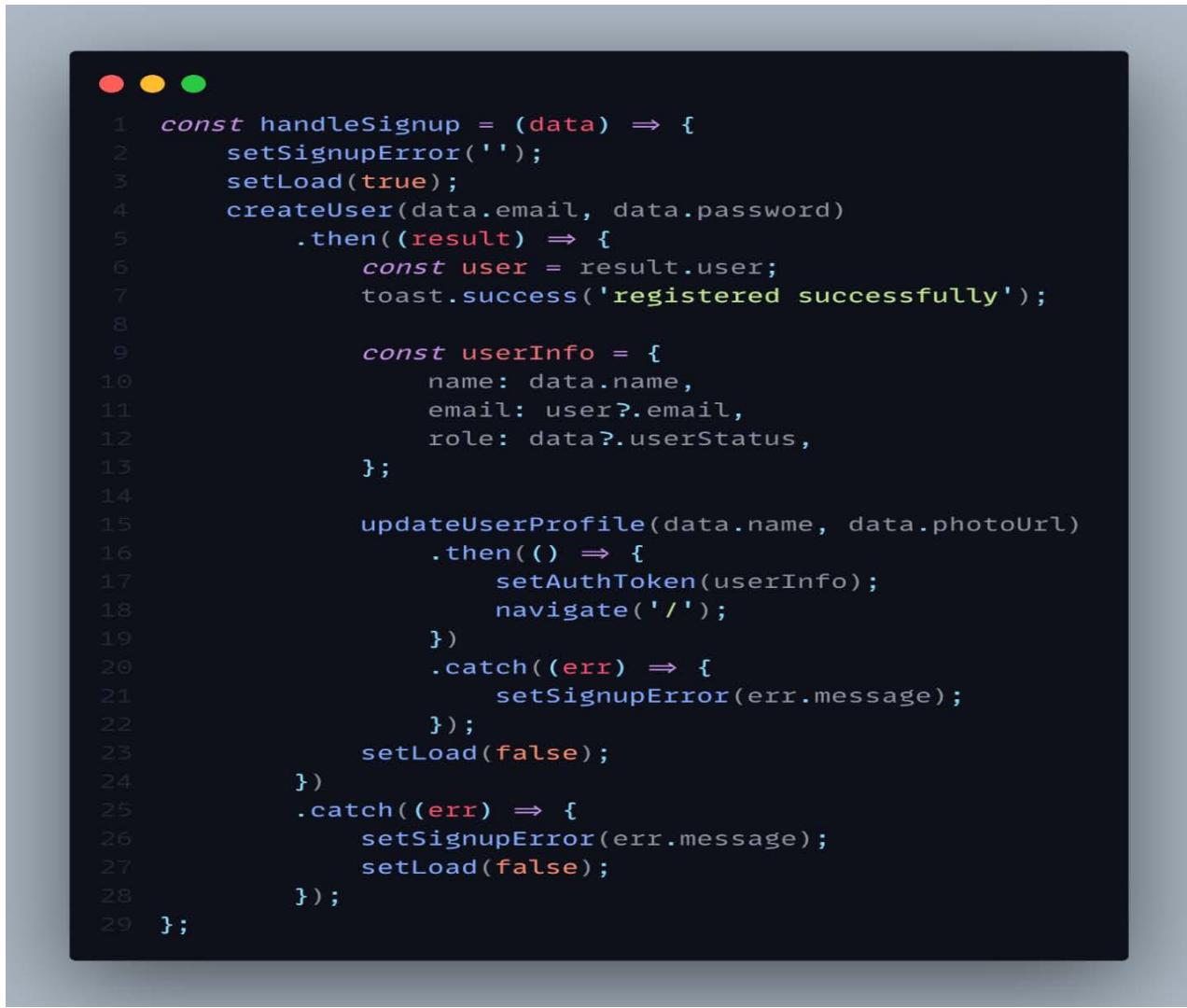 Figure 15: Code Snippet for Sign up
Due to the utilization of a React-hook form, there is no requirement for a state for each individual field. After filling out the form with all of the required information and then clicking the Sign-up button, the loader state will be set to true. This indicates that a loader will be displayed during the sign-up process. Next, the function create User, which is provided by firebase, is called, which calls the update User Profile function, which is also provided by firebase. Finally, the update User Profile function will call set AuthToken, which will be responsible for storing the user data in the database and assigning a token that will be kept in the local storage. After successfully registering, the user will be taken to the homepage of the site. In the event that there is a problem, the loading state will be changed to false; thus, the loading process will be halted, and a notice bar will be displayed alongside an error message.

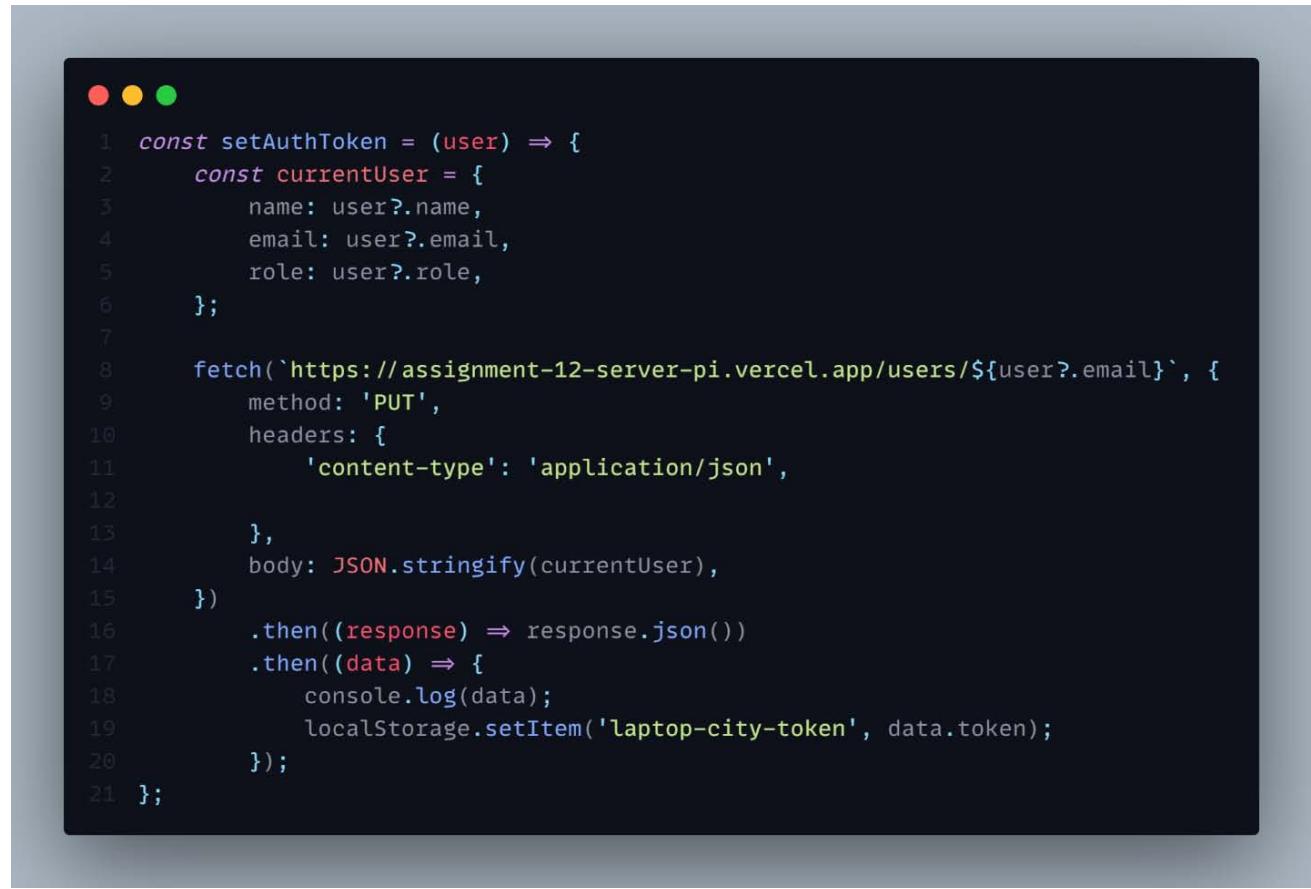 Figure 16: Code Snippet of Setauthtoken Function
## ii. Sign In
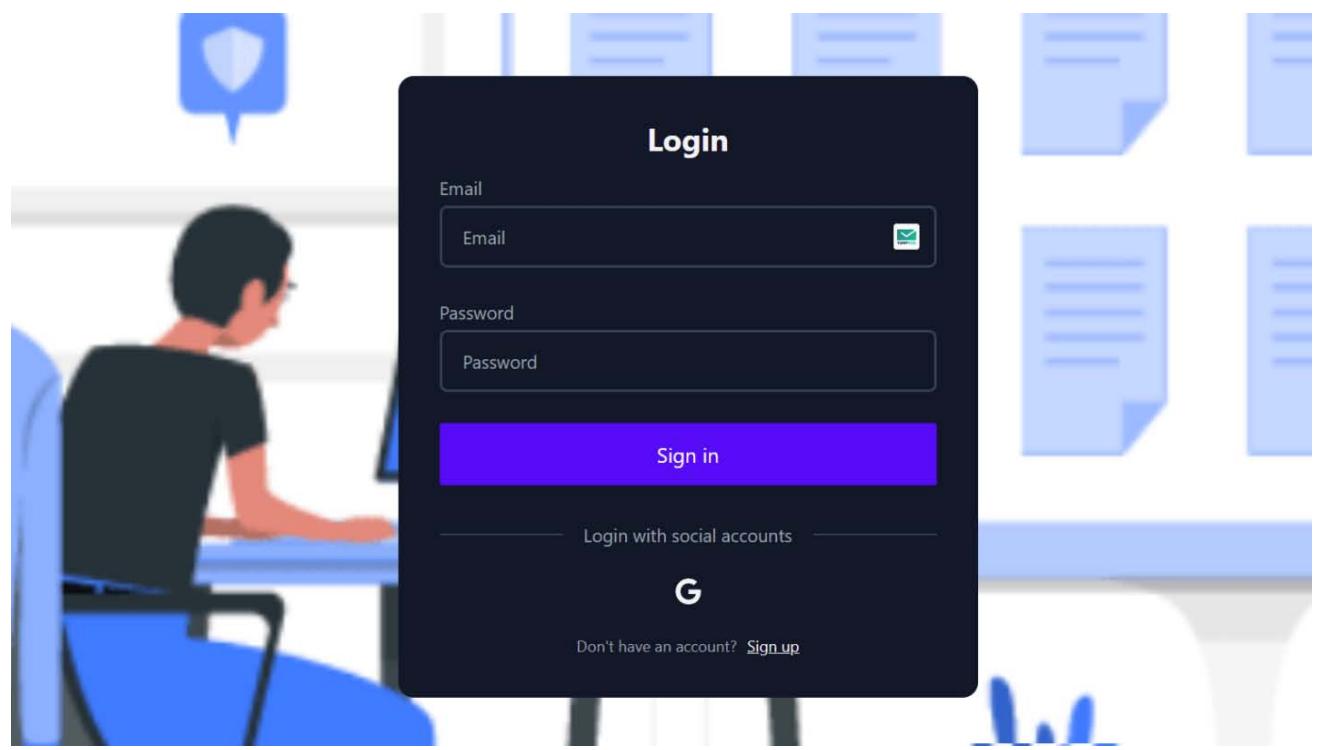 Figure 17: Login form Screen
user will be redirected to the page they wanted to visit previously.
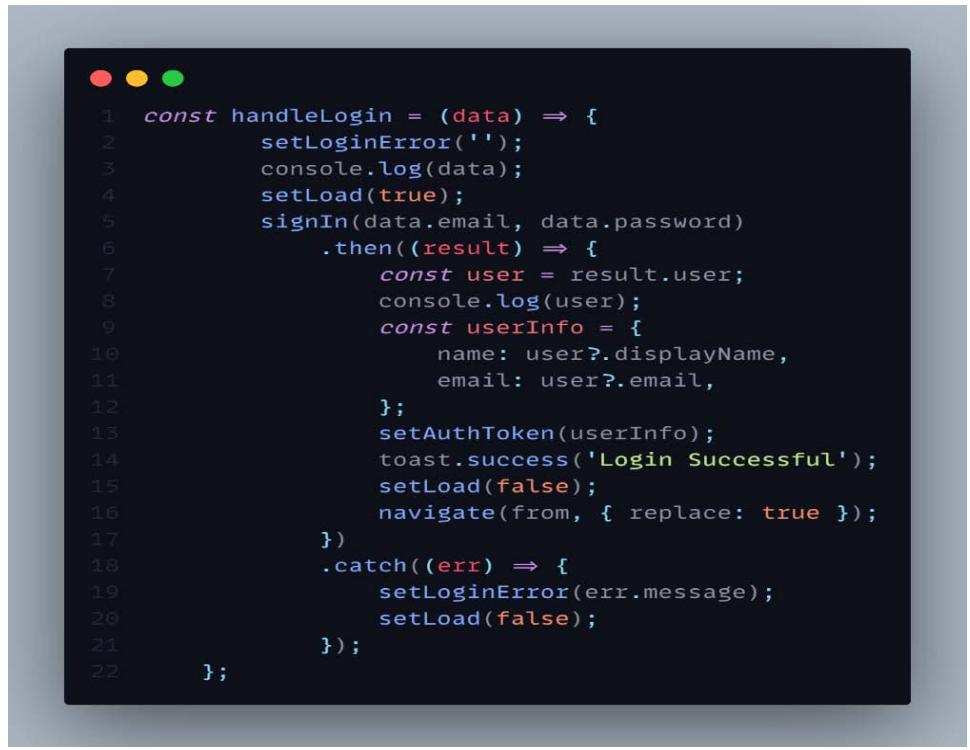 Figure 18: Code Snippets of Login
determine whether or not the user exists in the database. If the user is found in the database, a notification bar will appear with a message indicating success, and the browser will then reroute the user to the website that they had intended to visit before.
### d) Dashboard
## i. Admin Dashboard
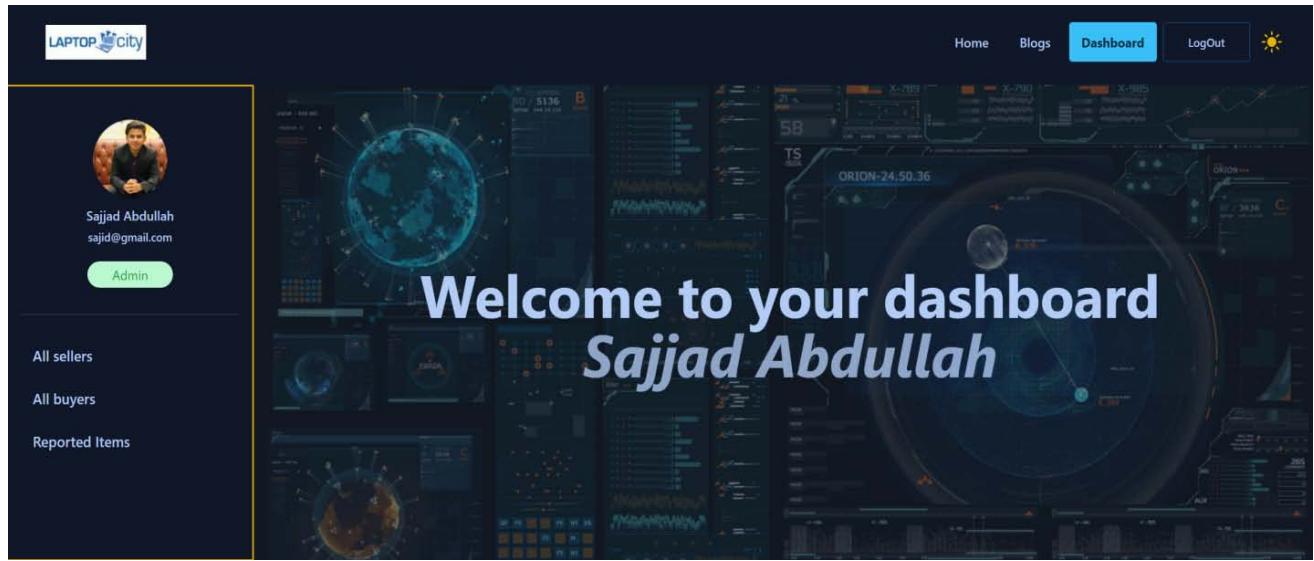 Figure 19: Admin Dashboard Screen
Figure 19 depicts the admin dashboard, where the administrator can view all sellers and all buyers and delete the records of these sellers and buyers from the database. Additionally, the Admin is able to view all of the items that have been reported and delete them if they so choose.
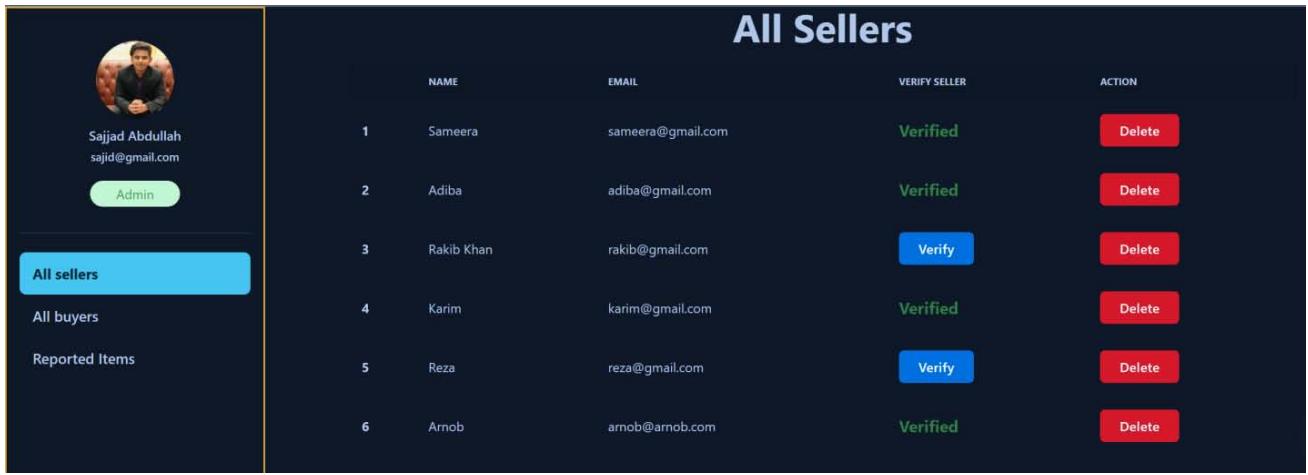 Figure 20: All Sellers Screen
As shown in Figure 20, the admin has visibility over all users who have the "Seller" role. By clicking the appropriate buttons, the admin can delete sellers and verify existing ones.
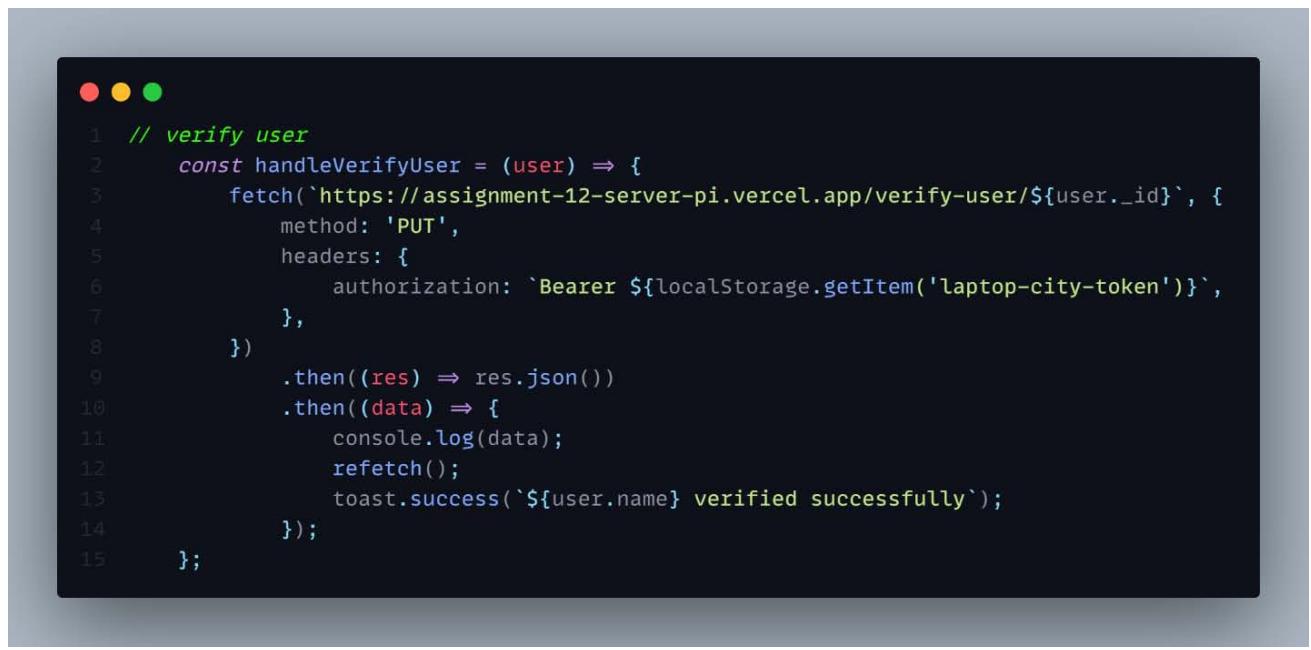 Figure 21: Verify Seller Code Snapshot
The handle Verify User method will be triggered immediately following the clicking of the Verify button. This function will make a call to the API, which has a query parameter for user id. PUT is the approach that is utilized because existing users in the database are the only ones that can be verified. In the event that the specified data does not already exist in the database, the PUT method will generate it, and in this instance, it will update the user data that was previously stored. If the operation was successful, the refetch function will be invoked. This method is supplied by React query, and if it is successful, it will immediately show the update on the screen without requiring the user to refresh the page. The seller's information in the product card will be accompanied by a blue badge if the user has been verified.
 Figure 22: Verified Seller Badge Along with Seller Information
The administrator has access to view all of the products that have been reported and can remove them from the database.
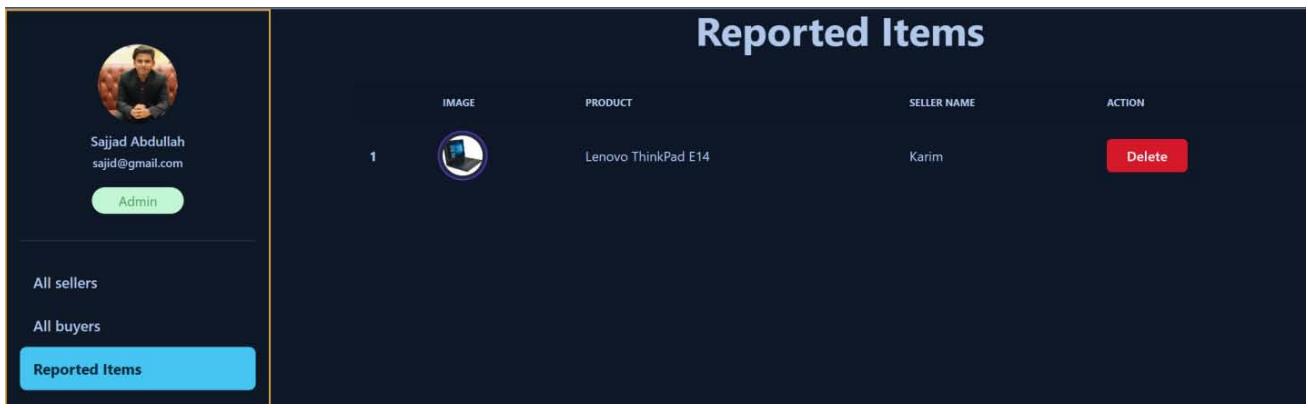 Figure 23: Reported Items Screen
Users can report a product by using the option that says "Report to Admin," as demonstrated in Figure 22. After that, Admin will be able to view the reported items in the manner depicted in Figure 23. The things that have been reported will be laid out in a table fashion and will include all of the pertinent product information, including a picture of the item, its name, the seller's name, and a button to delete the item.
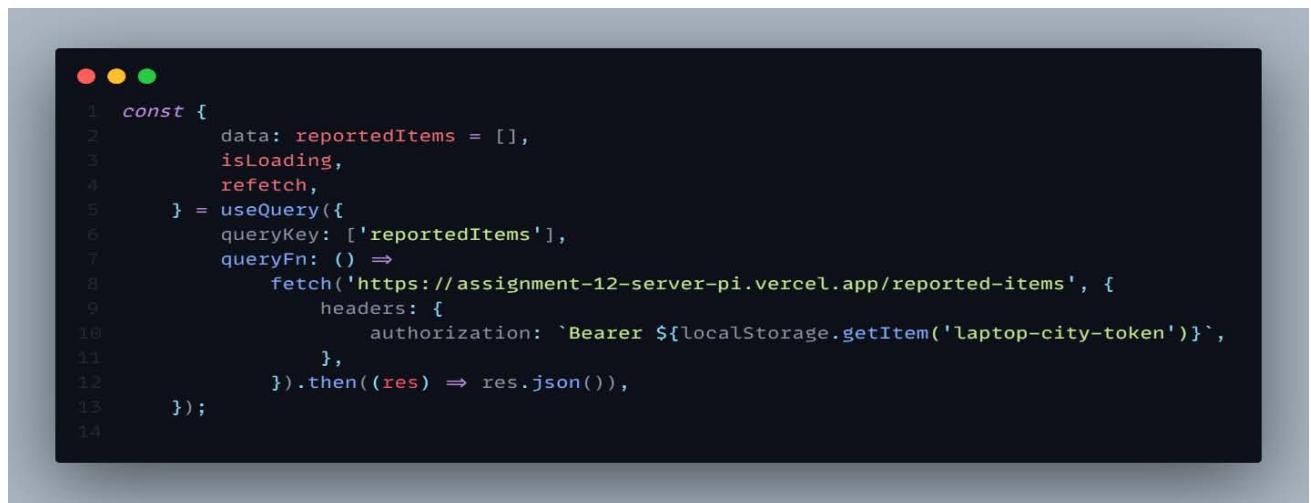 Figure 24: Reported Items Fetching Snapshot
As show in figure 24 data is fetched using React query. React Query is a data-fetched tool that helps your React application get, cache, synchronize, and update server state. Before we get into the details of React Query, it is important to know what the server state is. [24]
## ii. Seller Dashboard
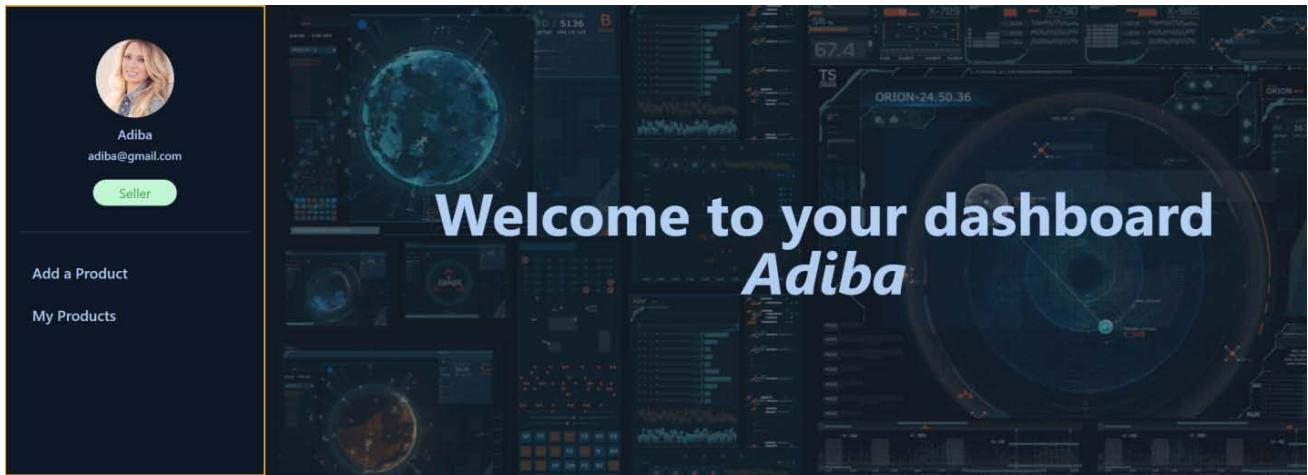 Figure 25: Seller Dashboard Screen
As can be seen in figure 25, a user with the seller role has the ability to both add products and look at all of the products that they have created.
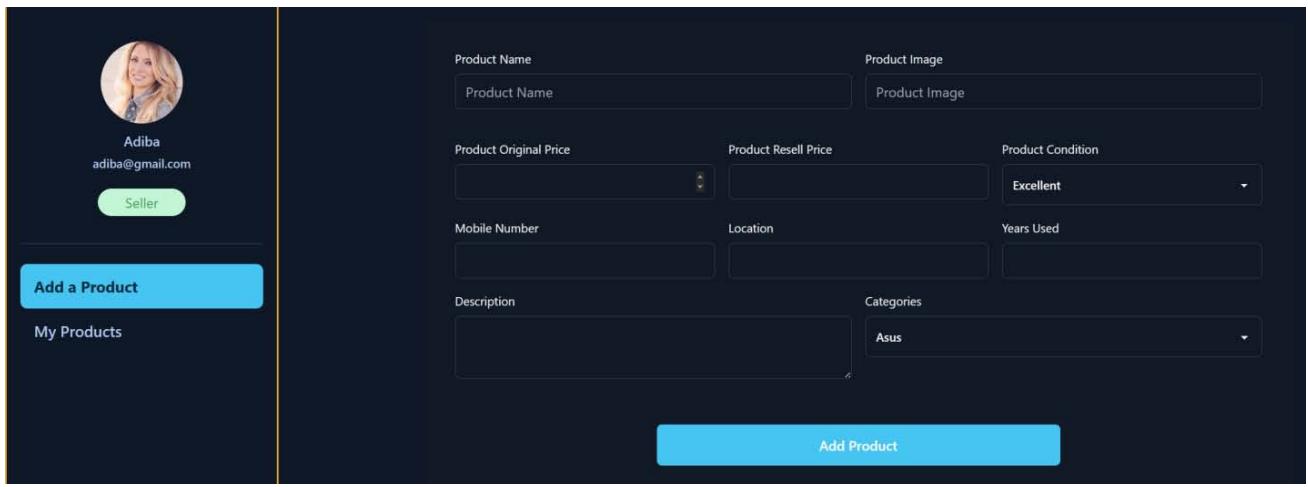 Figure 26: Add Product form Screen
A user with the seller role can add a product by filling out the Add a Product form with the appropriate information, as illustrated in Figure 26. All of this information collected from the fields will be saved in the database, along with the time at which that particular product was developed. Each field in this form must to be filled out by the seller in order to add the product, and none of the entries can be left blank.
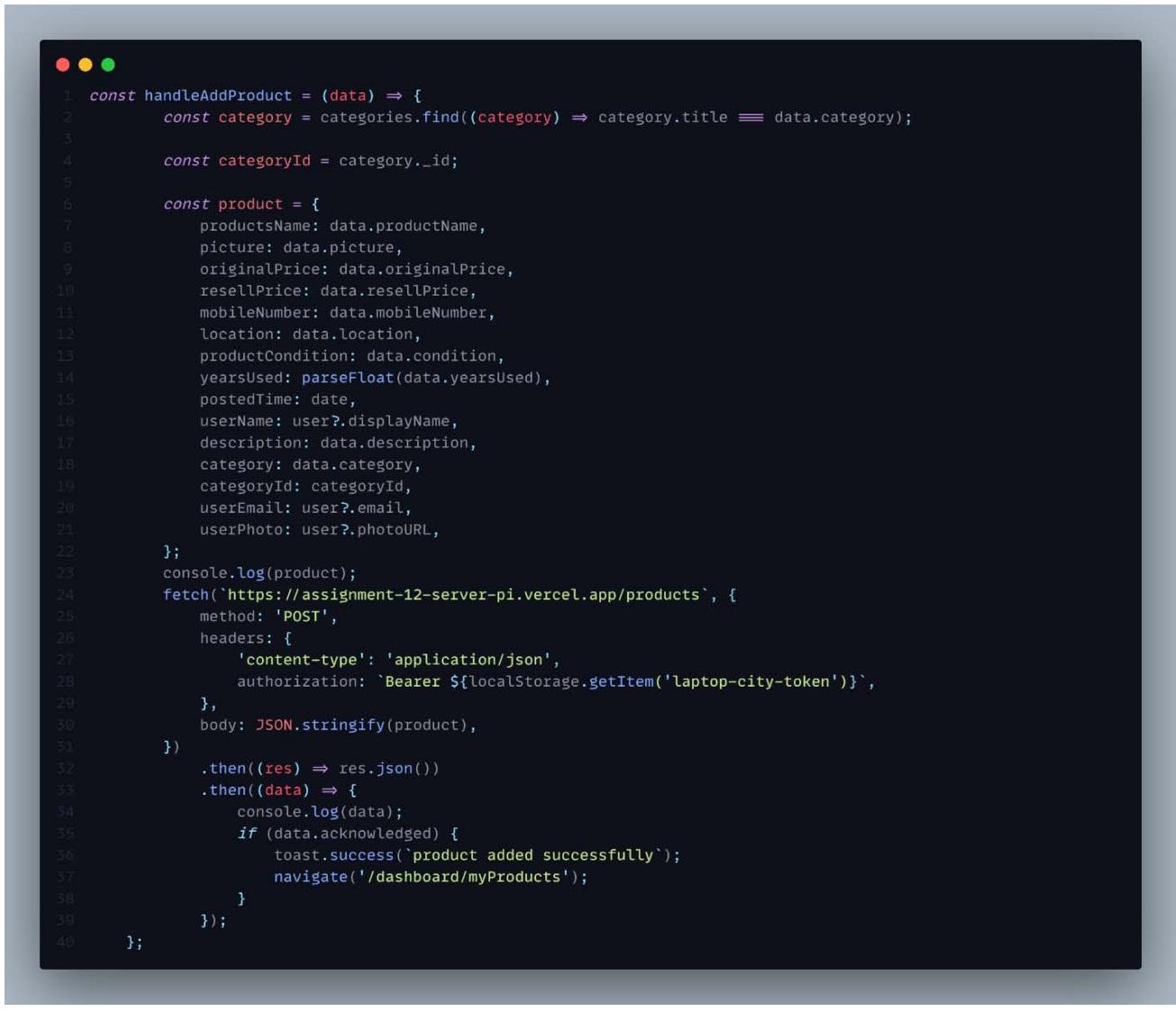 Figure 27: Add Product Code Snapshot
As can be seen in Figure 27, the POST function is implemented since it allows a new document to be generated in MongoDB. In addition to all of the information from the fields of the Add product form shown in Figure 26, the database will also store the time
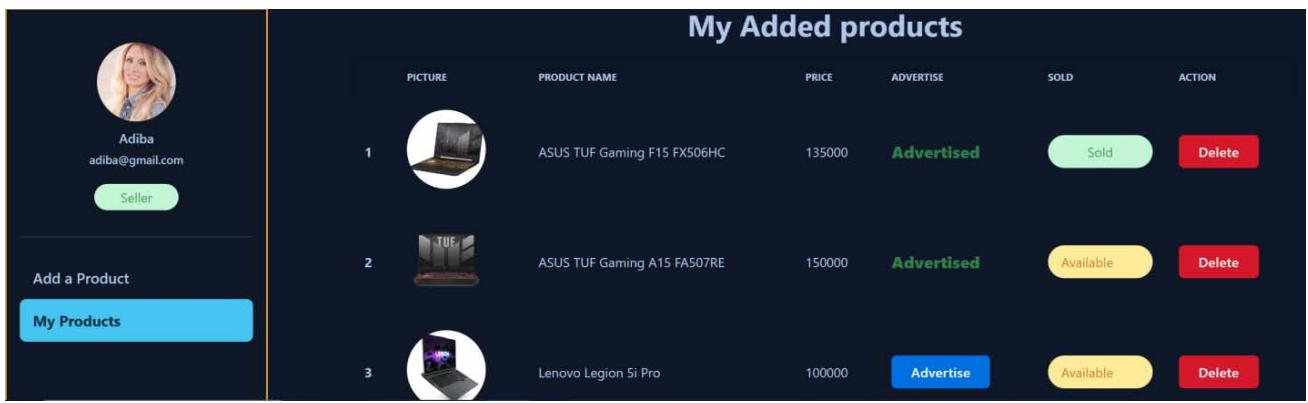 Figure 28: My Products Screen of Seller Dashboard
If the product was added without any errors, the seller will be sent to the page seen in Figure 28 entitled "My products."
My products page includes a table with information about the products, including product image, name, price, and product status (whether the product is sold or available), as well as a delete button and an advertise button. When the advertise button is clicked, the specific product will be displayed in the advertisement section of the home page. The seller is able to delete a particular product by clicking the delete button on the My products page.
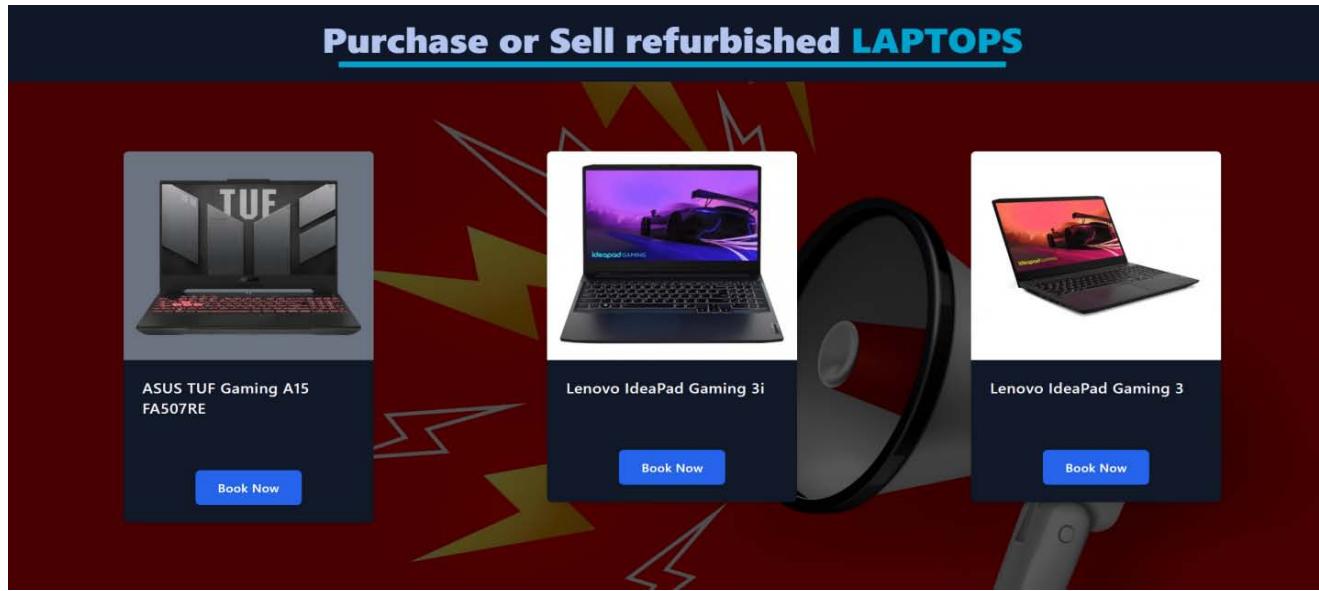 Figure 29: Advertisement Screen
As can be seen in Figure 28, the seller promoted ASUS TUF Gaming A15 FA507RE by hitting the advertise button. As a direct consequence of this, the laptop in question was advertised in the advertisements section in home page. Given that this laptop had not yet been purchased, it was featured in the advertisements section.
### 3.4.3 Buyer Dashboard
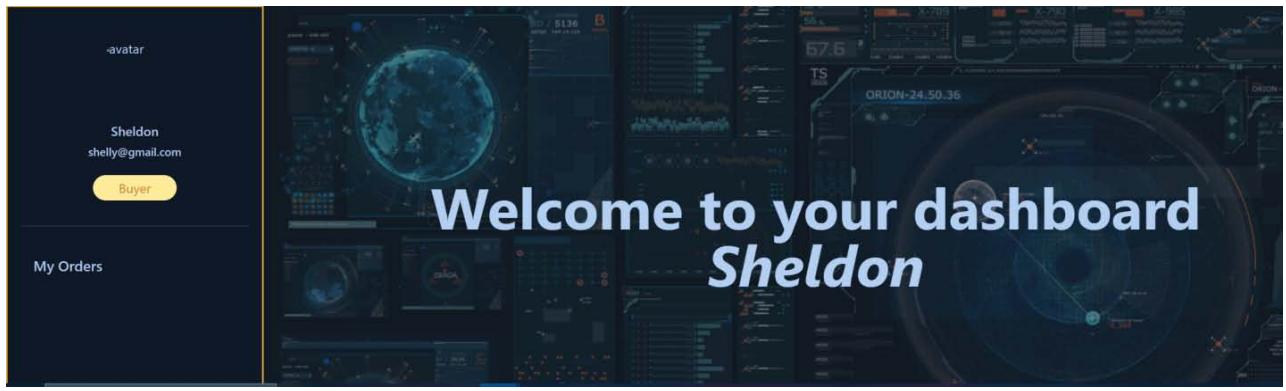
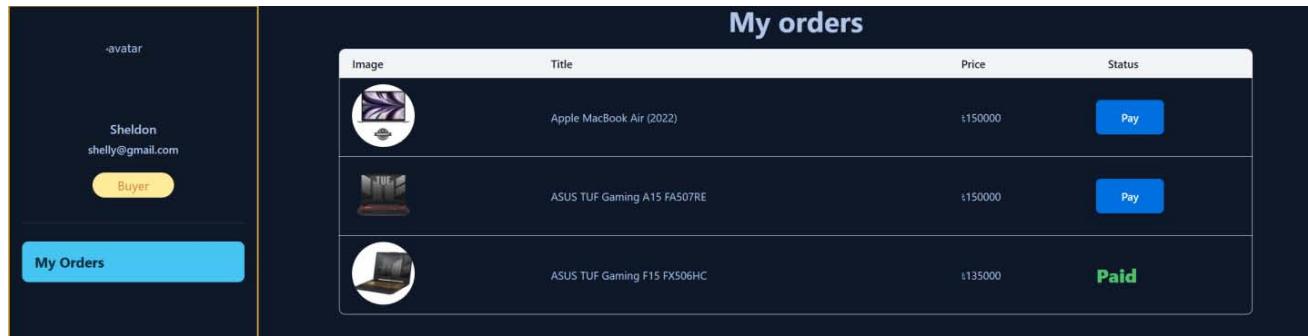 Figure 30: Buyers Dashboard Screen
Users that have the buyer role are able to view all of the items they have booked. Users are required to make a booking for the product before they may purchase a laptop. The product will then be presented in the format of a table, as shown in Figure 31, with information on the product including an image of the product, its name, its price, and a button to make a payment. In the event that the user has already paid for the laptop, the status will be updated to paid rather than displaying the pay button.
### e) Products Page
The Products page includes all of the laptops that are relevant to the category that is now selected. If you want to view the product page, you will need to sign in first. If the user has not already registered or logged in, they will be taken to the login page when they attempt to access the product page.
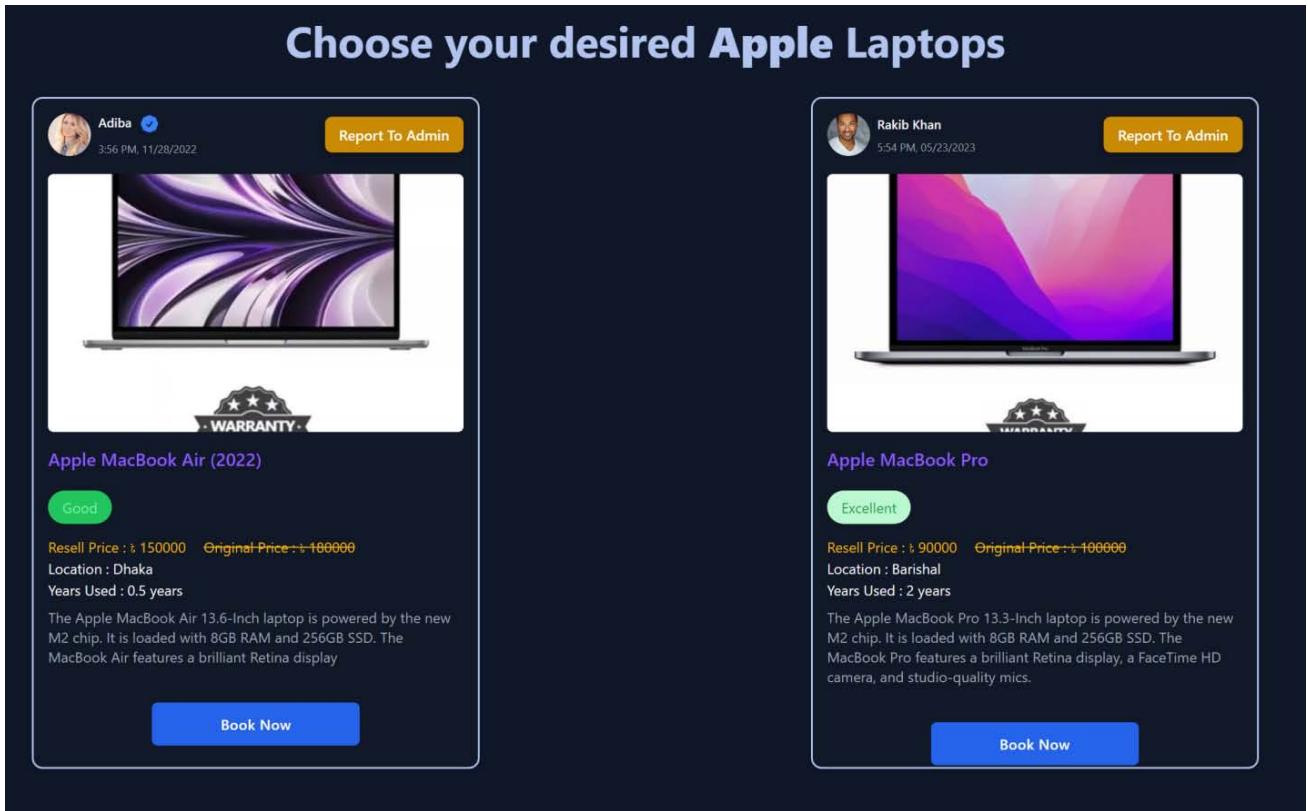 Figure 32: Product Page
As can be seen in figure 32, the products page includes all of the products that are pertinent to the category that has been selected. Each product card has a button at the top of the card that allows the user to report the product to the admin, as well as the seller's image, name, the day and time the product was posted, and so on. In addition, a product image, the product's initial price, its current resell price, its condition, its location, the number of years the product has been used, a brief description of the product, and a book now button is included on a single product card. There will be a blue badge next to the seller's picture if the seller has been verified.
## i. Booking and Purchasing Laptop
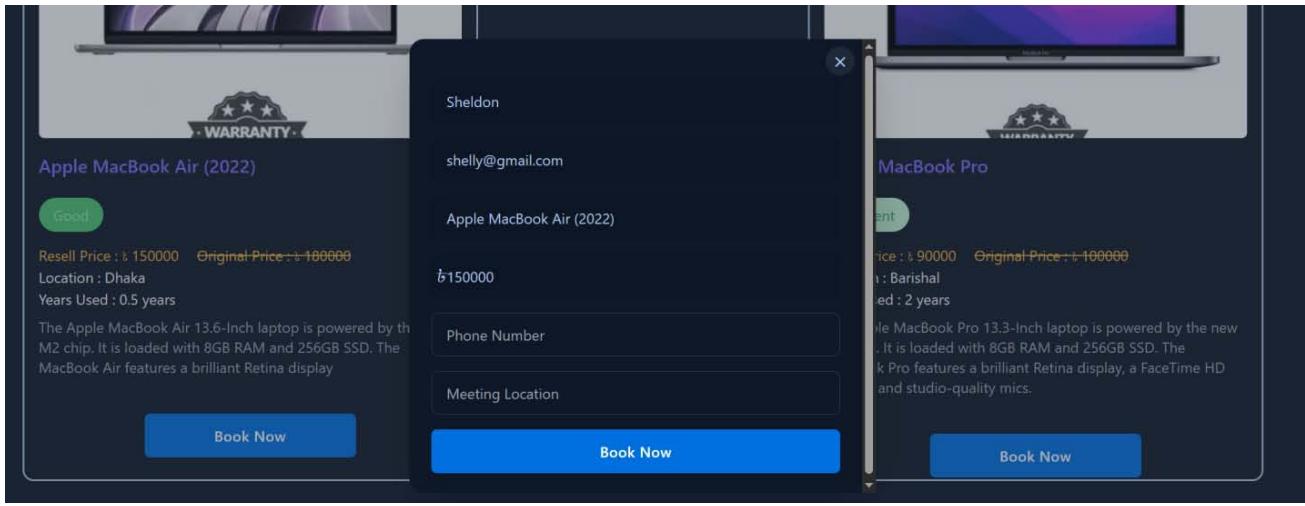 Figure 33: Booking Modal
price from within the modal. These fields can only be read, and no other actions may be taken on them. However, to book the product, the user is required to supply both their phone number and the location of the meeting.
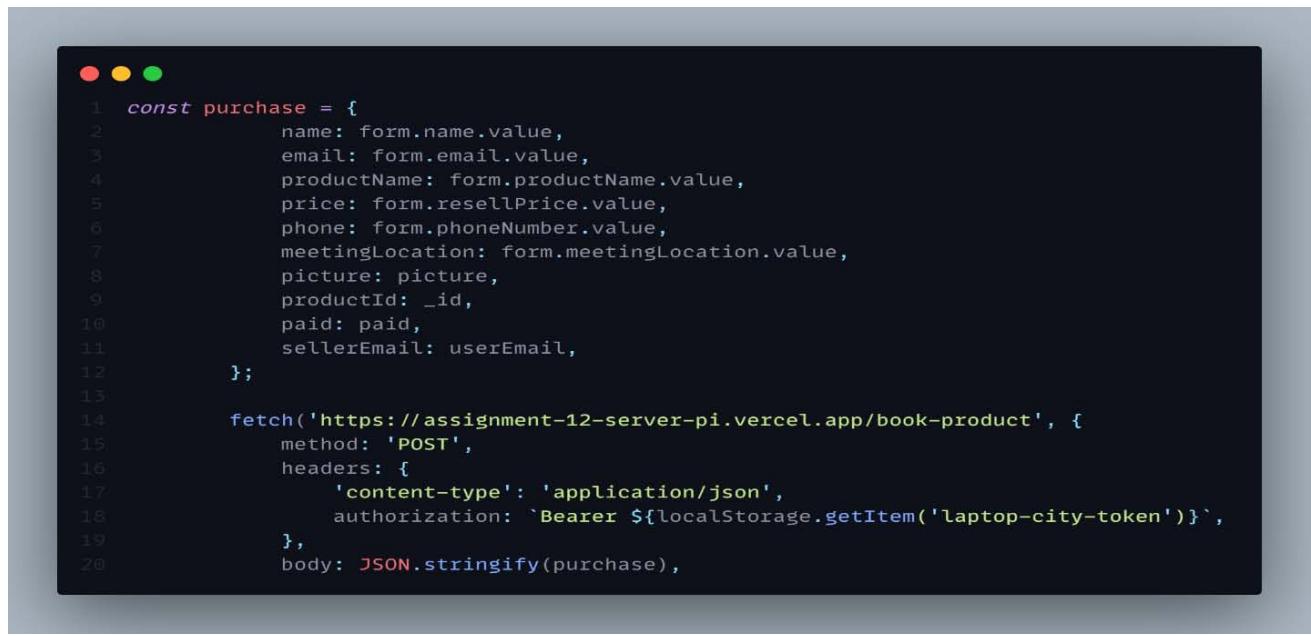 Figure 34: Booking Modal Code Snapshot
The data from the input fields of the Booking Modal that can be seen in Figure 33 is saved in the database along with some other product properties. This includes the product picture, the product id, the payment status (whether the product has been sold or not), and the seller email.
Once the user has successfully booked the laptop, the details of their booking can be viewed in the My Orders tab, as illustrated in Figure 31.
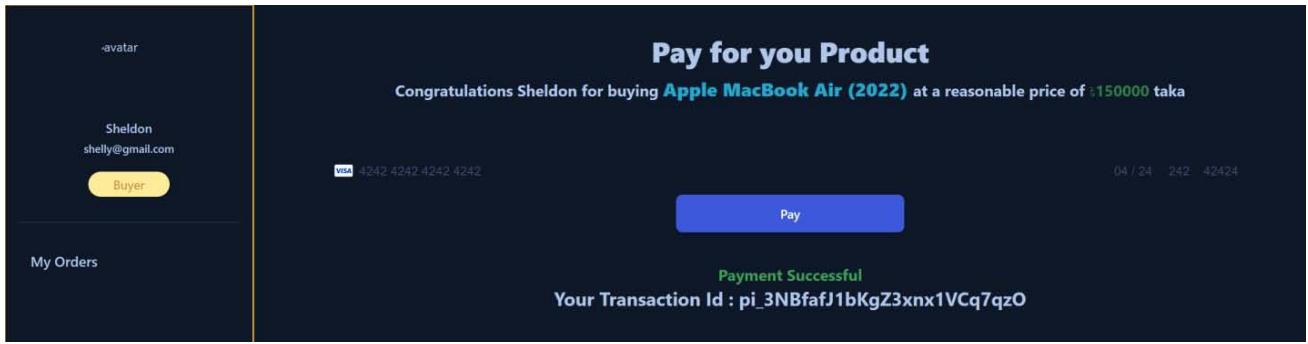 Figure 35: Payment Screen
The user will be redirected to the payment page after clicking the pay button. On this page, the user can finish the payment process by giving the essential information. A message that reads "Payment Successful" will appear on the payment page once the transaction has been completed successfully. Additionally, the transaction id of the user will be displayed. The user's browser will automatically navigate back to the orders page after a 2.5 second's delay.
### Payment Gateway (Stripe)
Payment gateway is an essential component of every e-commerce platform and should be included. In this application for laptop city, the payment gateway system known as Stripe is utilized. Stripe is a payment processing service that facilitates the acceptance of various card types and other payment types by online retailers. Because the majority of Stripe's distinctive features are primarily focused towards online sales, the platform is ideally suited for use by companies that generate the majority of their revenue through online transactions. Stripe allows merchants to take debit cards in addition to the more common credit card brands. UnionPay (used in China) is also accepted. Businesses can accept payments from clients using mobile wallets and services that let them make immediate purchases with later payment. Stripe allows users to make payments using a wide range of currencies. A point-of-sale system called Stripe Terminal is made available by the company so that it can take payments in person.
Stripe must submit to an annual compliance report as well as routine security scans and testing in order to maintain its status as a PCI compliance Level 1 service provider, which the company has been audited and certified to achieve. Customers' credit card numbers are encrypted by Stripe, and the decryption keys are stored in a separate location, so the company cannot see them unless special measures are taken. [25]
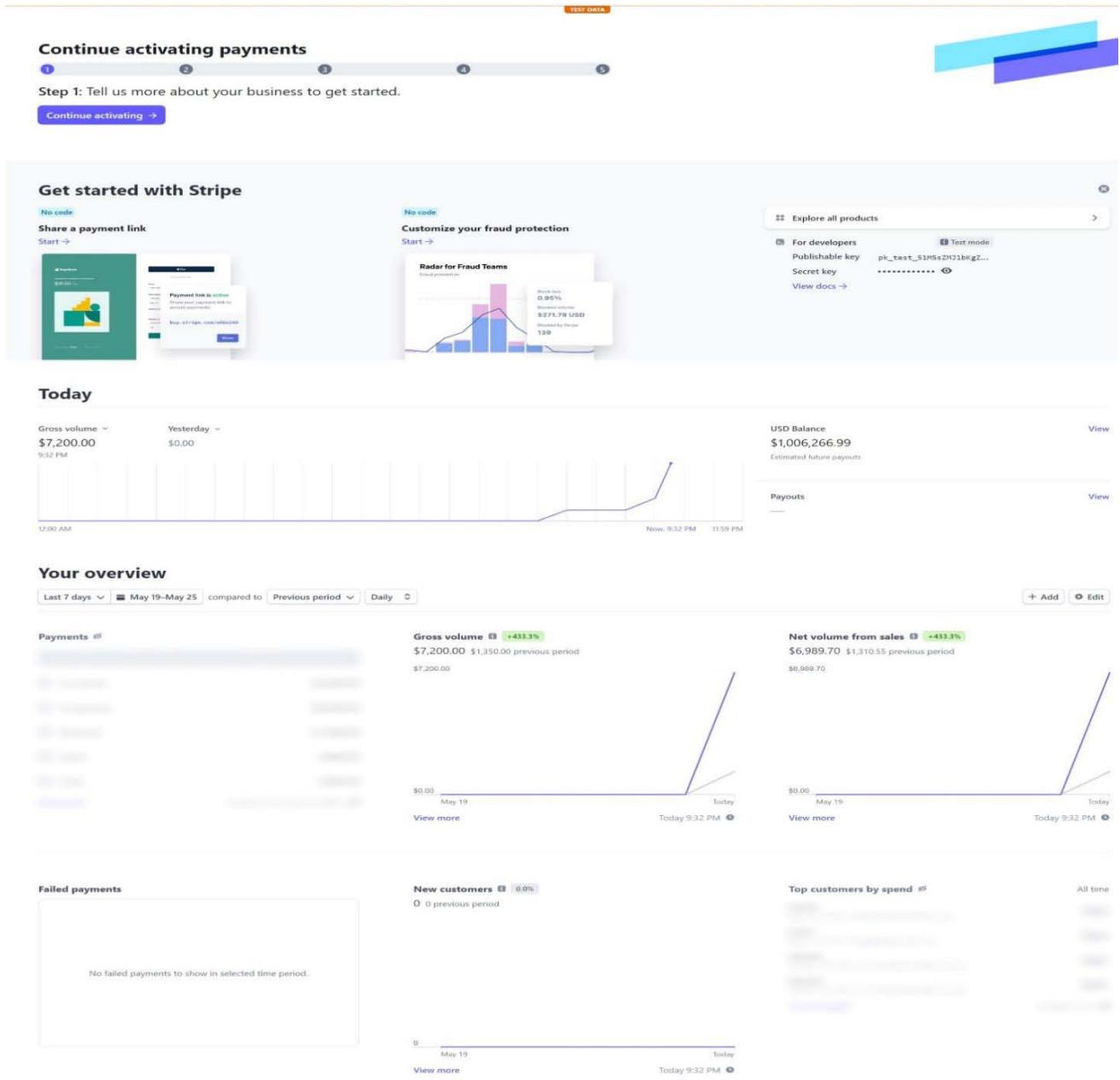 Figure 36: Stripe Developers Screen
In order to use Stripe, Stripe must be installed in both in front-end and back-end. After signing up in stripe, stripe will provide two secret keys for both front- end and back-end respectively. Due to the delicate nature of the topic of payment, these secret keys have been stored in env files.
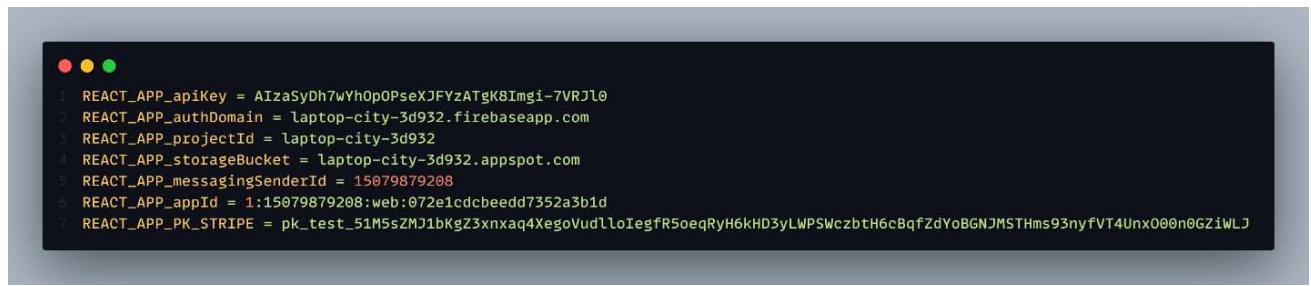
Figure 37: Snapshot of Stripe Publishable Key in Front-End

Figure 31: My Orders Page Screen
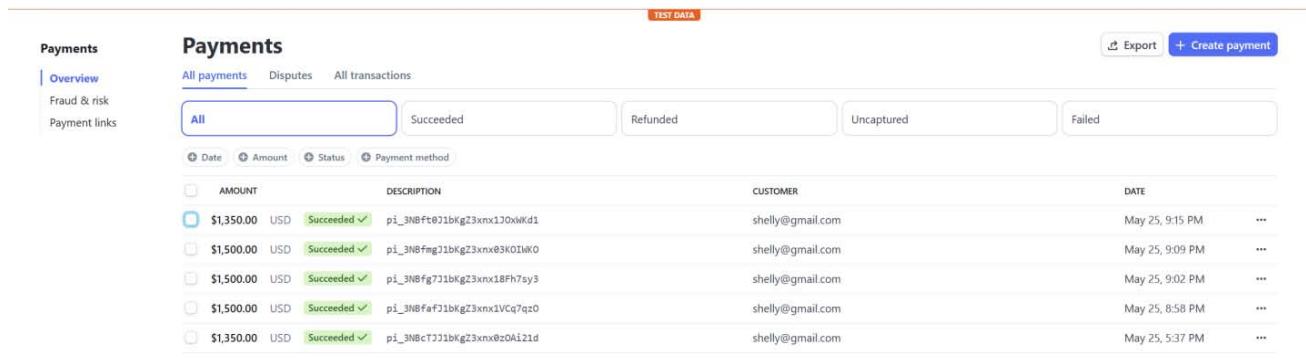 Figure 38: Snapshot of Stripe Secret Key in Back-End Figure 39: Payment Details from Stripe Payment Gateway
The payment system for the Laptop City app is currently in the testing phase. Therefore, the administrator will not get any legitimate payments. The remaining functionalities, with the exception of the payment mechanism, are operating as expected.
## IV. DISCUSSION
The MERN stack was utilized in the development of this Laptop City application. The front end of the application's user interfaces was built using React and Tailwind CSS, a utility first-class framework of CSS. Because the Tailwind CSS was utilized for the sake of styling, there was no requirement for additional CSS files to be utilized. Daisy UI, which is a Tailwind component library featuring various built-in components, was used for the front-end development. This makes it easier for the author, as they are able to only focus on the business logic of the application rather than having to worry about the app's styling.
Express.js is a Node.js framework that is utilized on the back-end and makes the process of developing applications simpler. It also has the function of syntactic sugar, which means that it has significantly streamlined and simplified the code sample. The construction of this application was carried out in two distinct stages, referred to as the front-end and the back-end.
All of the features had to be included in order to meet the intended criteria, but now the application is complete and can meet the needs of small businesses who want to sell secondhand laptops. Stripe requires the creation of a business account before the service can be used for commercial reasons. Since the author constructed the application solely for the sake of their thesis and had no intention of using it for commercial purposes, the author does not have a business account set up in Stripe.
### a) Scope for Improvements
Even if all of the planned requirements have been satisfied, there is still a significant amount of room for improvement, particularly in the way components are styled. There was no unique styling applied because the majority of the components came directly from Daisy UI. This meant that the color combination was not influenced in any way. There is room for improvement in the color mix in order to provide a superior user experience.
Even if all of the functionalities that were planned to be introduced have been implemented, there are still some functionalities that can be added for further development.
- Once payment is received, a confirmation email will be sent to the user.
- A seller can submit a request for Admin verification; Admin will then either accept or deny the request.
- Each product has a dedicated details page with reviews and rating.
- Image upload feature for seller in Add a product page.
## V. CONCLUSION
The primary objective of this thesis was to construct a fully functional multi-vendor e-commerce application using MERN stack components such as MongoDB, Express.js, React, and Node.js. This was the major objective of this thesis. In order for the author to conduct study on these technologies and incorporate them into a project, a respectable amount of time was required. The theoretical underpinnings of each component of the MERN stack have been thoroughly covered, and code snippet snapshots have been incorporated to ensure that readers have a clear mental image of what the code actually looks like. In addition, the author explains how the application operates step by step, complete with images of the user interface (UI) and code snippet snapshots. Readers will obtain a fundamental understanding of how the application functions internally and externally based on these screenshots of the code and the user interface. Readers of this thesis will be able to comprehend why the author opted to conduct research on the MERN stack and then put that research into practice by developing a multi-vendor E-commerce application, as well as why the MERN stack is the most popular stack as of the year 2023.
In the end, the Laptop City was built to everyone's satisfaction. To make the process of buying and selling used laptops simple and trouble-free, a multi-vendor, fully functional e-commerce application with three distinct types of user roles and distinct paths around the dashboard for each of these user roles was developed. This program was developed with the goal of providing users with a superior experience when using the application. The processes of selling and purchasing laptops have been simplified for customers, making it possible for users to successfully navigate their way through Laptop City without the need for any form of instruction or training.
Following extensive research as well as implementation on a project, the author has some perspectives on the MERN stack and the reasons why it ought to be employed to construct a web application. Because the MERN stack is simple to understand, all that is initially required to launch an e-commerce website is a single developer. Since most small businesses have limited funds, it is highly recommended that these businesses build their web applications utilizing the MERN stack. Secondly, the developer is required to become proficient in only one programming language, which is JavaScript, which has a larger community. Third, the environment setup for the project is easy, and these technologies can be used to build high-load projects. In the end, Node.js and Express.js are widely utilized for back-end development in the modern era. They receive a lot of support from the community, and they are also utilized by large businesses such as LinkedIn, Medium, Trello, Netflix, and others.
Generating HTML Viewer...
References
25 Cites in Article
C Emery (2019). A Brief History of Web Design.
Crystal Thies (2021). Why LinkedIn?.
Vasan Subramanian (2023). Pro MERN Stack.
A Kapoor (2021). Benefits of Using MERN Stack.
R Sheldon,J Denman (2022). ANALISANDO UX COM DESIGN PARTICIPATIVO EM JOGO PARA CRIANÇAS COM TRANSTORNO DO ESPECTRO AUTISTA: VIDAUT.
Altexsoft (2022). The Good and the Bad of Node.js Web App Development.
(2022). Stack Overflow Developer Survey.
Aashitace (2020). Node.js Modules.
N Abramowski (2022). What is NPM? A Beginner's Guide.
(2023). LAS VEGAS SANDS CORP., a Nevada corporation, Plaintiff, v. UKNOWN REGISTRANTS OF www.wn0000.com, www.wn1111.com, www.wn2222.com, www.wn3333.com, www.wn4444.com, www.wn5555.com, www.wn6666.com, www.wn7777.com, www.wn8888.com, www.wn9999.com, www.112211.com, www.4456888.com, www.4489888.com, www.001148.com, and www.2289888.com, Defendants..
(2023). MERN Stack-Based Multi-Seller E-Commerce Site Global.
D Taylor (2023). What is MongoDB? Introduction, Architecture, Features & Example.
Y Arora (2022). Understanding MongoDB Data Modeling: A Comprehensive Guide.
Luce Carter (2023). What Is MongoDB?.
Webandcrafts (2021). Top Advantages and Disadvantages of MongoDB NoSQL Database.
D Herbert (2022). What is React.js? (Uses, Examples, & More).
C Deshpande (2023). The Best Guide to Know What Is React.
M Hamedani (2018). React Virtual DOM Explained in Simple English.
(2023). JSX.
(2023). LAS VEGAS SANDS CORP., a Nevada corporation, Plaintiff, v. UKNOWN REGISTRANTS OF www.wn0000.com, www.wn1111.com, www.wn2222.com, www.wn3333.com, www.wn4444.com, www.wn5555.com, www.wn6666.com, www.wn7777.com, www.wn8888.com, www.wn9999.com, www.112211.com, www.4456888.com, www.4489888.com, www.001148.com, and www.2289888.com, Defendants..
Jonathan Caulkins,Beau Kilmer,Mark Kleiman (2022). What Are the Pros and Cons of Legalization Generally?.
(2014). Types of e-commerce | BloomIdea.
(2023). Firebase Authentication.
P Kumar (2023). React Query -The what, how & when.
R Murphy (2023). What Is Stripe, and How Does It Work?.
Explore published articles in an immersive Augmented Reality environment. Our platform converts research papers into interactive 3D books, allowing readers to view and interact with content using AR and VR compatible devices.
Your published article is automatically converted into a realistic 3D book. Flip through pages and read research papers in a more engaging and interactive format.
In almost every way, web development has been getting better and better over the last ten years. During this time, a number of frameworks and libraries came out, which made it much easier and faster to make a web app. Over the last decade, the LAMP stack (Linux, Apache, MySQL, and PHP) and Java-based applications have dominated web development. It was challenging for a single developer to construct a web application by using these stacks because of how complex they were. As the field of web development matured, MERN-an acronym for “MongoDB,” “Express,” “React,” and “Node JS”-emerged as the dominant stack in 2023. Due to the relative simplicity of the technologies comprising this stack, a single developer may effectively handle both the front-end and back-end of the application. MongoDB, which is a no-SQL database; Express, which is a framework of Node JS used in back-end development; React, which is a JavaScript library used in front-end development; and NodeJS, which is an environment for JavaScript; these are the components that make up the MERN stack.
Our website is actively being updated, and changes may occur frequently. Please clear your browser cache if needed. For feedback or error reporting, please email [email protected]
Thank you for connecting with us. We will respond to you shortly.