

Anshuman Awasthi
I. INTRODUCTION
A retailer has to perform several transactions in a business location, and there is a need for a reliable high-bandwidth internet circuit. In the absence of a high-speed internet connection, many sites may report slow internet performance as they may be running on a single high-cost low-bandwidth internet connection. This initiative targets to deploy SDWAN technology at all the business locations. The IT Network Engineering team of an organization can lead this initiative, but as this is a cross-functional project. It will need help from different groups like IT Operations for Server and Storage requirements, Business Support for coordination with Business Associates, Network Administrator, and Onsite Tech support team. They will be responsible for device installation at all galleries. In addition to these stakeholders, we need to have a dedicated Project Manager (PM) to monitor the project's overall progress, who will coordinate with COO for any budgetary issues and with VP –Infrastructure to allocate necessary organizational resources. The designated PM will work closely with Director Project Management Office to ensure the scheduled tasks for this project do not interfere with the plans in other areas of the business as the company has multiple projects in progress at the same time. This Project has four phases Design, Initial Implementation, Rollout, and Project Closure. We will estimate the average internet bandwidth upgrade and percentage increase in network and hardware reliability by reviewing the incident data post-upgrade to calculate the overall success of the project.
a) Cause
Below factors are contributing to the poor network performance and causing unreliable network connection at several business locations.
Most of the business locations have a high-cost low-bandwidth Private WAN (Wide Area Network) circuit. This circuit is very reliable but does not solve the increasing demand for high-bandwidth.
Many locations are just operating on a single Private WAN circuit. Very few locations have a reliable secondary network connection.
The business locations with dual circuits cannot utilize bandwidths effectively, as due to technical limitations, they are operating on Active/Passive mode. (Only one connection can be operational at one time).
b) Proposed Solution
The existing technology using traditional network architecture is undoubtedly unable to provide a solution that can solve our needs and still be affordable. The time has come to explore the capabilities of the SDWAN (Software - Defined Wide Area Network) solution. According to Wikipedia (n.d.), an SD-WAN simplifies the management and operation of a WAN by decoupling (separating) the networking hardware from its control mechanism. This concept is similar to how software-defined networking implements virtualization technology to improve data center management and operation.
An essential application of SD-WAN is to allow companies to build higher-performance WANs using lower-cost and commercially available Internet access, enabling businesses to partially or entirely replace more expensive private WAN connection technologies such as MPLS.
II. EVALUATION
a) Evaluation Approach
If the organization decides to implement SDWAN technology at all the business locations to improve the network performance and reliability, the IT Network Team can estimate the new bandwidth requirement using Solarwinds NPM (Network Performance Monitor) tool. The team should monitor all the interfaces of network devices at business locations and gather data about current usage; we can make use of this to estimate the required bandwidth of new circuits at each location.
The needs, as mentioned earlier from the new technology, will help to decide on the metrics to evaluate the project's success. In addition to the network performance parameters, we can also add some service and operational improvement data points to improve the overall experience of the employees concerning this project. The inclusion of service improvement metrics in the project's success will also ensure the vendors involved in the project to provide quality service since we will evaluate their performance as a part of the project's success.
b) Quality Assurance Criteria (Metrics)
We can use below Metrics as a reference to measure the proposed and actual outcomes of the project.
| Evaluations Area | Proposed% | Actual% | Business Feedback |
| Internet Bandwidth Upgrade | |||
| Network Reliability | |||
| Hardware Reliability | |||
| Ease of Installation | |||
| Ease of Access | |||
| Network Management | |||
| Security Policies Management | |||
| Vendor Support |
We can evaluate the network performance using a tool that is an industry leader in performing a speed test called OOKLA. To measure the overall network performance and compare the pre and post-installation results, we can use Solarwinds NPM (Network Performance Monitor). To measure incident ticket count and ease of administration using the incident resolution time matrix, we can use any ticketing tool like Service Now, one of the most popular Cloud-based ticketing systems in the industry today. We should only select an SDWAN partner once they provide supporting documentation that their product has passed the necessary security and health safety tests. The organization can also perform a vulnerability test once the product is installed at its first location to ensure there are no new vulnerabilities discovered in the network.
c) Solution Testing
To perform extensive testing with the new SDWAN solution provided by the vendor, the project team needs to work on a test location where they can replace the old router with the latest hardware and perform connectivity tests. The SDWAN technology partner can provide an appliance for the testing purpose; the organizationIT team can use the new hardware with the old network switch if the experts from theSDWAN team confirms that there will be no compatibility issues.
Please refer below the list of activities and observations as a reference that we need to execute every day to test the SDWAN hardware and software. The list of activities and the number of days required for testing are as per the use case.
| Location to be tested: Pleasanton (PL),CA |
| Person in-charge for testing:Name1,Name2 |
| Thursday 1st Oct Activity |
| Day1 -Activity |
| Created new Policy with Standard format and added ABC.com, Google, Yahoo,Linked In to choose all Network Paths |
| Switched On SDWAN-Observed 8 Ping Loss |
| From Pleasanton to Data Center average response time is 7ms |
| Turned on SDWAN at PL-Took around 2mins for steady response |
| Disconnected MPLS from providers end |
| Day1 -Observations |
| First -Internet and Datacenter Sites were reachable. MPLS sites were not reachable. |
| Second-Internet went down.Data Center sites were reachable |
| Internet went down and didn't come up |
| All sites went down |
| Connected MPLS Router back-connectivity is restored |
| Disconnected MPLS from WAN port for SDWAN |
| First, only connectivity to Datacenter was up |
| Then connectivity to all sites went down |
| Connected MPLS back to original state-all sites were online |
| Observation-Traffic is going to a blackhole- Needs investigation |
| Day 2 -Activity |
| The modified LinkedIn policy only to use MPLS and Internet(No Internet VPN) |
| Added 8.8.8.8 as DNS in SDWAN in PL as DNS along with Infoblox as the third option |
| Disconnect Router WAN connection |
| Day 2 -Observations |
| Linked was working but Yahoo and YouTube didn't work-Cannot ping to any internet sites |
| YouTube and Gmail was added to use the Direct Internet path and not to use Internet VPN |
| YouTube is working very slow |
| Direct Internet websites response is very slow and not reliable |
| Observation- Needs more investigation on high latency in direct internet response |
| Connected SDWAN appliance back |
| We switched back to original policies where we started |
| Day 3 -Activity |
| Validate All policies in Pleasanton |
| Add floating static Routes in on Rack 7 and Rack 6 Edge switches at Data Center for Pleasanton office |
| Change all applications listed in SDWAN policies to use a dual path |
| 1. Organization Websites- All Routes |
| 2. Symantec- Internet VPN +MPLS |
| 3. Google- All Routes |
| 4. YouTube- All Routes |
| 5. LinkedIn- All Routes |
| 6. Casper (Software management on MACs)- Internet VPN +MPLS |
| 7. Yahoo Mail- All Routes |
| 8. Google Hangout- All Routes |
| Start continuous ping to few websites |
| Disconnect Internet Circuit from SDWAN (Observe for any blips) |
| Connect Internet Circuit |
| Start Continues ping to few websites |
| Disconnect MPLS Circuit from SDWAN (Observe for any blips) |
| Connect MPLS circuit to SDWAN (bypass Cisco Router) |
| Perform Trace route to Data Center,Internet Sites,P2P(Point to Point), and MPLS sites |
| Day 3 -Observations |
| Check Core Switch in Data Center for new routes |
| Check MPLS Router in Data Center for new routes |
| Is MPLS working in Pleasanton -Yes |
| Day 4 - Activity |
| Connect MPLS back to Verizon Box |
| We had intermittent connectivity to complete connectivity loss |
| Tried rebooting the Verizon device |
| Tried rebooting MPLS router |
| Disconnect internet circuit from SDWAN |
| Day 4 -Observations |
| Stable connection |
| Able to browse to yahoo, google |
Test Cases
| Day 5-Activity |
| Upgrade Image on PleasantonSDWAN to 0.16.4 |
| Internet +MPLS (MPLS is already connected just connect Internet) |
| Day 5 -Observations |
| We had intermittent connectivity to complete connectivity loss to internet websites |
| Day 6-Activity |
| Upgraded to version 0.185 on Hub and SDWAN |
| Connected Internet Circuit |
| Day 6 -Observations |
| Stable connection |
| Able to browse to yahoo, google |
After multiple days of testing and running different scenarios, we can reach a stable image and network architecture. measure performance attributes and operational improvements.
d) Acceptance Criteria and Evaluation Framework
The Project Teamcan make a list of the abilities for the product acceptance criteria. It will also help to
| Evaluations Area |
| Internet Bandwidth Upgrade |
| Network Reliability |
| Hardware Reliability |
| Ease of Installation |
| Ease of Access |
| Network Management |
| Security Policies Management |
| Vendor Support |
The Project Manager, along with the help of Leadership and other teams, can perform the Cost-Benefit Analysis. Please refer below Cost Analysis for developing, installing, and supporting an SDWAN appliance at a business location. To justify the investment (project cost), we have also put together some data on how much time we are spending on the support of maintenance of existing network infrastructure and incidents that are occurring due to the bandwidth and technology limitations. It is essential to make a note of the financial loss we have to suffer in case of an internet outage at a business location.
Please refer below Cost Analysis table as a reference.
| Cost -Benefit Analysis of using SDWAN as Internet Appliance at Locations | |
| Projects Costs per Location | Amount |
| Datacenter Hardware | |
| Datacenter Hub -Product Design and Development | -- |
| Site Hardware | -- |
| Software & Licenses | -- |
| Support (Included in License) | -- |
| Internal - Labor ($75/ hour) -Installation 2 hour per location | -- |
| External -Labor ($125/ hour)-Installation 4 hour per location | -- |
| Internet Connection 1 -Monthly Recurring Charge per location | -- |
| Internet Connection 2--Monthly Recurring Charge per location | -- |
| Total Capital Expense for each Location (Only First Year) | -- |
| Total Operational Expense for each Location | -- |
| Current Costs (Project Cost Justification) | |
| Current Site Hardware Support | -- |
| Current Datacenter Hardware Support & Maintenance | -- |
| Internal - Labor ($75/ hr) - To solve Incidents | -- |
| External -Labor ($125/ hr) - For Technician | -- |
| Internet Connection 1 | -- |
| Loss in revenue due to internet outage (per hour) | |
| Large locations | -- |
| Small Locations | -- |
| Total Operational Expense | -- |
| Revenue Loss per hour for each location (Outages-Due to old Technology/Hardware) | -- |
It can become very clear from the above Cost-Benefit Analysis that the organizations are spending considerable amounts in supporting the existing technology and not getting any benefits in return. It is advisable to invest in the new technology and avoid these outages so that we can run our business smoothly. The modern technology architecture is centrally managed through a cloud-based controller and needs minimum operational expenditure post implementation.
In addition to the above-mentioned acceptance criteria, which includes Cost-Benefit analysis, hardware/technology performance the project team should involve the legal team to create an MSA (Master Service Agreement) which includes some pre-checks to ensure the vendor is following all the environmental and legal obligations like the validation of their W9 form, tax
III. PROJECT REVIEW
a) Phases & Milestones
The SDWAN implementation project has four phases, with below listed main milestones in each group.
First Phase: SDWAN Design
Identify what SDWAN has to offer
Research available SDWAN vendors
Finalize an SDWAN Vendor
Shortlist a vendor and perform a POC
This phase will lay the foundation stone for the project; the project team needs to be aware of the fact that if they make a wrong decision at this stage or they miss on a critical test scenario to evaluate the product, it can take the whole project to the failure. The Project Manager needs to spend a lot of time with the technical Teams to document all the evaluation parameters to ensure we select the appropriate SDWAN technology partner. It is essential to make all the configuration changes in the test environment before we say that the technology is ready to be implemented in production. At the end of this, the team can select an SDWAN partner that provides relevant documentation to integrate the new technology into the existing enterprise network. The team should also evaluate their assumptions and carefully recorded various network performance parameters.
Second Phase: Initial Implementation
Implement a solution in the first location and evaluate results
Implement the solution in five more locations
The activities in this phase are essential before the team goes into the full rollout phase, as it is helpful to implement the solution on a smaller scale, collect feedback, and make final configuration changes. This phase will help the team to fine-tune their skills required in the rollout phase to implement the solution in multiple locations. The Network team should work with the onsite operations to install the SDWAN hardware in the first location. If the new technology and equipment's verification in the previous phase, there should be no big surprises. Still, there can be many learnings that can help the team to prepare a precise playbook that should be followed by the technicians for the installation of the hardware in the other locations.
Third Phase: Rollout
Implement the final solution in the remaining Business and Office locations
Review results with the Operations team and Management
Prepare Training and Documentation
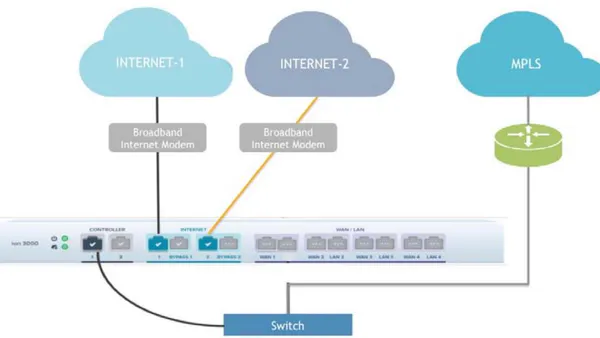
In thisstage, all hands on deck are required. The team should feel confident about the solution, as we have done enough testing during the earliest two stages. The PM helped to coordinate all the scheduled tasks and allocate resources as per the plan. The Support Team should work with the Network Administrators and Onsite Tech for the installation and configuration of the SDWAN hardware. The project team can prepare a detailed playbook on what steps to follow along with the diagrams for the device installation and perform application testing.
Please refer below diagram for reference, showing steps for connecting SDWAN devices in a location.
- Existing Setup
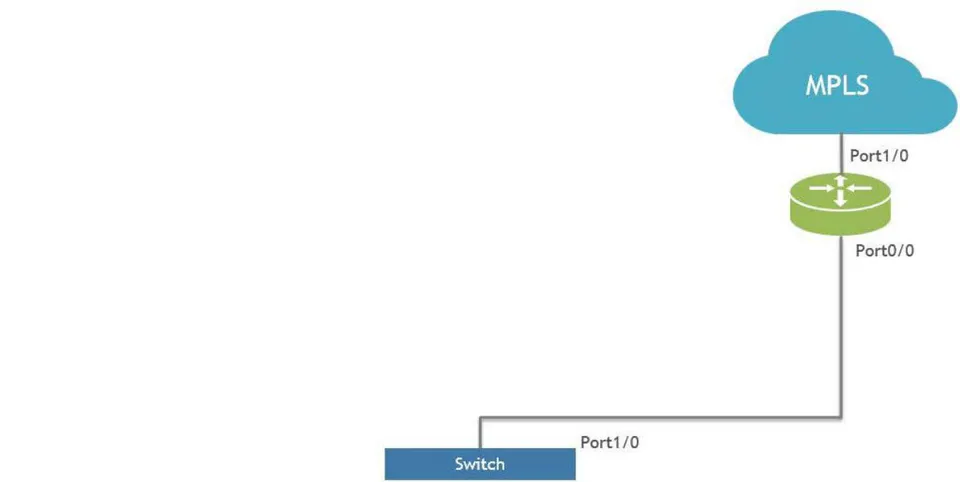
- Step 1- Connect controller port to switch
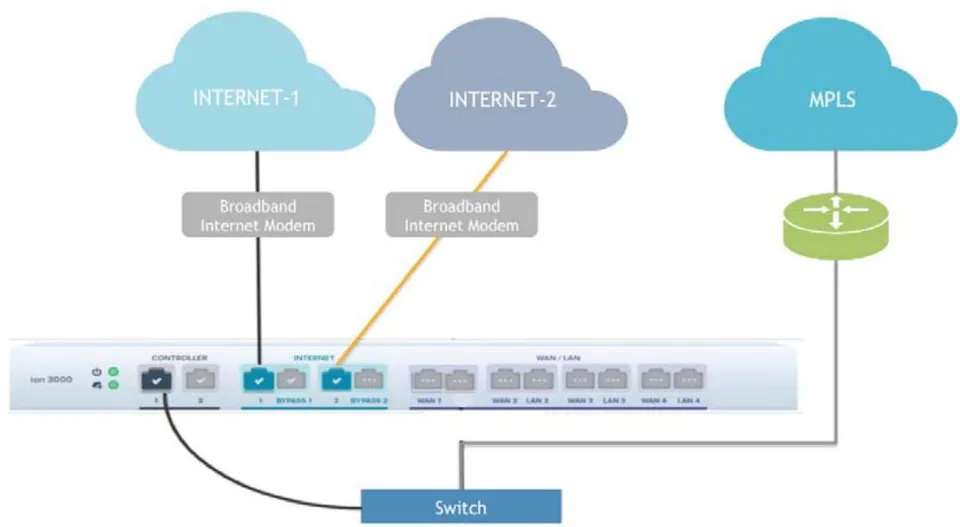
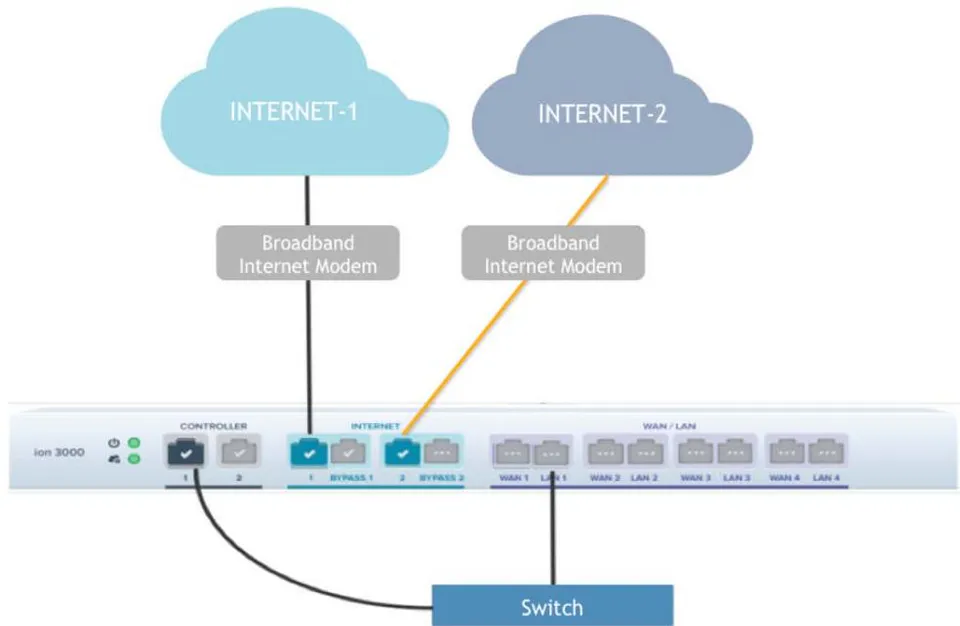
- Step 2- Move Router link to SDWAN appliance
The Project Team can prepare a detailed set of instructions for technicians on what equipment's/tools are required to perform the installation. Please refer to a sample of instructions.
The objective of this visit is to visit the business location and complete the Network Conversion to make Primary and MPLS Router/Failover on the new SDWAN device using the equipment on Day 1. You will work with the Network Team before making any cable move.
b) Equipment Needed by Tech
Working computer with working NIC
Cat5 Ethernet Cable
Null Modem Cable (Console cable)
Punch down tool
Label Maker
c) Hardware to be Found Onsite
Broadband Wireline Modem
SDWAN Device
Red, White, and Green patch cables
The Project team can create a list of tests to perform application testing post-installation. A sample of test instructions is mentioned below:
Once you have made the connection updates and the Network contact has confirmed the network is up, request the location Leader to follow below test plan:
Test iPad to connect to Organization's Intranet website
Test iPad to Gmail
Test iPad to CNN.COM
Test iPad for printing
Test POS (Point of Sale) for printing
Test POS for $ transactions-look for an item
Test PC for Internet
Test PC for printing
Test wireless phone for an incoming and outgoing call
With the help of these installation details, along with the helpful diagrams and test instructions, the installation crew can perform installations successfully. The PM needs to schedule conference calls to review past installations so that we can learn from the mistakes and make necessary changes for future installs.
Fourth Phase: Project Closure
Conduct Training for Operations and Support Team
Handover to Operations
Update Integrations with Incident Management Tool
Prepare Project Closure Documentation
According to MOP (n.d.) Project closure activities ensure the recording project documents, archiving in organizational process assets, making final payments, releasing resources, and completing the project. Every project teaches lessons to the organization, whether it is a success, or it is a failure. So even after a project finishes, the documentation of this project will be helpful for completing the future projects successfully.
During this phase, the PM worked with the Project Technical team like Network and SDWAN partner to create documentation that includes the below details.
How to support the new SDWAN technology
How to perform daily administrative tasks
How to troubleshoot any wireless network issues with SDWAN device.
Please refer sample of instructions as a reference that can be created by the project team to handover to operations.
• Path Selection process
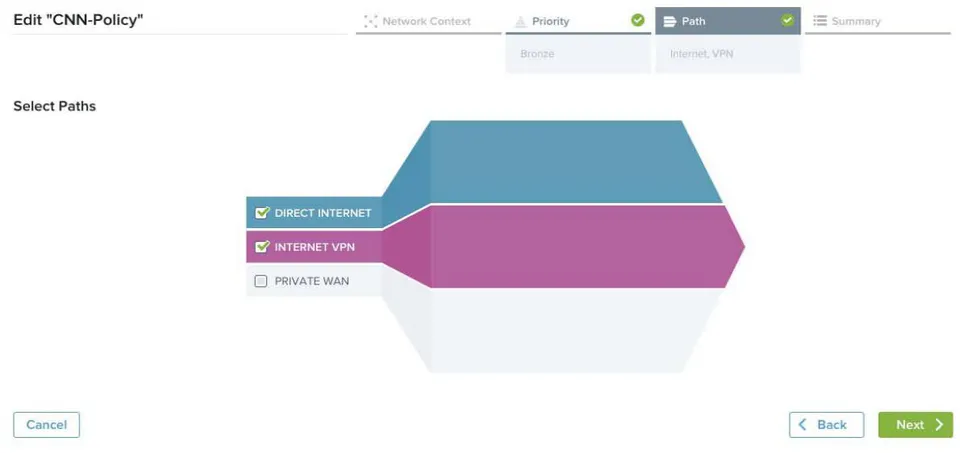
• How to check Device Status
Red indicates the device has no power:


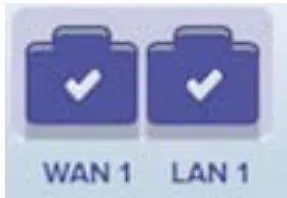
Not configured and No connection:
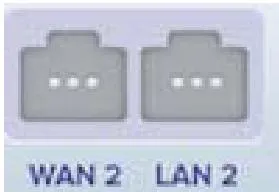
Ports configured but not connected:

The PM should schedule few trainings for the support team members. The technical team members who performed the actual implementation should lead the training sessions. It is due to the detailed support documents and the training workshop; the support team can gain the confidence to work on the new technology.
The PM needs to work with the IT Operations team to integrate the new technology with the existing enterprise applications. Once we have completed all the necessary administrative tasks, including paying the due invoices and reviewing actual time spent vs. time allocated, the PM should send a project closure report to the management and all the stakeholders involved.
Timeframe:
Please refer below chart to compare the planned vs. actual period as a reference. The team may encounter some initial challenges during the testing phase due to which they may have to extend the SDWAN design phase by sometime. As mentioned in the previous section, the team prepared very detailed installation instructions to expedite the installations. We have highlighted the estimated timeline in grey, and the actual time it took is done in red.
| Duration | Week1 | Week2 | Week3 | Week4 | Week5 | Week6 | Week7 |
| Phases | |||||||
| SDWAN Design-Planned | |||||||
| SDWAN Design-Actual | |||||||
| Identify what SDWAN has to offer | |||||||
| Research available SDWAN vendors | |||||||
| Finalize a SDWAN Vendor | |||||||
| Shortlist a vendor and perform a POC | |||||||
| Initial Implementation-Planned | |||||||
| Initial Implementation-Actual | |||||||
| Implement solution in first location and evaluate results | |||||||
| Implement solution in five more locations | |||||||
| Roll out -Planned | |||||||
| Roll out -Actual | |||||||
| Implement final solution in remaining locations and outlet locations | |||||||
| Review results with the Onsite operations team and Management | |||||||
| Prepare Training and Documentation | |||||||
| Project Closure-Planned | |||||||
| Project Closure-Actual | |||||||
| Conduct Training for Operations and Support Team | |||||||
| Handover to Operations | |||||||
| Update Integrations with Incident Management Tool | |||||||
| Prepare Project Closure Documentation |
d) Dependencies
In this project, each phase can relate to other phases in sequence. Hence, the tasks associated with each phase also had a sequential relationship with each other (Dependent Tasks are highlighted in each phase
e) Resources
in the timelines section). However, action items in the project closure phase were supposed to be carried out concurrently (Tasks in the project closure phase are not highlighted). The project team members should perform the tasks as per the plan.
| Skills | Project Phases (Estimated hours)- Only for Reference | |||
| Project Initiation | Initial Implementation | Roll Out | Project Closure | |
| Phase Duration | 2 weeks | 1 week | 2-3 weeks | 1-2 weeks |
| Project Manager | 40 | 30 | 30 | 70 |
| Network Architect | 60 | 30 | 10 | 40 |
| Network Administrator | 20 | 50 | 200 | 50 |
| Onsite Support | 10 | 20 | 100 | 60 |
| IT Operations | 10 | 20 | 70 | 20 |
| SDWAN Partner | 30 | 20 | 100 | 50 |
f) Milestones
The project team can plan for below milestones based on the implementation strategy.
Finalizing an SD-WAN vendor - Finalizing the network design with the SD-WAN vendor
Implementing SD-WAN technology in the initial pilot location
Reviewing performance results with the project team and management
Obtaining approval to proceed with the rollout
Implementing SD-WAN technology in all the locations
Handing over to operations
g) Deliverables (Hardware and Software)
SD-WAN hardware installation in all office locations
Dual direct internet access circuit installation at all locations
Network policy configuration for SD-WAN software
Security policy configuration for SD-WAN software
h) Implementation Plan for Documenting Deliverables
The project team planned to submit the below documentation as deliverables.
Non-disclosure agreements (NDAs) with various SD-WAN providers for technology review.
Master Service agreement (MSA) agreed with the SD-WAN partner.
Statement of works (SOW) agreed with the SD-WAN partner.
4. Detailed project plan.
- Network architecture diagrams prepared, showing the SD-WAN in the production network.
6. Application integration documentation prepared.
An SD-WAN hardware installation guide produced.
Organizations network topology developed, including an SD-WAN network administration guide produced.
An SD-WAN Location support guide produced.
IV. REVISIONS MADE BASED ON FORMATIVE EVALUATION RESULTS
The project team may need to perform some revision in their plan or test scenarios based on their observations or initial test results. Please refer below iterations as a reference.
Revision 1:
More test scenarios were included after initial testing of the SDWAN technology.
The Project Team selected an SDWAN partner based on the features available in their product and various other factors like ease of installation. During the SDWAN Design phase, when the team started to test the application in the existing enterprise network, the group encountered a few challenges, as the application did not work as expected. The Network Team worked extensively with the SDWAN technical team to figure out what changes are required in the existing network configuration to accommodate new technology. The PM and the professional team decided to include more test scenarios based on the experience. It will also help to ensure they do not encounter any challenges in the rollout stage as that will cause an interruption to the operations, and it may take the whole project in jeopardy. This revision helped the project in a big way, and the team decided to do a few more design changes in the network architecture before going to the next phase.
Revision 2:
Perform the rollout in two weeks instead of three.
It is imperative to implement the new technology as soon as possible, especially before any big holiday season, as that is when most of the sales happen. The team had taken some extra time during the SDWAN design phase, and PM realized that with the current plan, they would not be able to complete the project as per the schedule. The PM met with the Leadership Team, and they collectively decided to request Onsite Tech partner to allocate extra resources to perform multiple installations at the same time at different locations. The project team has already worked extensively to develop the installation playbook and application test instructions that helped the installation crew to install with only a few issues. Due to the expedited schedule that the project members decided, the team was able to complete the project on time.
V. PLAN FOR SUMMATIVE EVALUATION
According to NIU (n.d.), Summative assessment takes place after the project has been completed and provides information and feedback that sums up the teaching and learning process. Summative evaluations are more product-oriented and assess the final output, whereas formative assessment focuses on the process of completing the product.
With the help of inputs received from various stakeholders, including leadership, technical, and operations, the project manager performed Summative Evaluation at the end of the project. The PM evaluated the project from various aspects as per below.
Compare proposed Vs. Actual Deliverables
Budget Allocated Vs. Actual Spent
Resources Allocated Vs. Actual
Timelines (Planned Vs. Actual)
Significant challenges encountered in various phases
Impact on operations due to project activities
Return on Investment (ROI)
Associates feedback
The PM has planned to use this data to conduct a lessons learned session along with the Leadership Team, which will help the organization carry out future projects more efficiently.
VI. PROJECT REPORTS AND EVALUATION RESULTS
The PM can plan to send reports and evaluation results to the below group of stakeholders.
First Stakeholder Group: Internal Technical Teams
This Stakeholder group is consists of two primary teams: IT Network and IT Operations
1. IT Network Engineering
2. Network architecture
3. Network administrators
Responsibility: IT network engineering
The organization's network engineering team should work closely with the SD-WAN technology partner to design the network; administrators will be responsible for the switch and appliance configurations. They will work as per the agreed implementation plan and scheduled tasks.
IT operations (server & storage)
Server administrator
Storage and backup administrator
Responsibility: IT operations
The IT operations team will provide the necessary computer storage for hosting the application in the data center. The server administrator will integrate the SD-WAN platform with other enterprise applications such as Okta for single sign-on or monitoring tools like Solar winds for alert monitoring purposes. The storage and backup administrator will provide the capacity for the servers and will be responsible for adding any servers to the backup policy.
Reports & Evaluation Results for this group:
- Product information
The PM will also schedule technical workshops with this group during the SDWAN design phase and weekly conference calls with all the stakeholders during the Initial implementation and Roll-out phase. The PMO (Project Management Office) will also create a common shared folder the enterprise google drive (Document sharing platform) where these reports will be stored, and any member can review these reports whenever they need to.
Second Stakeholder Group: Operations Support and Onsite Technicians
This Stakeholder group is consists of two primary teams: Operations Support and Onsite Technicians
Operations support
Technical support analyst
Support center leader
Responsibility: Operations support
The technical support analyst will work closely with the network team and the PM to install the SD-WAN hardware in all the locations. The technical support analyst will also assist the PM in coordinating the tasks and will collect feedback from the associates. The support center leader will be responsible for providing the necessary resources for the support staff and will conduct training on the new technology.
On-site technicians
Justification: on-site technicians
The on-site technical support team will be responsible for providing the necessary resources and tools for the installation of SD-WAN hardware at all the business and office locations. They will provide the necessary support, "on the ground," to the network administrator who will be making the required configuration changes remotely.
The PM can schedule daily installation workshops with this group during the SDWAN design phase to discuss the network topology and SDWAN installation playbook that can be used by the team members daily.
Third Stakeholder Group: Project Leadership and PMO
This Stakeholder group consists of Chief of Operations (COO), Vice President (VP) of IT and PMO, including dedicated PM for this project.
Chief of Operations (COO)
Responsibility: COO
The COO will approve the budget allocated to the project and be responsible for providing any financial resources for the project's completion. The PM and the VP of Infrastructure will update the COO on the project's overall progress (Clarizen, 2017). In this project, the COO will be the main project sponsor, and PM will work with COO in case any changes are necessary in the allocated budget amount.
Vice President (VP) of IT
Responsibility: VP-IT
The VP- IT will work closely with all the technical teams and the PM to allocate the necessary organizational resources for project task completion. He will also approve changes in the network and application architecture, which may be required to complete the project.
Project management office
Project manager
Director - PMO
Responsibility: project management office
The PM will be responsible for the overall progress of the project. He will take care of preparing the project plan, scheduling tasks, and coordinating resources. He will also maintain the project budget and provide regular updates to the project stakeholders. He will also review the overall project portfolio for the organization along with the director of PMO (Project Management Office) to ensure that scheduled tasks do not clash with the major activities of other business areas.
The PM can plan to send below reports to this group using enterprise email.
Initial Project Charter
Cost-Benefit Analysis
Project Plan
Resource Allocation
Risk Evaluation
Product Evaluation reports
Weekly Project Updates
Resource utilization
Business feedback
Project Closure
The PM should invite all the stakeholders in the initial kick-off meeting of the project to discuss Project scope and his plan for budget and resource allocation. He should gather feedback from all the participants and make final adjustments before he shares the documents with the other groups involved in the project.
Fourth Stakeholder: Associates
Justification: Associates
An associate can be selected from each location to provide feedback on the overall hardware installation service during implementation and on network performance improvement following installation. The associate will also grant any exclusive access or permissions required for installing a new internet circuit or hardware device.
The PM will schedule a meeting with the selected associates to brief them on the project and what all is needed from them to make this project successful. The PM will also share the process of sharing feedback on product performance.
Fifth Stakeholder: SD-WAN technology Partner
Justification: SD-WAN technology partner
The SD-WAN partner will work closely with the network architect during the initial network design. The partner will also provide support to the PM and network administrator in preparing training materials or making decisions on configuration changes.
The PM can plan to send below reports to this group using enterprise email.
Daily Design reviews and architecture draft (in SDWAN design phase)
Network Architecture
Application integration documentation
Product Performance Matrix
Project Plan
Weekly Project Updates
Project Closure
The PM will involve technical team members from the SDWAN group in the technology workshops with the Network and IT Operations team so that both parties have clear information about their environment. The PM will also schedule product review discussions with the group as and when needed.
VII. POST-IMPLEMENTATION DESCRIPTION
a) Resource Requirement
The project team will share the operations support plan in its handover documentation to the operations team and will request for below resources for post-implementation support.
Onsite Support Team
The onsite support team will be responsible for managing the day-to-day operational tasks related to network changes and monitoring all the alerts. They will be responsible for performing Level1 troubleshooting on all the incidents. This team will escalate the issue to the next level that is either Network or IT operations depending upon the type of alert.
Network Administrator
The Network Operations team will have multiple Network Administrators who will work as a point of escalation for the onsite support team. Few team members from this group can be involved in the initial network design, and they will have in-depth knowledge about the technology and its usage. They will be responsible for coordinating regular software code upgrades. They can engage in SDWAN technical support whenever they need an expert opinion on any support issues, or they need any explanation on how to use new features.
IT Operations
The IT operations will work as another escalation point for the support team to resolve any issues like communication failures with other enterprise applications. This team will be responsible for any new application integration that may come in the future as they have sufficient knowledge of the integration framework. This team can help Onsite Support to setup new performance alerts or add new sites to monitoring tools as and when needed.
b) Maintenance Plan
To maintain and administer the new technology, the project team can plan to share the documents with the IT Network operations and support team.
Short-term maintenance activities:
SDWAN Troubleshooting Guide
SDWAN –New site setup guide
Long-term maintenance activities:
SDWAN Hardware Maintenance Process
SDWAN –New site setup guide
SDWAN software upgrade process
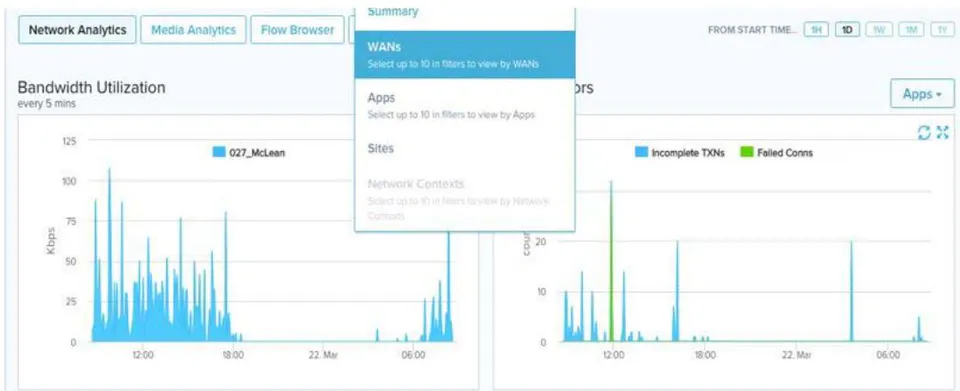
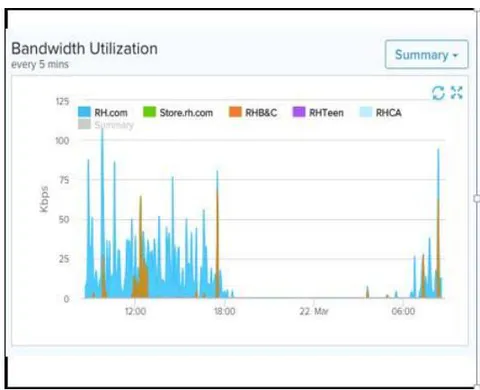
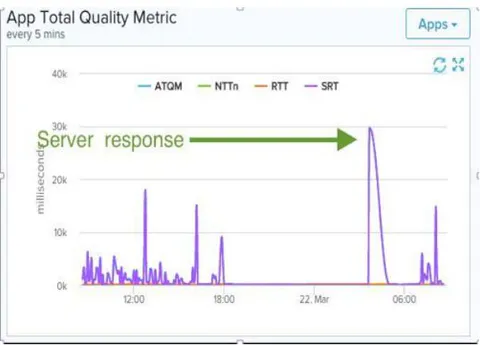
These guides should contain detailed documentation with screenshots on how to maintain the product. A preview of the guide on how to measure the various performance parameters is shown below for reference:
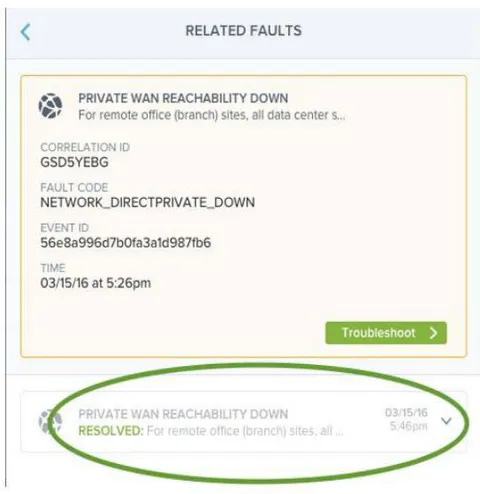

Please login to SDWAN application GUI (Graphic User Interface) using ---- link.
Click on Network Analytics to review bandwidth utilization.
To view the application performance view Application Metric.
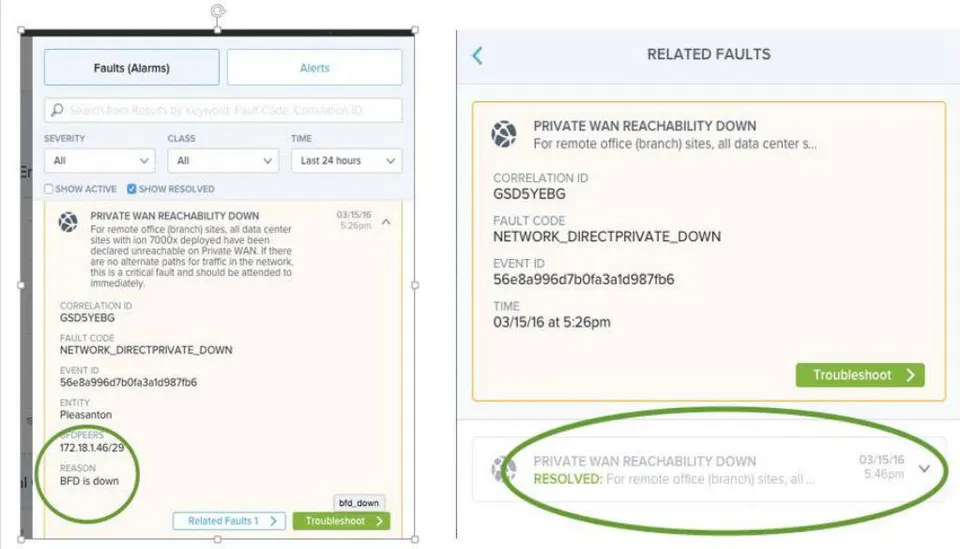
The project team will share a detailed document on how to manage the application upgrade process and how to contact the SDWAN support team, their working hours, and support contract details.
VIII. POST-IMPLEMENTATION PROJECT SUMMARY
a) Deliverables to document the Plan and Process
The Project Team can plan to send below reports/data to all the stakeholders involved to share the success story of the project:
Locations-Network Performance Report
Network Incident report - Sample Pictures that were taken at different locations after successful install
Associate feedback
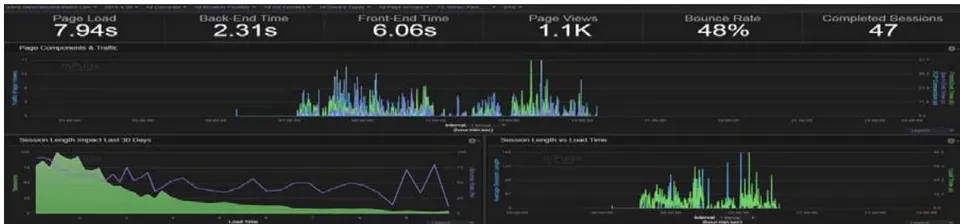
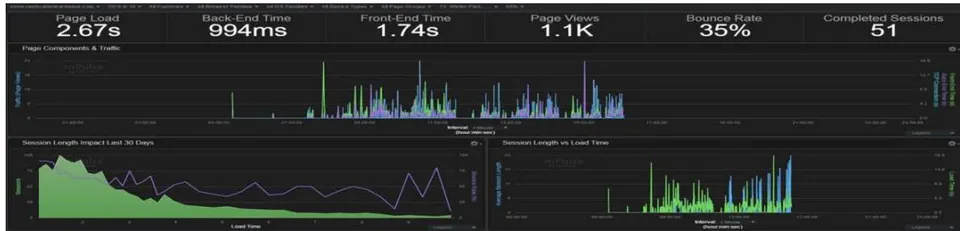
Please refer the below sample of a Network performance report of a location that was complaining about the network performance when they were using an older technology.
We have observed that after Circuit upgrade and SDWAN implementation, it has reduced the response time for our organization's website by almost fifty percent. Please refer below screenshot for a location taken from the OOKLA tool that is world-renowned for network performance measurement.
b) Criteria and Evaluation Framework
We can evaluate the overall success of the project based on the criteria shown below:
Improvement in the network performance after completion.
Ease of implementation of the new technology at the new sites.
Ease of network administration
Reduction in network incidents after the final rollout
Overall operational and process improvements
The vulnerability reports on the hardware and software.
Please refer below metrics as a reference to measure the proposed and actual outcomes of the project.
| Evaluation criterion | Proposed% | Actual% | Business Feedback |
| Internet bandwidth upgrade | 35M | 40M | Positive |
| Network reliability | 100% | 100% | No Issues |
| Hardware reliability | 100% | 100% | No Issues |
| Ease of installation | 40% | 30% | No Issues |
| Ease of access | 50% | 60% | NA |
| Network management | 50% | 70% | NA |
| Security policies management | 60% | 80% | NA |
| Vendor support | 50% | 40% | NA |
IX. LEARNINGS
According to Sabyasachi (n.d.) by collecting and publishing lessons the team learned while completing the previous project, your organization as a whole can benefit. You can help reduce the odds of other groups by making sure they do not repeat the same mistakes and provide insights into how various processes and procedures can be improved overtime. According to Rowe, S. F. & Sikes, S. (2006), most project managers know the importance of capturing lessons learned; it is suitable for the team, organization, existing, and future projects. Lessons learned are the documented information that reflects both the positive and negative experiences of a project. They represent the organization's commitment to project management excellence and the project manager's opportunity to learn from the actual experiences of others I want to mention the below points that I learned from the process of completing this project.
The more time we spend on initial design and testing, the more we increase the chances of success in completing the project on schedule and achieving our targets.
We need to involve all the stakeholders from the beginning of the project.
The PM should inform stakeholders about any changes in the budget, resource allocation, or times lines as soon as possible.
It is essential to decide on the Project Scope, success criteria, and tools used at the beginning of the project.
The process of lessons learned should be adapted from the initial implementation stage (not at the end of the project) so that the team can review "What went wrong" and "What needs to be improved." This project manager should use the same forum to discuss "What went right."
It is better to keep some buffer in terms of resources or timelines in each phase and some cushion in the overall project timelines.